34
3191
3617 3735
68 67
7047769
Control Change Note On / Off
83 84
0
3982
56
105
24
7
63
99
100
116
4
65
117
5
66
89
101
77
71
90
102
78
72
93
87
69
94
82
112 113 114 115
59
26
60
27
21
112
24
113
27
252322 26
114
30
115
33
MIDI Mapping
When using Serato Scratch Live software, the mixer is plug-and-
play with all required MIDI mapping done for you. For advanced
users or users using 3rd party DAWs, it is possible to custom
MIDI-map most mixer controls on the Sixty-One.
MIDI Implementation
Scratch Live MIDI Control only supports:
• Note On/Off
• Standard 7-bit CC (Control Change)
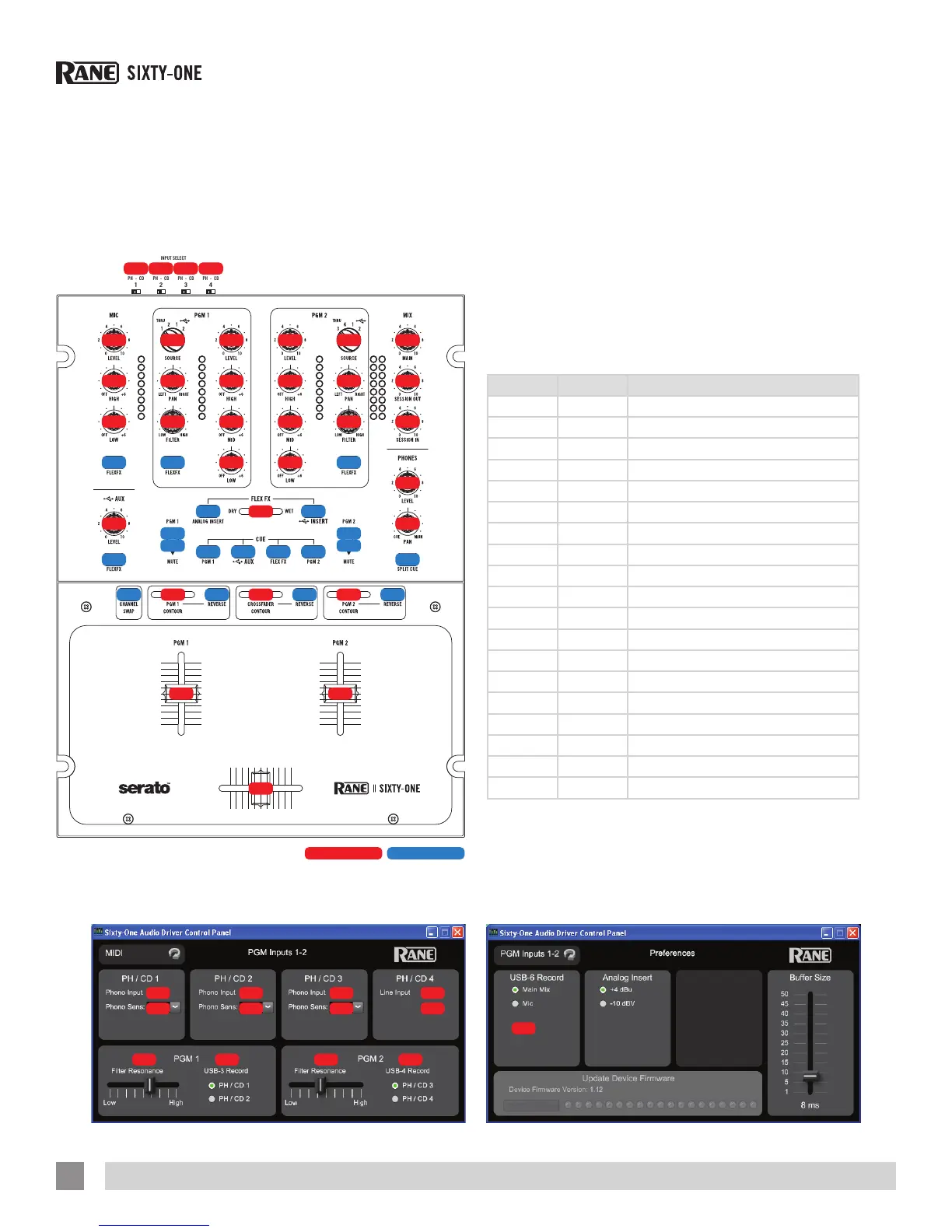
MIDI Note ON/OFF Chart
Note on/off MIDI controls are associated with mixer functions
and restricted to MIDI out only. A user is unable to control mixer
functions via MIDI and is unable to change the color or intensity
of an LED under one of these mixer controls. Users are able to
use MIDI out messages from these controls to trigger or control
software functions.
Note # Hex # Function
4 0x04 FlexFx Cue
17 0x11 Channel Swap
24 0x18 USB AUX FlexFx
26 0x1A PGM 1 Mute Toggle
27 0x1B PGM 2 Mute Toggle
31 0x1F USB Insert
34 0x22 Mic FlexFx
35 0x23 PGM 1 Fader Reverse
36 0x24 PGM 2 Fader Reverse
37 0x25 Crossfader Reverse
56 0x38 Split Cue
59 0x3B PGM 1 Mute Press
60 0x3C PGM 2 Mute Press
67 0x43 PGM 2 FlexFx
68 0x44 PGM 1 FlexFx
69 0x45 PGM 1 Cue
70 0x46 PGM 2 Cue
77 0x4D USB Aux Cue
91 0x5B Ext Insert
RANE SIXTY-ONE MIXER FOR SERATO SCRATCH LIVE • OPERATOR’S MANUAL 2.4.4
46


 To Next Page