6
Holiday
TEMPERATURE CONTROL
Frz.
Temp
OK
Ref.
Temp
3S
1
2
Lock
TEMPERATURE CONTROL
Frz.
Temp
OK
Ref.
Temp
3S
1
2
TEMPERATURE CONTROL
Frz.
Temp
OK
Ref.
Temp
3S
S.Frz. Ice Fuzzy Holiday Lock
C
D
F
A
B
H
E
J
G
I
K
If You Do Not Use Ice Too Often
Older ice cubes can get stale. Clean the ice container
periodically using warm water. Before putting it back, dry it
well so that the cubes do not stick to the surfaces.
If You Do Not Use the Ice Container For Long Periods of
Time:
If you will not be using the ice container for a long time,
throw out the remaining ice cubes, wash the container with
warm water, dry it with a towel and place back in the fridge.
Close the water supply to the ice maker (see ‘Closing the Water
Supply to the Ice Maker’).
Note: When opening the upper freezer drawer, avoid rapid
pull out which can cause the ice cubes to fall into the lower
deep freeze drawer.
When the ice maker is dropping ice into the ice
container, a signal of circling dashes appears on the
dispenser screen. It is recommended the user waits
for the ice cubes to drop before opening the top
freezer drawer.
Fridge Freezer Operation
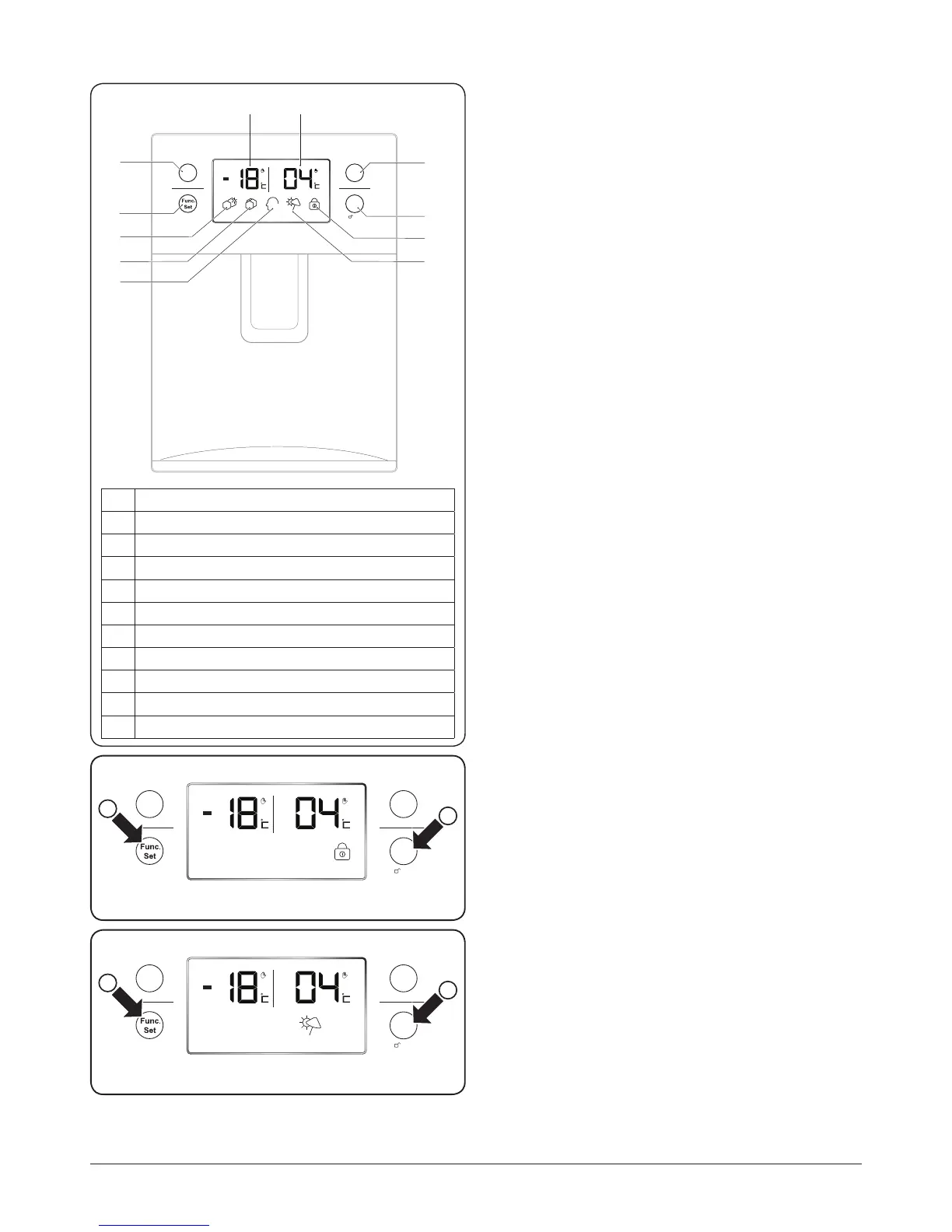
The water dispenser, digital display and function buttons are
shown in Fig.2.11.
Lock Mode
This feature will lock the temperature and function settings.
When locked, the lock icon is displayed.
To Lock
1. Press the ‘Func. Set’ button until the ‘Lock’ setting is
selected, the ‘Lock’ icon will ash (Fig.2.12).
2. Now press the ‘OK’ button to conrm selection. The
‘Lock’ icon will turn on and the refrigerator will lock.
To Unlock
Press and hold the ‘OK’ button for 3 seconds. The ‘Lock’ icon
will turn o and the refrigerator will unlock.
Holiday Mode
This feature allows you to leave the fridge section unused
while the freezer section operate as normal.
Before activating the Holiday mode, empty the
fridge section to avoid spoilage.
To Turn On
1. Press the
‘Func. Set’
button until ‘Holiday’ mode is
selected, the ‘Holiday’ icon will ash
(Fig.2.13)
.
2. Now press the ‘OK’ button to conrm selection. The
‘Holiday’ mode icon will turn on.
To Turn O
1. Press the
‘Func. Set’
button until ‘Holiday’ mode is
selected.
2. Now press the ‘OK’ button: the
‘Holiday’
mode icon will
turn o.
Fig.2.11
Fig.2.12
Fig.2.13
A Function selector button
B Function conrm button
C Freezer temperature button
D Fridge temperature button
E Freezer temperature display
F Fridge temperature button
G Quick freeze icon
H Lock icon
I Ice icon
J Holiday mode icon
K Fuzzy intelligence icon



 To Next Page