R76 Series of Tire Changers 54 P/N 5900346 — Rev. C — Dec. 2019
Check the Water Level
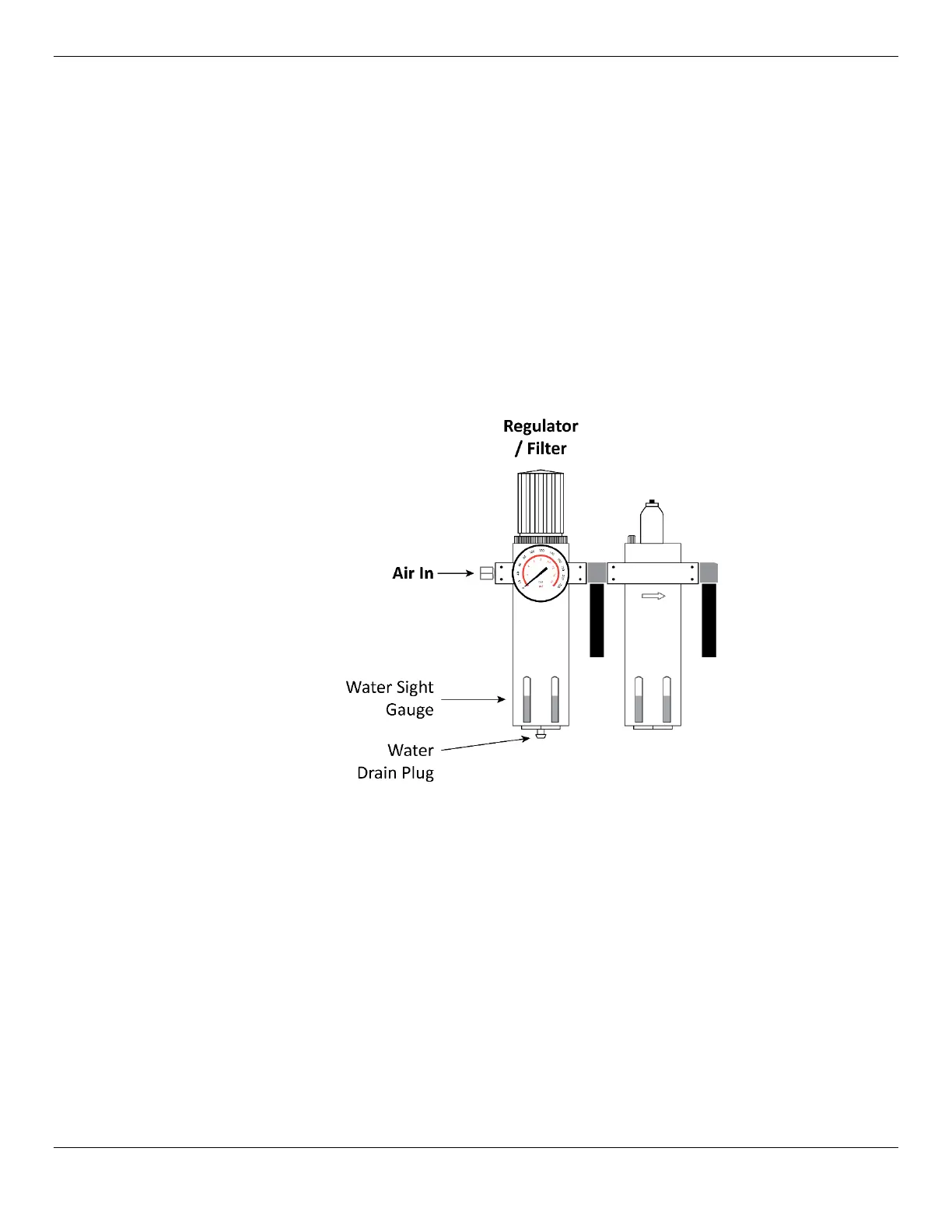
Water coming in via the incoming air is removed by the Regulator/Filter and dropped into the reservoir
at the bottom.
This water needs to be drained periodically.
To drain water from the Regulator/Filter reservoir:
1. Check the Water Sight Gauge to see how much water is currently in the reservoir.
If the reservoir is a quarter (25%) or more filled with water, you need to drain it.
2. Disconnect the incoming air at the Air In connector.
⚠ WARNING Make sure to disconnect the incoming air and make sure it cannot be reconnected
until you are done draining the water from the Regulator/Filter. If the incoming air is
reconnected during the procedure, it could damage the Regulator/Filter, the Tire
Changer, and possibly injure bystanders.
3. Press upwards on the Water Drain Plug at the bottom of the reservoir.
The water drains out.
4. Release the Water Drain Plug.
5. Re-connect the incoming air.


 To Next Page