63
Change Conservatism during the dive
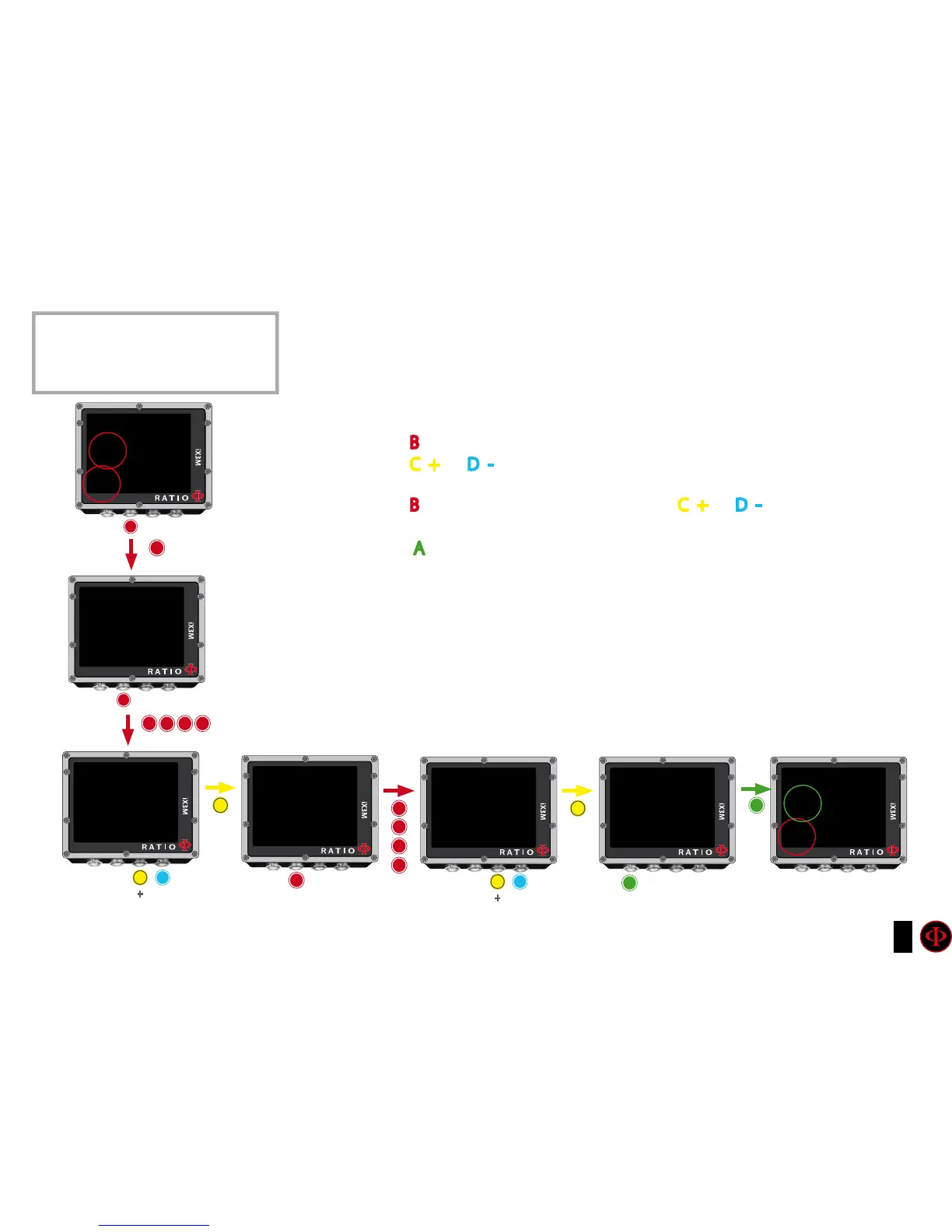
To navigate this menu follow the instructions shown in the picture on the left.
In the example it is shown the value GFL/GFH; if you have chosen the VPM algorithm sarà the R0
will be visualized (for the iX3M Deep you’ll visualize the conservatism levels). The procedure to
modify the parametres is the same:
Press button B to select the GFL
Press button C (+) or D (-) to set the desired GFL
(Remember that the GFL must never ever be higher than GFH)
Press button B to select the GFH and press button C (+) or D (-) to set the desired
GFH.
Press button A at any time to save the selection and go back to the dive.
Do you know what?:
Reduce the algorithm conservatism is particularly useful to handle possible emergencies during the dive. If, for
any reason, you have not enough gas for the ascent, it is possible to decrease the algorithm conservatism to
reduce TSS as much as possible.
(Note the decreasing of TSS inthe first and in the last screen on the example)
In the example a Gradient change from 20/70 to 93/93
ATTENTION: To modify the GF or the R0 an
adequate training is necessary.
Do NOT modify hte GFor the R0
if you don’t have received it!!
b
b
b
b
b
A
A
C
C
SAVE AND
ExIT
OC SET
MODE: OC
MIX: 21/0 ACT
GFL/GFH: 20/70
OC SET
MODE: OC
MIX: 21/0 ACT
GFL/GFH: 20/70
OC SET
MODE: OC
MIX: 21/0 ACT
GFL/GFH: 20/93
OC SET
MODE: OC
MIX: 21/0 ACT
GFL/GFH: 20/93
OC SET
MODE: OC
MIX: 21/0 ACT
GFL/GFH: 93/93
b
b
b
b b
50.7m
15:48
93/93
24
1:
gF
OC
bUl
CNSOTU
TIME
b
b
50.7m
15:41
20/70
24
1:
gF
OC
bUl
CNSOTU
TIME
C
C
D
D
+
+
_
_
1220:
STOPTTS
2451:
STOPTTS



 To Next Page