INSTRUCTION, USE AND
MAINTENANCE MANUAL
GB
Page 17 of 60
1
90°
3
4
5
2
1
2
3
3
4
4
1
2
3
3
4
4
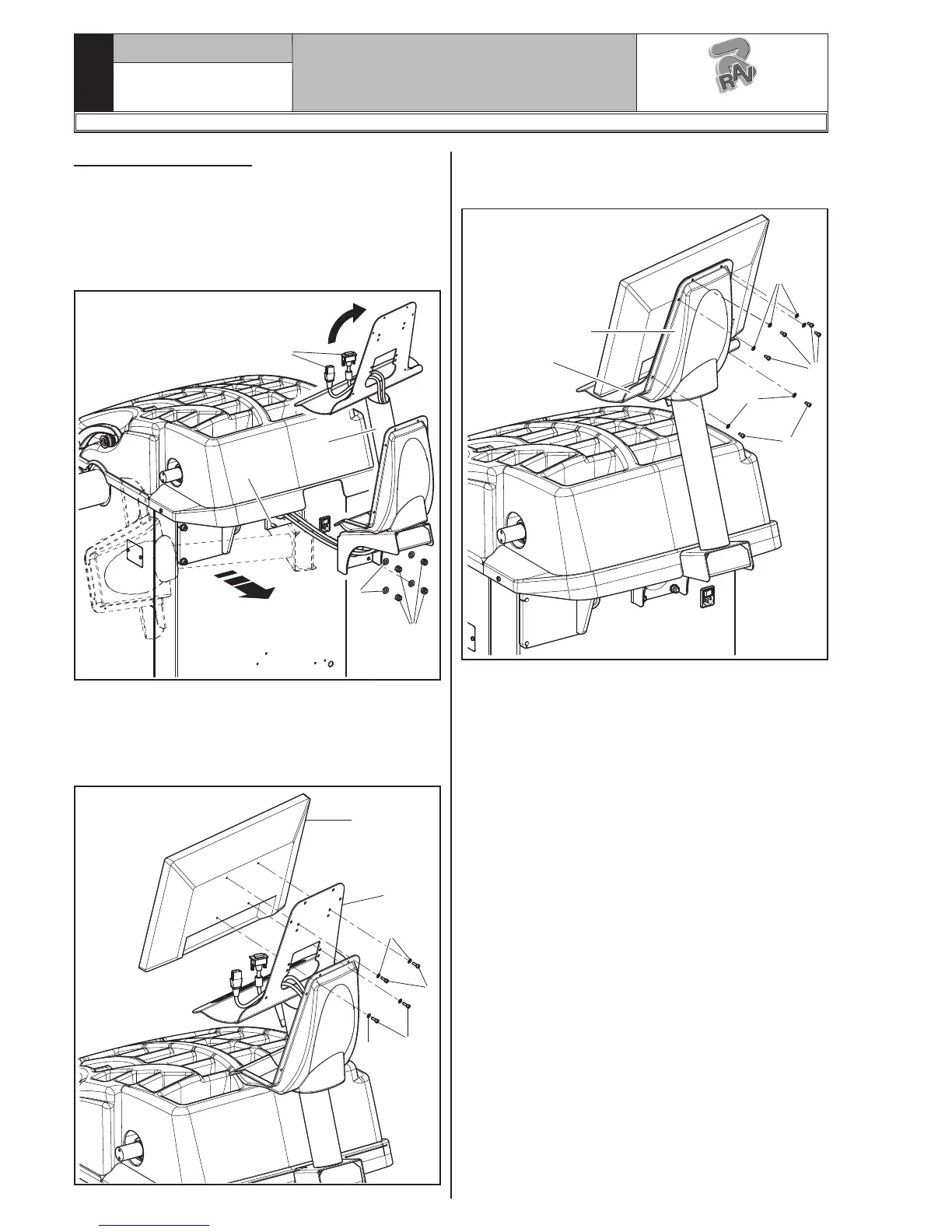
9.3.5 Monitor fitting
1. Unscrew the nuts (Fig. 19 ref. 1) and the washers
(Fig. 19 ref. 2) from the screws (Fig. 19 ref. 3).
Fit the support tube (Fig. 19 ref. 4) rotated through
90°, paying attention to the monitor and keyboard
cables (Fig. 19 ref. 5) inside it. Then screw the
previously unscrewed nuts and washers again.
Fig. 19
2. Connect the plugs on the power supply sockets and
monitor signal. Connect the wiring of the keyboard.
3. Fix the monitor (Fig. 20 ref. 1) to the support
(Fig. 20 ref. 2) with the screws (Fig. 20 ref. 3)
and the washers (Fig. 20 ref. 4) supplied.
Fig. 20
4. Mount the guard (Fig. 21 ref. 1) to the support
(Fig. 21 ref. 2) with the 6 screws (Fig. 21 ref. 3)
and the washers (Fig. 21 ref. 4) supplied.
Fig. 21
1297-M007-1_R
G3.140R - GP3.140R - G3.140RS - GP3.140RS
RAVAGLIOLI S.p.A.



 To Next Page
 Loading...