BLADE
GAMING USB
KEYBOARD
15
EN
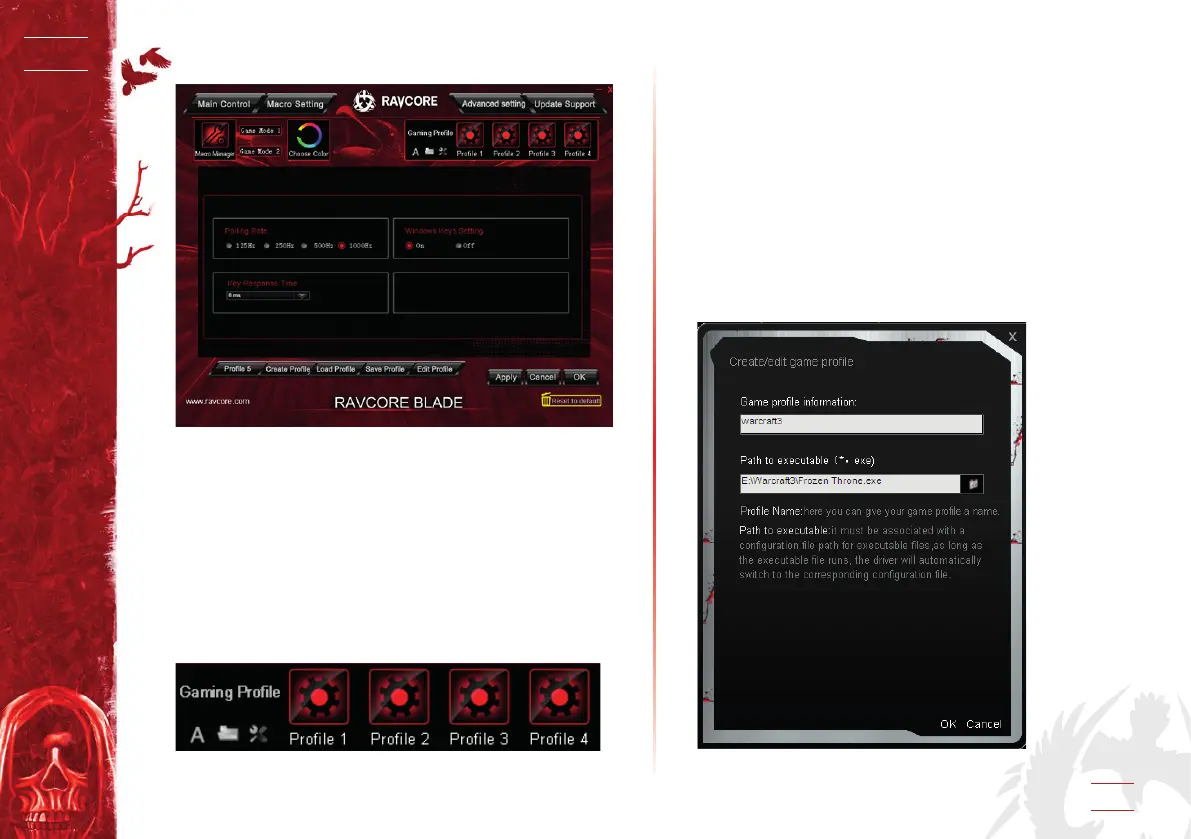
4. ADVANCED SETTING
5. CONFIGURATION CONTROL
1. Each conguration le corresponding to a keyboard mode, so
it can provide powerful game support for the gamers to make
targeted game conguration les. Keyboard driver can set cur-
rent keys conguration into a conguration le targeted for the
game, when complete dening the conguration le you can
save it (it is Recommend that conguration name associated
with the corresponding game). The driver is equipped with four
conguration le : Prole#1~ Prole#4. The path by default is
the Cong le package in driver installation directory, one to
one correspondence with the associated four games program
in current setting interface.
2. Keyboard set up create prole/load prole/save prole/edit
prole function for you. You can save various conguration
which you don’t use temporarily in your PC. You can load
them directly when you need to use next time. This can
avoid setting item by item repeatedly. When you change the
operating environment, for example, when using a dierent
computer, you can load the proles saved in the previous
computer.
5.1 Create prole
1. Open the current setting interface, click “Create Prole”, here
you can associated the new prole with a game.
2. Click “OK”.


 To Next Page