22
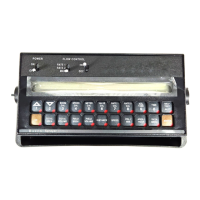
1) Definition of Data Menu Key:
Depressing this key displays selected Data Menu features.
EXAMPLE: Display will display options by name and default setting.
Depressing this key after selecting DATA MENU increments up through desired
features.
EXAMPLE:
PRINT FIELD BEGIN
,
ALARM ON
,
DISPLAY SMOOTHING ON
, etc.
Depressing this key after selecting DATA MENU increments down through
desired features.
EXAMPLE:
PRINT FIELD BEGIN
,
DATA-LOG OFF
,
DATA LOG TRIGGER
UNITS FEET
, etc.
2) CONSOLE DATA PRINTOUT
a) Display will show
PRINT FIELD BEGIN
.
1) To Print Field Begin, depress .
b) Display will now show
PRINT FIELD END
.
1) To Print Field End, depress .
2) While
PRINT FIELD END
is displayed, if Field Begin is required,
depress to toggle the display to
PRINT FIELD BEGIN
.
c) Momentarily depress to advance to AUDIBLE ALARM ON/OFF.
3) AUDIBLE ALARM ON/OFF
a) Display will show
ALARM ON
.
b) Depressing momentarily changes the display between
ALARM ON
and
ALARM OFF
. A value of
ALARM ON
means the audible alarms are enabled;
a value of
ALARM OFF
means the audible alarms are disabled.
c) Momentarily depress to advance to DISPLAY SMOOTHING ON/OFF.
4) DISPLAY SMOOTHING ON/OFF
a) Display will show
DISPLAY SMOOTHING ON
.
b) Depressing momentarily changes the display between
DISPLAY
SMOOTHING ON
and
OFF
. A value of
ON
means smoothing is enabled; a
value of
OFF
means smoothing is disabled. Selecting DISPLAY SMOOTHING
ON means the display shows target rate when actual rate is within 10% of
the target rate. Selecting DISPLAY SMOOTHING OFF means the display shows
actual target rate.
c) Momentarily depress to advance to RATE CHANGE ALARM ON/OFF.


 To Next Page
 Loading...