EasyManua.ls Logo

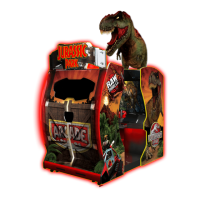
Raw Thrills Jurassic Park Arcade - User Manual

Raw Thrills Jurassic Park Arcade
36 pages
Print Icon
To Next Page IconTo Next Page
Loading...
PN:040000440116‐Jan
OPERATOR’S MANUAL

Questions and Answers

  • J
    Jacob SanfordAug 18, 2025
    How to troubleshoot Raw Thrills Jurassic Park Arcade that will not power up?
    • C
      Connie BrooksAug 18, 2025
      If your Raw Thrills Arcade Game Machine isn't powering up, start by ensuring it's plugged into a working outlet and that the main power switch is turned on. Check the game's fuse and replace it if necessary. Also, verify that the PC power switch is on and the IEC cable is securely connected. If the outlet isn't providing power, test it and try a different one. If the PC BIOS is set incorrectly, consult the BIOS Settings chapter.
  • R
    richard46Aug 20, 2025
    What to do if Raw Thrills Jurassic Park Arcade show NO VIDEO message?
    • I
      Ian WallAug 20, 2025
      If you are getting a NO VIDEO message on your Raw Thrills Arcade Game Machine, first, check and tighten the video cables connected to both the monitor and the PC. Then, power cycle both the PC and the game. If the problem persists, try replacing the video cable. Also, ensure that the PC is turned on.
  • C
    Cheryl DiazAug 23, 2025
    How to fix Raw Thrills Jurassic Park Arcade guns that won’t register?
    • M
      Michael PhillipsAug 23, 2025
      If your Raw Thrills Arcade Game Machine guns won’t register hits or function poorly, try calibrating the guns first. Then, inspect the potentiometers for dirt or damage, and replace them if needed. Also, check the connections to the gun and potentiometer to ensure they are secure.
  • N
    Natalie EnglishAug 26, 2025
    What to do if Raw Thrills Jurassic Park Arcade Arcade Game Machines say 'Connect I/O Board or I/O Board Missing'?
    • B
      bbeckAug 26, 2025
      If your Raw Thrills Arcade Game Machine displays 'Connect I/O Board' or 'I/O Board Missing', start by checking the USB connection from the PC to the I/O board and try a different USB port. Verify that the 5V and 12V fuses are not blown. Check for proper voltage (+5V, +12V) at the RIO P2 connector. If these steps don't resolve the issue, try replacing the RIO board with a known functional one. Also, ensure that the AC line cord has a functional ground plug and is connected to a properly grounded AC power outlet.
  • R
    Richard VillarrealAug 27, 2025
    Why is the screen not powering on with my Raw Thrills Arcade Game Machines?
    • P
      pereztimothyAug 27, 2025
      If the screen on your Raw Thrills Arcade Game Machine isn't powering on with the game, check for any loose or bad AC power or video connections.
  • M
    Michael BarryAug 30, 2025
    How to troubleshoot no sound on Raw Thrills Jurassic Park Arcade?
    • L
      Louis SolisAug 30, 2025
      If your Raw Thrills Arcade Game Machine is not producing any sound, check the connection of the ¼” stereo cable from the PC to the RIO and speakers.
  • D
    Dr. Robin ArmstrongSep 1, 2025
    What to do if Raw Thrills Jurassic Park Arcade Arcade Game Machines say 'Dongle Not Present'?
    • Q
      qhillSep 1, 2025
      If your Raw Thrills Arcade Game Machine displays a 'Dongle Not Present' error, first locate the dongle USB connection and reseat it in the USB port. If that doesn't work, try connecting the dongle to a different USB port.
  • D
    Dylan HurleySep 3, 2025
    Why does my Raw Thrills Jurassic Park Arcade keep resetting?
    • J
      Jennifer PalmerSep 3, 2025
      If your Raw Thrills Arcade Game Machine is resetting unexpectedly, run a File Test and restore the hard drive. Also, replace the 5V fuse on the RIO pcb.
  • J
    Jeffrey JonesSep 6, 2025
    What to do if Raw Thrills Jurassic Park Arcade does not load?
    • A
      Andrew McneilSep 6, 2025
      If your Raw Thrills Arcade Game Machine does not load, attempt to recover the hard drive.
  • J
    John AllenSep 8, 2025
    How to fix weak seat subwoofer sound on Raw Thrills Jurassic Park Arcade?
    • A
      asantosSep 8, 2025
      If the seat subwoofer sound is weak on your Raw Thrills Arcade Game Machine, adjust the power supply voltage and set the volume for the desired vibration effect.

Summary

Product Specifications

Safety Precautions

Operation, Transport, and Handling Safety

Covers safe operation, transporting heavy cabinets, and handling sensitive components.

Electrical and Monitor Safety

Warns about high voltages, grounding, monitor hazards, and power selector usage.

Operational Warnings and Information

Water Jets and Epileptic Hazard Warnings

Advises against water use and warns about potential seizures during gameplay.

Cabinet Setup and Installation

Diagnostic Menu System

Diagnostic Menu Navigation

Explains how to navigate the diagnostic menu using service panel switches or the gun.

Troubleshooting Guide

General Game Troubleshooting

Common problems like power issues, screen issues, sound, and game loading errors.

Raw Thrills Jurassic Park Arcade Specifications

General IconGeneral
BrandRaw Thrills
ModelJurassic Park Arcade
CategoryArcade Game Machines
LanguageEnglish

Related product manuals