EasyManua.ls Logo

Raypak B0507 - Page 44

Raypak B0507
57 pages
Print Icon
To Next Page IconTo Next Page
To Previous Page IconTo Previous Page
Loading...
TEMPERATURE CONTROL
44
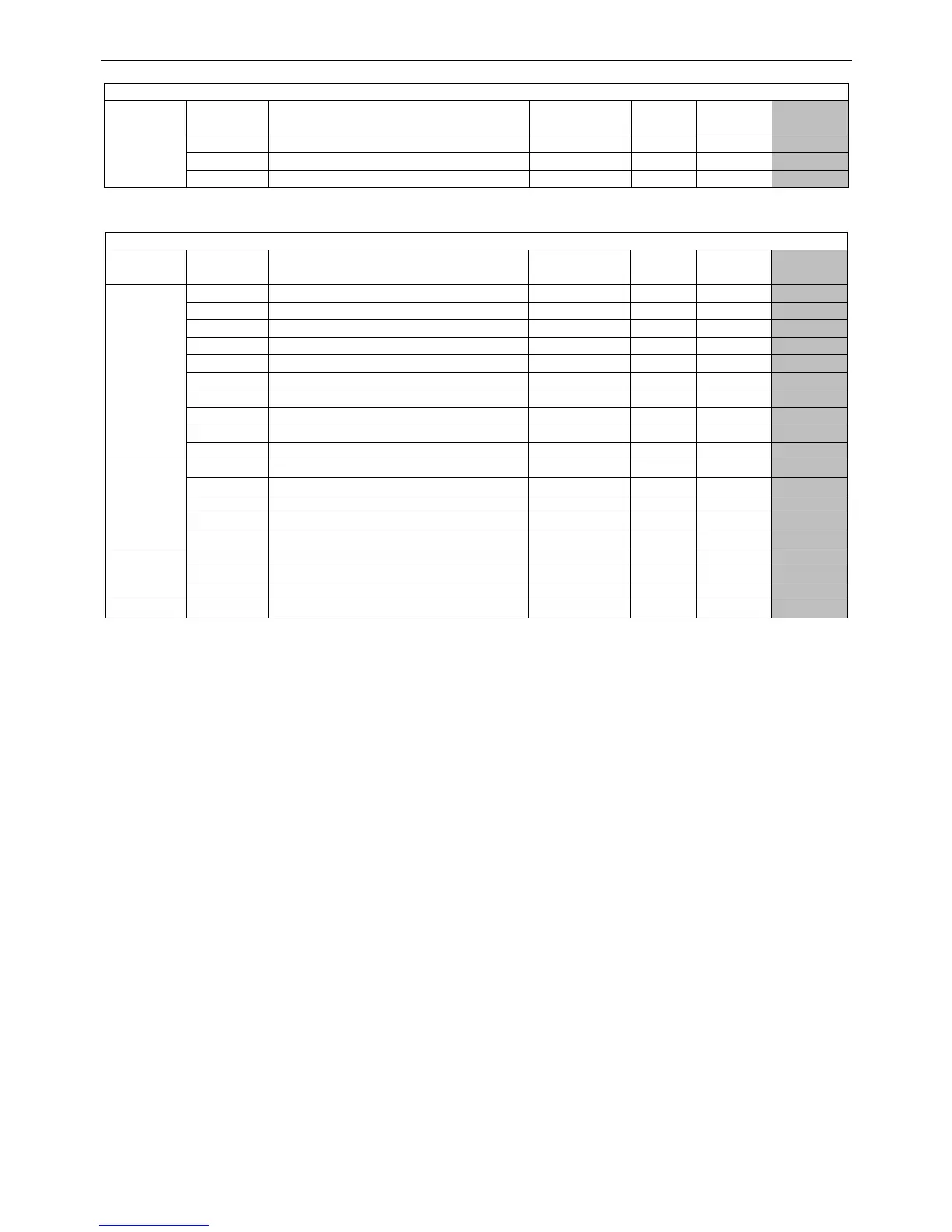
IC902 System Status Parameters
Folder
Parameter
Description
Range or
Option
Default
Value
Unit of
Measure
Raypak
Setting
SEt
SEt
Temperature set point
LSE ~ HSE
0
ºC or ºF
50
(1)
CA1
Tank sensor calibration (off set)
-12.0 ~ 12.0
0
ºC or ºF
0
Pb1
Tank sensor value (detected temp)
N/A
N/A
ºC or ºF
N/A
(1)
Set point may differ to setting shown in „Raypak Setting‟ column.
IC902 Level 1 Parameters
Folder
Parameter
Description
Range or
Option
Default
Value
Unit of
Measure
Raypak
Setting
CP
diF
Differential (Set minus dif = ON)
0 ~ 30.0
5
ºC or ºF
2
HSE
Restricts max set point value
LSE ~ 302
140.0
ºC or ºF
80
LSE
Restricts min set point value
-55.0 ~ HSE
-55.0
ºC or ºF
20
HC *
Heating or cooling mode
H or C
C
flag
H
Ont
Start up time if probe is faulty
0 ~ 250
0
min
0
OFt
Shutdown time if probe is faulty
0 ~ 250
1
min
1
dOn
Start up delay
0 ~ 250
0
sec
0
dOF
Delay after shutdown
0 ~ 250
0
sec
0
dbi
Delay between start ups
0 ~ 250
0
min
0
OdO *
Output delay time in event of OFF
0 ~ 250
0
sec
0
DiS
LOC
Locks thermostat for set point adj
n or y
n
flag
n
PA1
Parameter lock code (0 = no lock)
0 ~ 250
0
num
0
ndt
Numbers shown with decimal point
n or y
n
flag
n
CA1
Tank sensor calibration (off set)
-12.0 ~ 12.0
0
ºC or ºF
0
dro
0 = centigrade, 1 = Fahrenheit
0 or 1
0
flag
0
CnF
H00 *
Probe type: 0 = PTC, 1 = NTC
0 or 1
0
num
1
rEL
Release firmware version read only
N/A
N/A
N/A
N/A
tAb
Table of parameters read only
N/A
N/A
N/A
N/A
FPr
UL
Up load parameters to copy card
N/A
N/A
N/A
N/A
(1)
Set point may differ to setting shown in „Raypak Setting‟ column.
Note: If a level 1 parameter shown with an asterisk (*) is modified, the thermostat must be reset to ensure correct
operation. To reset the thermostat, remove the power supply to thermostat, wait ten seconds and then restore the
power supply.
IC902 Adjustment Procedures
Notes to all IC902 thermostat adjustment procedures:
If a button is not pressed within 15 seconds during any thermostat adjustment procedure, the thermostat will
automatically exit the relevant folder and any changes made will be saved.
The thermostat will operate as normal whilst performing any thermostat adjustment procedure.
Some level 1 parameter changes require the thermostat to be reset. Refer to IC902 Parameters” on page 43
for more information.
Checking or Adjusting IC902 Thermostat Set Point
1. Press and release the set button. „SEt‟ will be displayed.
2. Press and release the set button. The current set point temperature setting will be displayed.
3. Press and release the up or down ▼button to change the set point setting (skip this step if viewing only).
4. Continually press and release the fnc button until the display shows the current tank temperature.
Checking or Adjusting IC902 Thermostat System Status Parameters
System status parameter settings can be viewed or changed (except for read only informational parameters) by
performing the following procedure:
1. Press and release the set button. „SEt‟ will be displayed.
2. Press and release the up or down ▼button to scroll the required parameter.
3. Press and release the set button to enter the selected parameter.


Related product manuals