Performance
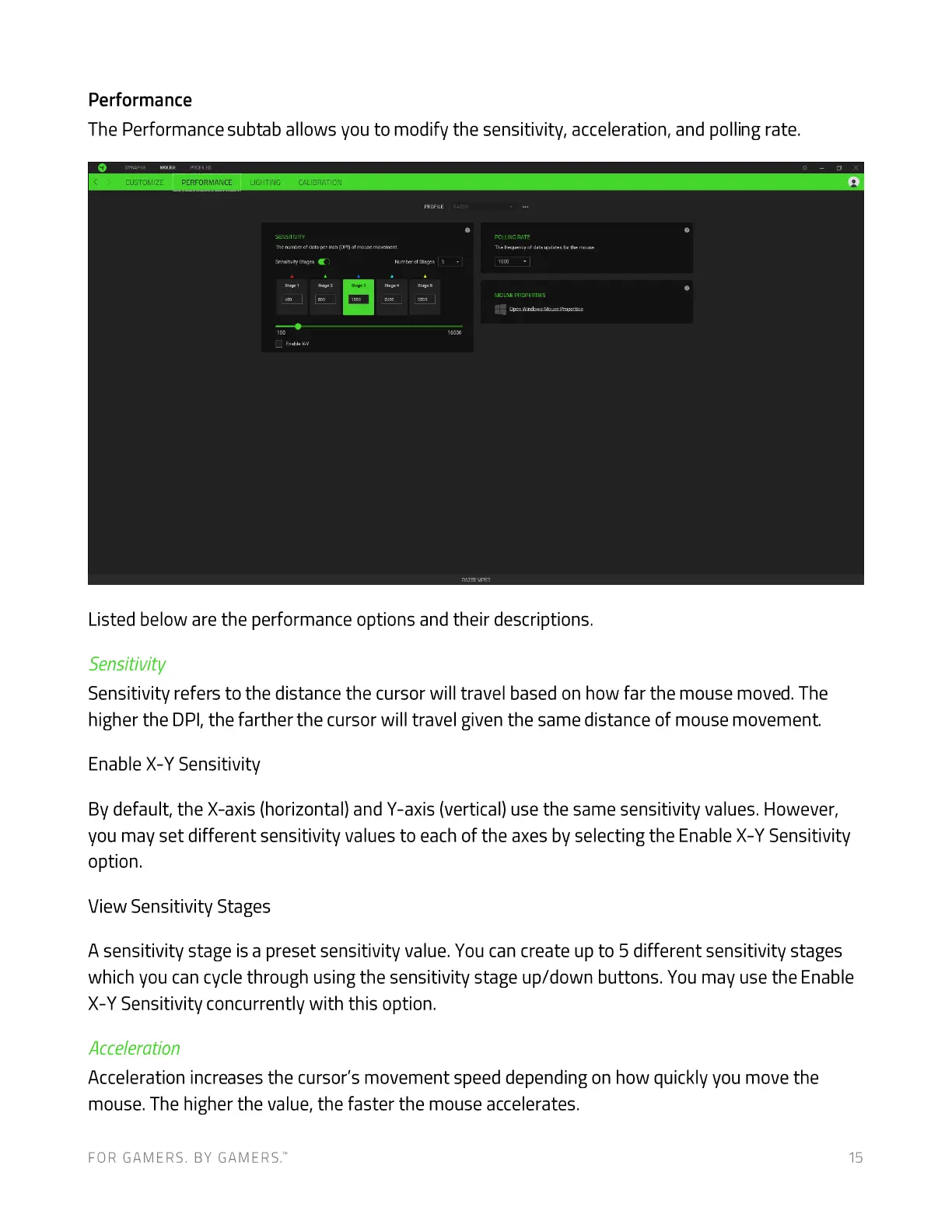
The Performance subtab allows you to modify the sensitivity, acceleration, and polling rate.
PEREORMANCE
pounc RATE
Listed below are the performance options and their descriptions.
Sensitivity
Sensitivity refers to the distance the cursor will travel based on how far the mouse moved. The
higher the DPI, the farther the cursor will travel given the same distance of mouse movement.
Enable X-Y Sensitivity
By default, the X-axis (horizontal) and Y-axis (vertical) use the same sensitivity values. However,
you may set different sensitivity values to each of the axes by selecting the Enable X-Y Sensitivity
option.
View Sensitivity Stages
A sensitivity stage is a preset sensitivity value. You can create up to 5 different sensitivity stages
which you can cycle through using the sensitivity stage up/down buttons. You may use the Enable
X-Y Sensitivity concurrently with this option.
Acceleration
Acceleration increases the cursor's movement speed depending on how quickly you move the
mouse. The higher the value, the faster the mouse accelerates.
FOR GAMERS. BY GAMERS:
15










 To Next Page