Function Summary and Button Definition
◆Function Summary
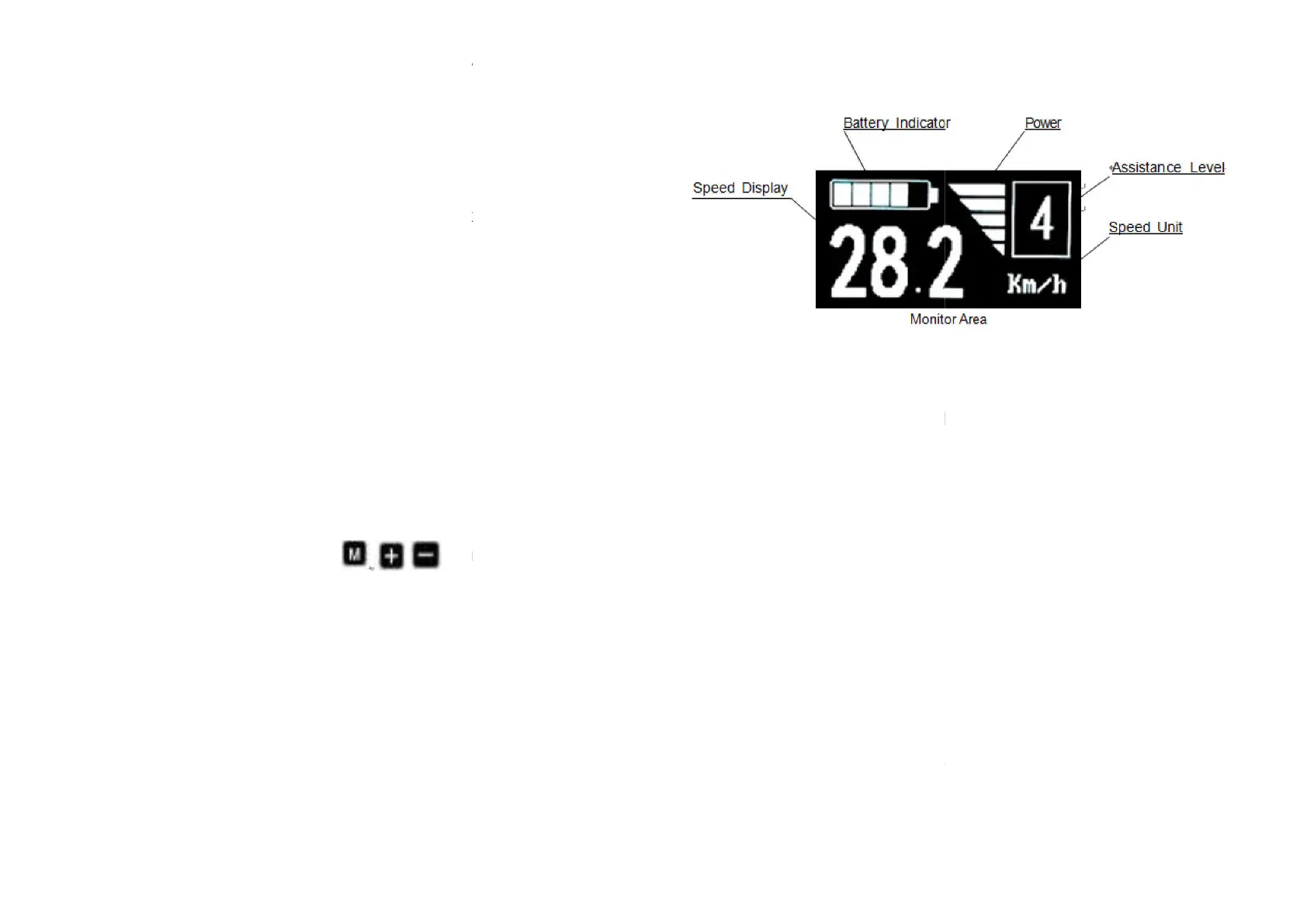
KD580 can provide a lot of functions to fit the users’ needs. The
indicating contents are as following:
●
Battery charge-control indicator
●
Assistance-level indication
●
Speed indication (incl. running speed, max speed and average
speed)
●
Motor-output indicator
●Trip time indication
●
Trip distance and Total distance
●
The push-assistance function
●The Lighting On/Off
●
Error Code indication
●
Various Parameters Settings (e.g., wheel size, speed
battery level bar, PAS level, password enable, controller limited
current etc .)
●
Recover Default Settings
◆Button Definition
There are three buttons (
that represented
by the following functions respectively: MODE, UP and DOWN.
Function Summary and Button Definition
KD580 can provide a lot of functions to fit the users’ needs. The
Speed indication (incl. running speed, max speed and average
Various Parameters Settings (e.g., wheel size, speed
-limited,
battery level bar, PAS level, password enable, controller limited
) on the KD580 display
by the following functions respectively: MODE, UP and DOWN.
Monitor Area Instruction
◆Switching the eBike On/Off
To switch on the eBike system, hold MODE
In the same way to hold MODE button for 2 s again, the eBike
system will be switched off.
When switching off the eBike system the leakage current is less
than 1 uA.
■
When parking eBike for more than 10 minutes, the eBike system
switches off automatically.
◆Display Interface
After switching on the eBike system, the display shows Running
Speed. On the condition of riding, to change the indicated
information, press MODE to show in turn as below: Running Speed
(Km/h) → Trip Distance (Km)
Speed (Km/h) →
Max Speed (Km/h). Each state will display for 6
seconds and then automatically returns to the Running Speed
interface. On the condition that the speed is 0 km/h, Trip Distance
will be added to the circulation interfac
7
To switch on the eBike system, hold MODE
button for 2 s.
In the same way to hold MODE button for 2 s again, the eBike
When switching off the eBike system the leakage current is less
When parking eBike for more than 10 minutes, the eBike system
After switching on the eBike system, the display shows Running
Speed. On the condition of riding, to change the indicated
information, press MODE to show in turn as below: Running Speed
→
Trip Time (Hour.) → Average
Max Speed (Km/h). Each state will display for 6
seconds and then automatically returns to the Running Speed
interface. On the condition that the speed is 0 km/h, Trip Distance
will be added to the circulation interfac
e.


 To Next Page