24
Install Blades
CAUTION: Mating surfaces between spindle,
lower spindle, guard, blade, and washer
MUST be free of debris to ensure correct
tightness and alignment.
1. Secure lower spindle guards and blades
to
spindles with one bevel washer and hex
bolt. Torque to 156 N•m – 217 N•m
(115 lb-ft – 160 lb-ft)
(see Figure 19).
2. Reconnect spark plug wires.
CHECK PARKING BRAKE
NOTICE: Check brake on both sides of unit.
1. Place unit in service position. See
Service
Position
on page 20.
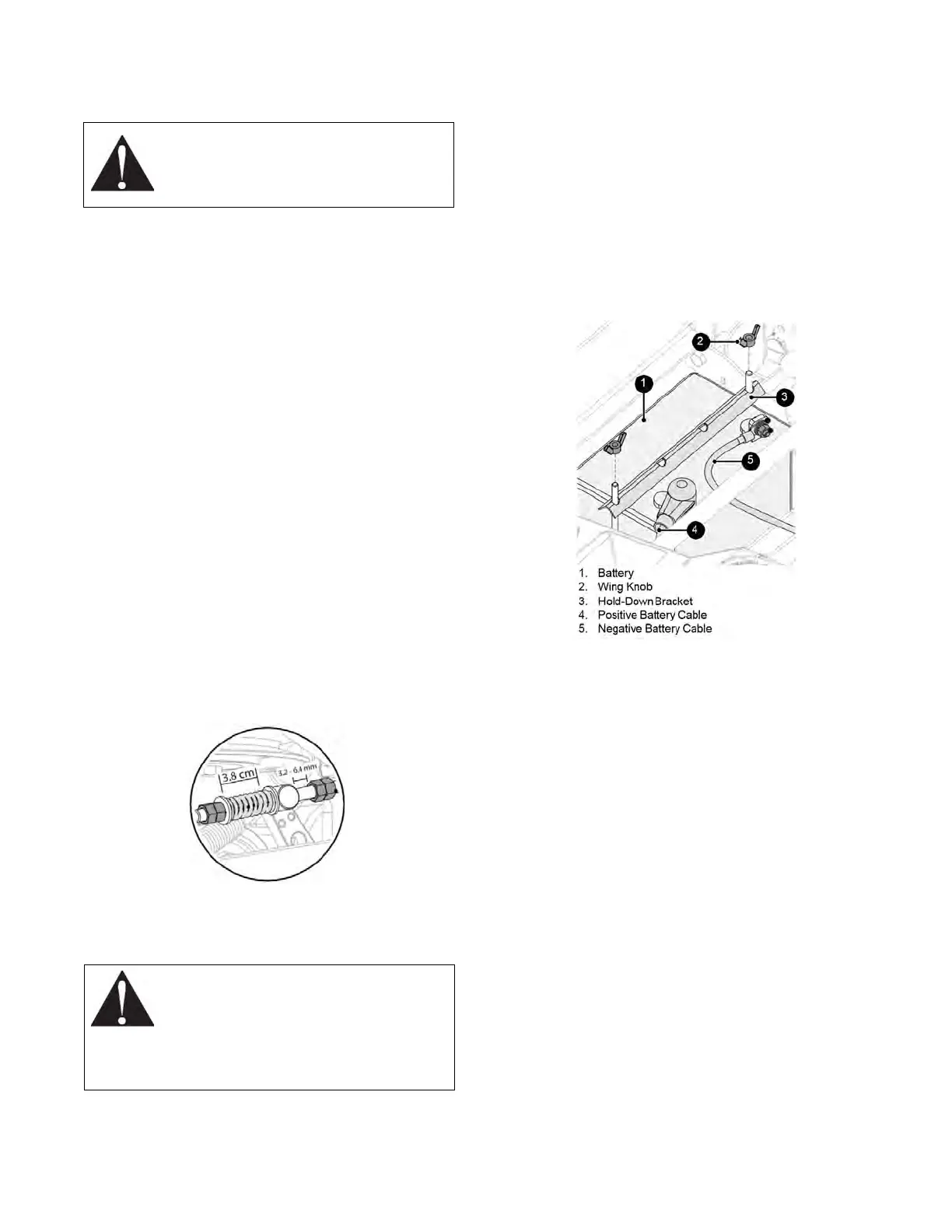
2. Measure length of compression spring
and
distance between the stop nut and
trunnion.
Compression spring length
MUST be 3.8 cm
(1-1/2") and the gap
between stop nut and
trunnion MUST be
3.2 mm – 6.4 mm
(1/8 – 1/4 in.)
(see Figure 21).
•
If measurements are within
specification, no adjustment is needed.
•
If measurements are outside
specification, contact RC Mowers at
(920) 634-2227.
3. Return hood to operating position.
Figure 21
CHECK MOWER BATTERY
WARNING:
Avoid Injury
.
Battery posts, terminals, and related
accessories contain lead and lead
compounds, chemicals known to the State of
California to cause cancer and reproductive
harm. Wash hands after handling.
Remove Battery
See Figure 22.
1. Place unit in service position. See
Service
Position
on page 20.
2. Disconnect the negative cable and then
the
positive cable from battery.
3. Remove wing knobs securing hold-down
bracket to battery and remove bracket.
4. Remove battery.
Figure 22
Clean Battery
1. Clean terminals and battery cable ends
with
a wire brush.
2. Coat terminals with dielectric grease or
petroleum jelly.
Install Battery
1. Install battery and secure with hold-down
bracket and wing knobs.
2. Reconnect positive cable and then the
negative cable.
3. Place boot over positive terminal.
4. Return hood to operating position.


 To Next Page