EasyManua.ls Logo

RCA BRM300DU - User Manual

RCA BRM300DU
60 pages
Print Icon
To Next Page IconTo Next Page
Loading...
Copyright © 2015 RCA Communications Systems
1BRM300D
TM
Professional Digital Two-Way Mobile Radio Instruction Manual
Congratulations on selecting the BRM300D
TM
from
RCA Communications Systems - The most trusted name in radios!
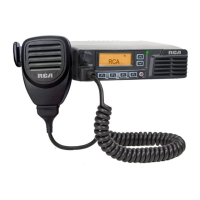
The BRM300D digital professional communications products are based on DMR technology and
establish a benchmark in premium digital two-way radio equipment. These radios are made to
perform awlessly under the most demanding commercial conditions and feature cutting edge
design, high-end professional grade materials and components, simple operation and superior
assembly quality. BRM300D mobiles and base stations are covered by a three-year “Warranty
Protection Program,” one of the most comprehensive warranties in the communications industry.
To ensure you achieve maximum performance from your BRM300D radio, please be sure to carefully
read this manual.
MODELS COVERED IN THIS MANUAL:
BRM300DV - VHF Two-Way Radio
BRM300DU - UHF Two-Way Radio

Table of Contents

Questions and Answers

  • C
    cameronjensenAug 14, 2025
    How to increase volume on RCA BRM300DU?
    • S
      Stephen MaloneAug 14, 2025
      If you can't hear voice transmissions clearly on your RCA Two-Way Radio, or the volume is too low, try turning the volume control knob to the maximum level. Also, ensure that you are within the radio's communication range for optimal performance.
  • J
    jessica18Aug 17, 2025
    How to reduce noise on RCA Two-Way Radio?
    • A
      Amanda AllisonAug 18, 2025
      If you are experiencing loud noise on your RCA Two-Way Radio, try checking the squelch level. Additionally, you might be beyond the efficient communication range of the radio.
  • D
    David MooreAug 21, 2025
    What to do if RCA Two-Way Radio is not transmitting?
    • N
      Nicholas MorrisonAug 21, 2025
      If you are unable to transmit using your RCA Two-Way Radio, ensure that you have completely pressed the PTT (Push-To-Talk) button. Also, verify that the transmitting frequency has been set on the radio. Finally, consider that the radio might have been remotely disabled.
  • R
    Robert DeanAug 25, 2025
    How to improve range on RCA BRM300DU Two-Way Radio?
    • S
      Samuel CallahanAug 25, 2025
      If the communication range of your RCA Two-Way Radio is limited, ensure the antenna is undamaged and securely connected. Also, check the squelch level.
  • P
    Paul GardnerAug 27, 2025
    Why RCA BRM300DU Two-Way Radio will not turn on?
    • J
      Joe HendersonAug 28, 2025
      If your RCA Two-Way Radio will not power on, check the power connections to ensure they are solid. Also, check for any blown fuses.
  • M
    Michael CannonAug 31, 2025
    How to block outside transmissions on RCA BRM300DU Two-Way Radio?
    • H
      Haley PenaAug 31, 2025
      If you are hearing transmissions from people outside your group on your RCA Two-Way Radio, change the CTCSS/DCS tone and ensure that all other radios in your group are using the same CTCSS/DCS tone.
  • M
    Marie AndersonSep 3, 2025
    What to do if buttons on RCA Two-Way Radio are not working?
    • K
      kimberly74Sep 3, 2025
      If the buttons on your RCA Two-Way Radio are not working, try restarting the radio.
  • O
    oliviapatelSep 7, 2025
    Why can't I hear my group on RCA Two-Way Radio?
    • D
      Donald PinedaSep 7, 2025
      If you cannot communicate with or hear your group members on your RCA Two-Way Radio, make sure you are within communication range. Check the squelch level, and ensure that the CC, ID, and Time Slot are set correctly. Also, verify that you are using the same channel and/or have the same CTCSS/CDCSS settings as your group members.
  • M
    Mrs. Dana JohnsonSep 10, 2025
    What to do if RCA BRM300DU Two-Way Radio cannot lock out?
    • F
      Frank MatthewsSep 10, 2025
      If your RCA Two-Way Radio cannot lock out, try restarting the radio.

Summary

Safety and General Information

Operational Safety and Precautions

Guidelines for safe operation, RF exposure, and handling in various environments.

Product Inspection and Preparation

Transceiver Installation and Connections

Steps for mounting, connecting power, and attaching the antenna.

Transceiver Features

Making and Receiving Calls

How to make and receive calls, including transmitting and listening.

Advanced Functions

Emergency Operation

Initiating emergency alarms and utilizing related features.

Troubleshooting and Maintenance

Troubleshooting Common Issues

Solutions for common radio operational problems like no power or no sound.

Compliance and Warranty

Warranty Statement

Details on the limited warranty for the radio and accessories.

RCA BRM300DU Specifications

General IconGeneral
BrandRCA
ModelBRM300DU
CategoryTwo-Way Radio
LanguageEnglish

Related product manuals