Chapter 6 57
Additional Information
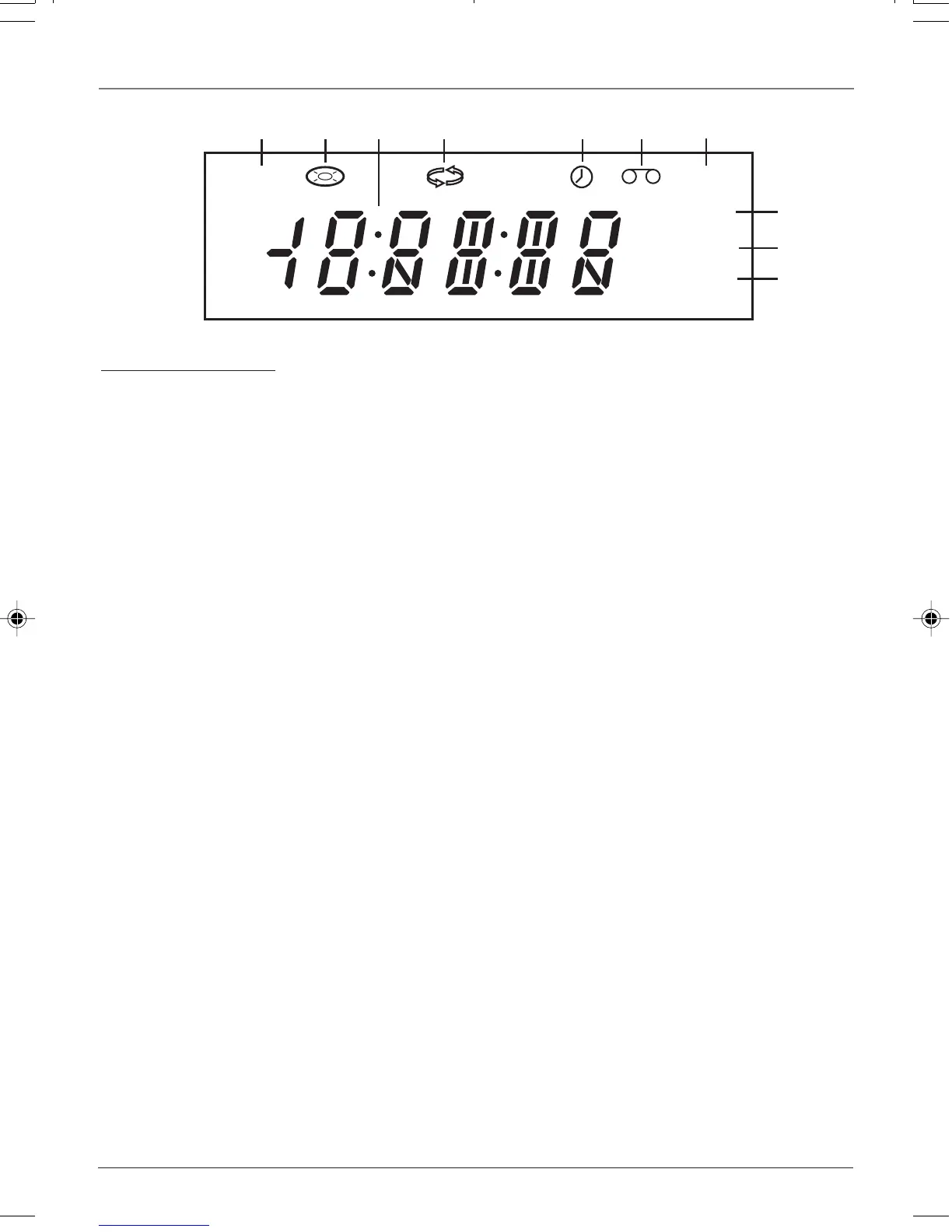
Front Panel Display
1. DVD — The DVD mode is selected.
2. Disc icon — A disc is loaded. Flashes when no disc is loaded.
3. Number display — The current time, counter, remaining time on a video tape,
time expired on a disc, or the current DVD/VCR status (PLAY, REC, etc.).
4. Repeat icon — The repeat mode is selected.
5. Timer icon — A timer recording is programmed or in progress.
6. Tape icon — A tape is loaded. If flashing, you need to insert a tape.
7. VCR — The VCR mode is selected.
8. REC — A recording is in progress.
9. PM — Time is PM (AM is not displayed).
10. TV — The TV mode is selected.
Display Messages
The following are some messages you might see in the DVD/VCR display.
DVD
VCR
REC
PM
TV
1 2 4 5 63
7
8
9
10
CUE — Tape is searching forward during
playback.
Disc (with Disc icon flashing) — No disc is
loaded.
EJEC — Tape is ejecting.
FF — Tape is fast forwarding.
L1, L2 — The front or back video input channel is
selected.
Open — Disc tray is opening.
PLAY — Playing a VCR tape.
Read — Loading a disc.
REC — Tape is recording.
REC-P — Recording is paused.
REV — Tape is searching backward during
playback.
REW — Tape is rewinding.
SAFE — Child lock is active.
SCH — Tape is peforming a visual search.
SP, SLP — Tape recording speed.
STiLL — Tape is paused.
STOP — Tape is stopped.
16166400.06 Additional 5/29/03, 10:02 PM57


 To Next Page
 Loading...