21
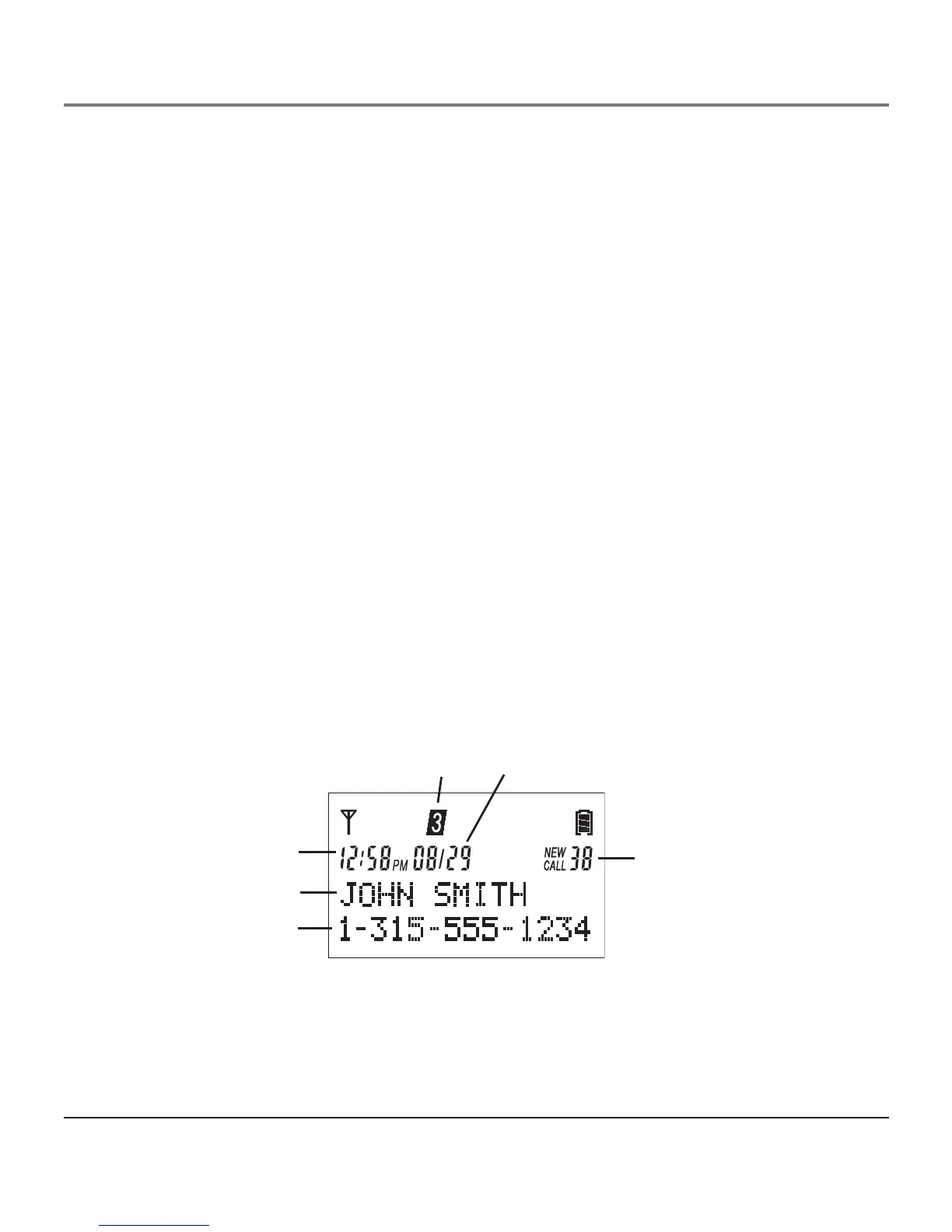
Date
CID sequence number
Line number
Time
CID phone number
CID name
Dialing a Stored Number
Make sure the phone is ON (in TALK mode).
1. Press the DIR/3button.
2. Use the VOL ( 6 or 5) button to scroll to the desired telephone number.
3. Press Select/Save to dial the displayed number.
-OR-
1. Make sure the phone is OFF (not in TALK mode).
2. Press the DIR/3 button.
3. Use the VOL ( 6 or 5) button to scroll to the desired telephone number.
4. Press the Talk button to access an available line or select your preferred line. The
telephone number dials automatically.
Caller ID (CID)
NOTE: This feature does not function when using the handset with base model 25423,
as it does not support Caller ID.
Caller ID (CID) is a service available from your local telephone company. For Caller ID
to work on this system, you must subscribe to Caller ID service. To receive Caller ID
information for a Call Waiting call, you must subscribe to the combined Call Waiting
Caller ID service.
This telephone system receives and displays CID information transmitted by your local
telephone company. This information can include the phone number, date and time; or
the name, phone number, and date and time.
Caller ID


 To Next Page