Choose Your Connections
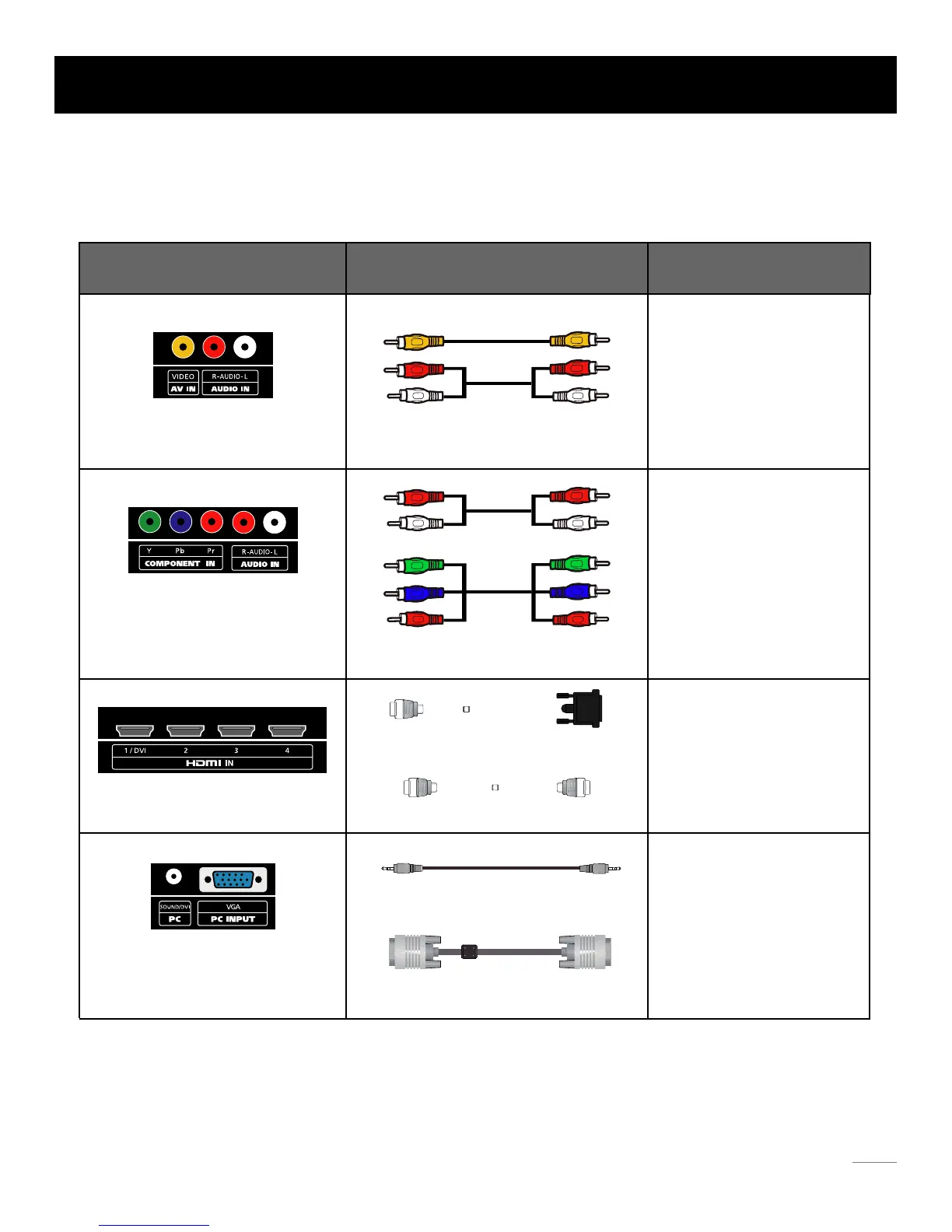
TV supports various of connecting ways from other devices (such as DVD, VCR, Set-top box, ect.). Please follow the table sheet
to choose the cables which adapt to your device.
HDMI cable
TM
Note:
HDMI, the HDMI logo, and High-Definition Multimedia Interface are trademarks or registered trademarks of HDMI Licensing LLC
Caution:
Unplug the AC cord when you connect other devices to TV.
Jacks Cables Further Information
Audio cable with 3.5mm terminal
VGA cable
Video/Audio cable
Audio Cable
COMPONENT video cable
HDMI-DVI cable
Go to page 12
Go to page 13
Go to page 14
Go to page 15
AV IN VIDEO, R-AUDIO-L
R-AUDIO-L
COMPONENT IN Y, Pb, Pr
HDMI IN 1/DVI, 2, 3, 4
PC SOUND/DVI
VGA
Cable Connections
11


 To Next Page