EN
Getting Started
2
Unpacking Your System
You should have:
• One main unit (with 2 speakers);
• One remote control;
• One safety leaflet;
• One User Manual;
• Owner registration card.
Installation
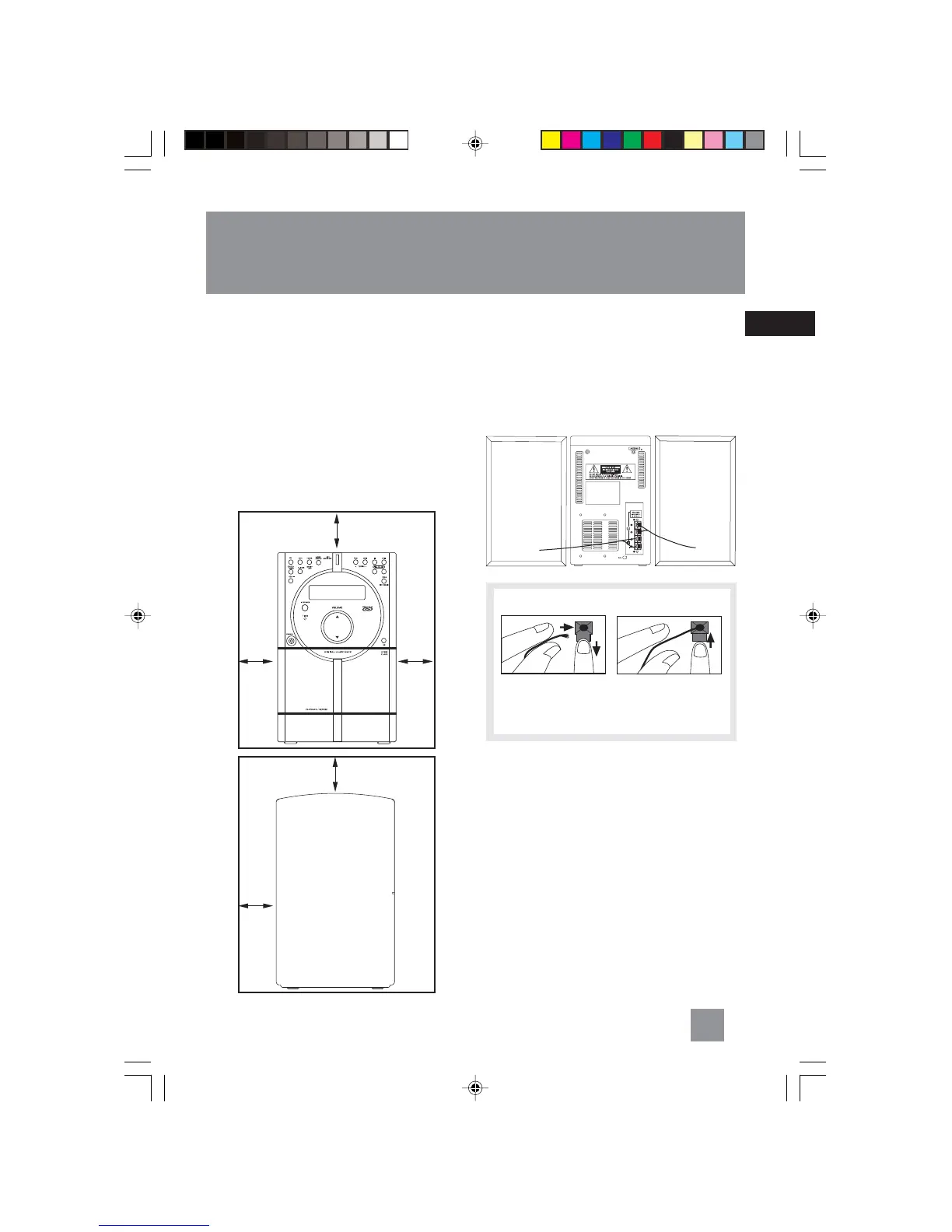
To ensure sufficient ventilation, keep the spacing
shown as below:
4 inches
4
inches
4
inches
4 inches
2
inches
Connecting the Speakers
When connecting the speakers, match the red
wires to the red jacks and the black wires to the
black jacks. Each speaker has a black and a red
jack, one for positive and one for negative. The
top two jacks are for the left speaker, while the
bottom two jacks are for the right speaker.
Release tab to lock wire in
the terminal.
NOTE: Make sure the insulation
is completely removed from the
ends of the
speaker wires at all connection
points.
Speaker
Wire Connection
Push Speaker terminal tab
down to insert wire.
Using the Antenna
Before you use your audio system, you’ll want to
make sure the FM antenna is positioned properly.
The FM antenna is the coiled wire connected to
the back of the unit. Uncoil it, making sure it is
fully extended (you may even want to tape it to
the wall behind the unit, if possible. The higher,
the better.)
For better AM reception, move or rotate the unit.
R
L
Front View
Side View
RS2040 EN 2/2/04, 5:16 PM5



 To Next Page