Safety Precautions
• Never open the cabinet under any circumstances.
Any repairs or internal adjustments should be made
only by atrained technician.
• Never operate this product with the cabinet
removed.
• Do not useyour System immediately after transport-
ing it from a cold place to a warm place, ascondensa-
tion may cause the systemto malfunction.
• Keep your unit away from humid areas and abnor-
mally hot places.
• Do not touch the player with wet hands. If any liq-
uid enters the player cabinet, take the player to a
trained technician for inspection.
• This compact disc player uses a laserto read the
music on the disc. The laser mechanism corresponds
to the cartridge and stylus of a record player.
Although this product incorporates a laser pick-up
lens, it is completely safe when operated according to
directions.
• Discsrotate at high speed inside the player. Do not
usedamaged, warped, or cracked discs.
• Do not touch the pick-up lenswhich islocated
inside the disc compartment. To keep dust from col-
lecting on the pick-up lens, do not leave the compart-
ment door open for an extended period of time. If
the lensbecomes dirty, clean it with a soft brush, or
usean air blower brush designed for camera lenses.
• The apparatus shall not be exposed to dripping and
splashing.
Important Battery Information
• Remove the batteries to avoid leakage if you do not
useyour remote control for more than one month.
• Discard leaky batteries immediately asleaking bat-
teries may causeskin burns or other personal injuries.
Dispose of batteries in the proper manner, according
to provincial and local regulations.
• Any battery may leak electrolyte under the follow-
ing circumstances:
- if mixed with a different battery type,
-if inserted incorrectly,
- if all batteries are not replaced at the sametime,
- if disposed of in fire, or
- if an attempt ismade to charge a battery not
intended to berecharged.
Headset Safety
• Do not playyour headset at high volume.
Hearing experts warn against extended high-vol-
ume play.
• If you experience ringing in your ears, reduce vol-
ume or discontinue use.
• You should use with extreme caution or temporar-
ily discontinue use in potentially hazardous situa-
tions.
Evenif your headset is an open-air designed to let
you to hear outside sounds, do not turn up the vol-
ume so high that you are unable to hear what is
around you.
Don't Infringe
This product should only be used for the purposes
for which it issold, that is,entertainment, violating
no copyright law. Any attempts to use this product
for which it is not intended isunlawful and there-
fore not condoned by Thomson multimedia.
Technical Specification
Power supply: 120V~60Hz
Dimensions ( HxW x D inches):
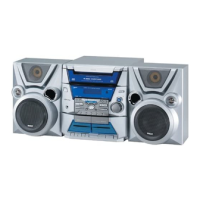
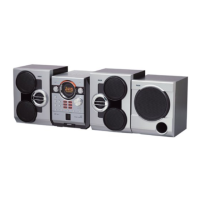
Unit size - 12.2 x 12 x 15.4
Main Speaker - 12.2 x 8.5 x 7
Tape deck: Response curve: 125Hz-8kHz (-5dB)
CD player: Response curve (+/- 2dB): 60Hz to 15 kHz
Rating Plate: Look for it at the back of the set.
The descriptions and characteristics given in this document are given
as a general indication and not as a guarantee. In order to provide
the highest quality product possible, we reserve the right to make any
improvement or modification without prior notice. The English ver-
sion serves asthe final reference on all products and operational
details should any discrepancies arise in other languages.
What your warranty covers:
• Defectsin materialsorworkmanship.
For how long after your purchase:
• One year from date of purchase for laborand parts
• Warranty period for rental units begins with the first rental or 45 daysfrom date of shipment to the rental
firm, whichever comes first.
What we will do:
• Payany Authorized RCAAudio ServiceCenter the labor charges to repair your unit.
• Payany Authorized RCAAudio Service Center for the new or, at our option, refurbished replacement parts
required to repair your unit.
How you get service:
• Take your unit to any Authorized RCAAudio Service Center. To identify your nearest Authorized RCAAudio
ServiceCenter, askyour dealer, look in the Yellow Pages,or call 1-800-336-1900.
• Show the Authorized Service Center Representative your evidence of purchase date or first rental.
• Pick up your unit when repairs are completed.
• Proof of purchase in the form of a bill of sateor receipted invoice which isevidence that the product iswithin
the warranty period must be presented to obtain warranty service. For rental firms, proof of first rental isalso
required.
What your warranty does not cover:
• Customer instruction. (Your Owner's Manual describes how to install, adjust, and operate your unit. Any
additional information should be obtained from your dealer.)
• Installation and related adjustments.
• Signal reception problems not caused by your unit.
• Damage from misuseor neglect.
• Cleaning of audio heads.
• Batteries.
• A unit that has been modified or incorporated into other products or is usedfor institutional or other com-
mercial purposes.
• A unit purchased or serviced outside the U.S.A.
• Acts of nature, such as but not limited to lightning damage.
Product Registration:
• Pleasecomplete and mail the Product Registration Card packed with your product. It will make it easier to
contact you should it ever be necessary.The return of the card isnot required for warranty coverage.
"°° ................................................................................................................................................................................ .°°°" °°,° ............................................................................................................................................................................... ,o°'°
12 1_33


 To Next Page
 Loading...