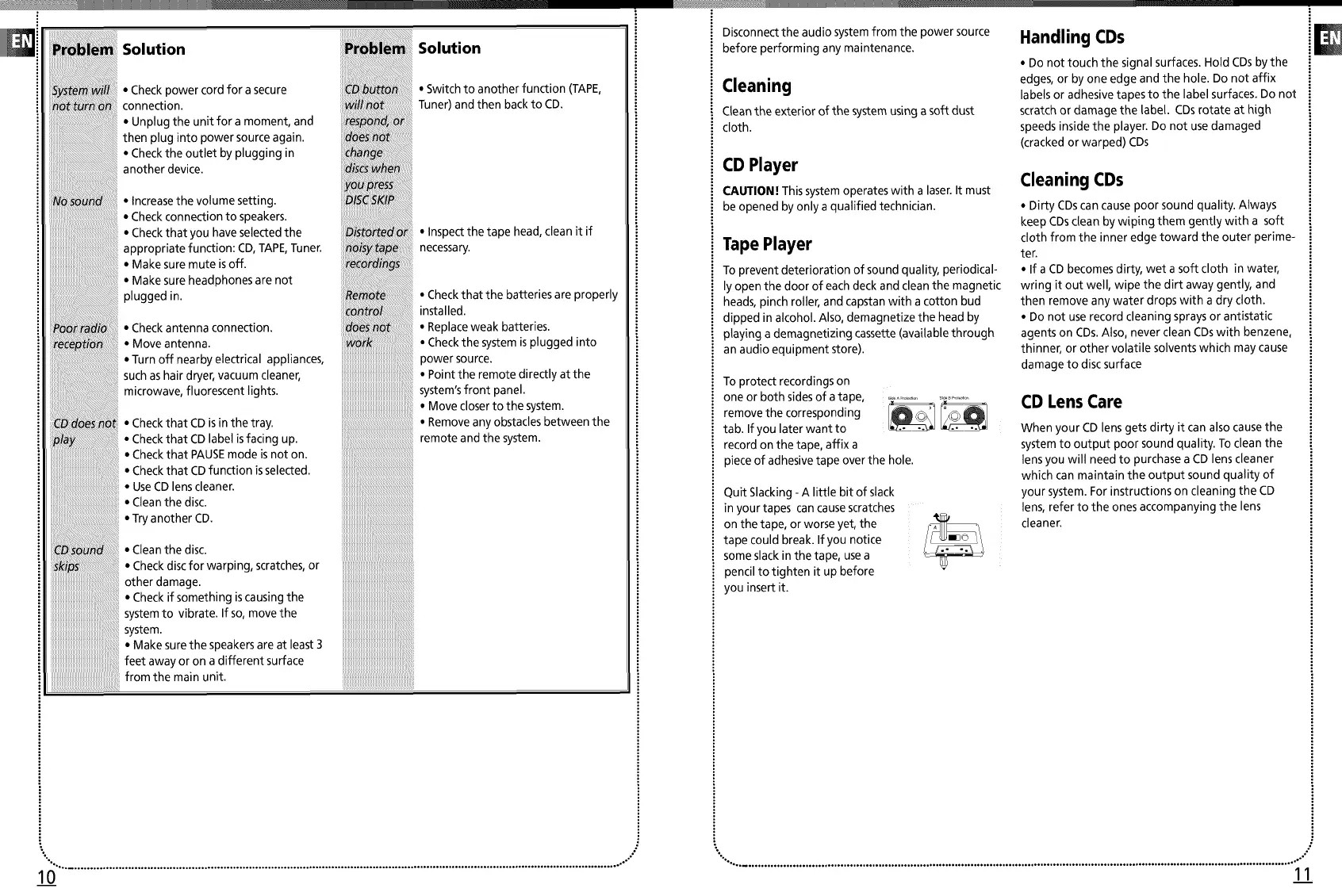
_te:_! ,Checkpowercordforasecure C£
_tu _ connection, wi
• Unptugtheunitforamoment, and re
thenptugintopowersourceagain.
• Checktheouttetbypluggingin ch
anotherdevice.
,Increasethevotumesetting.
,Checkconnectiontospeakers.
,Checkthatyouhaveselectedthe
appropriate function:CO, TAPE,Tuner.
,Makesuremuteisoff.
,Makesureheadphonesarenot
p uggedin
Poradi ,Checkantennaconnection.
reep_io • Moveantenna.
• Turnoffnearbyelectrical appliances,
suchashairdryer, vacuumcteaner,
microwave, fluorescentlights.
,CheckthatCDisinthetray.
/a ,CheckthatCDlabelisfacingup.
,CheckthatPAUSEmodeisnoton.
,CheckthatCDfunctionisselected.
,UseCDlenscleaner.
,Cteanthedisc.
,TryanotherCD.
CD: ,Cteanthedisc.
,Checkdiscforwarping, scratches,or
otherdamage.
• Checkifsomething iscausingthe
systemto vibrate, lfso, movethe
system.
,Makesurethespeakersareatleast3
feetawayoronadifferentsurface
from the main unit.
i i iiiiiiiiiiiiiiiiiiiiiiii!i!i!!i!!ii
Solution
• Switch to another function (TAPE,
Tuner) and then backto CD.
• Inspect the tape head, clean it if
necessary.
• Check that the batteries are properly
installed.
• Replaceweak batteries.
• Check the system isplugged into
power source.
• Point the remote directly at the
system'sfront panel.
• Move closer to the system.
• Remove any obstacles between the
remote and the system.
Disconnect the audio systemfrom the power source
before performing any maintenance.
Cleaning
CLeanthe exterior of the system using a soft dust
cloth.
CD Player
CAUTION! This systemoperates with a laser.It must
be opened by only a qualified technician.
Tape Player
To prevent deterioration of sound quality, periodical-
ly open the door of eachdeck and clean the magnetic
heads, pinch roller, and capstan with a cotton bud
dipped in alcohol. Also, demagnetize the head by
playing ademagnetizing cassette (available through
an audio equipment store).
To protect recordings on
one or both sides of atape, ,.............................
remove the corresponding __
tab. If you later want to
record on the tape, affix a
piece of adhesive tape over the hole.
Quit Slacking - A little bit of slack
in your tapes can cause scratches
on the tape, or worse yet, the
tape could break. If you notice
some slack in the tape, use a
pencil to tighten it up before
you insertit.
Handling CDs
• Do not touch the signal surfaces. Hold CDs by the
edges, or by one edge and the hole. Do not affix
labels or adhesive tapes to the label surfaces. Do not
scratch or damage the label. CDs rotate at high
speeds inside the player. Do not use damaged
(cracked or warped) CDs
Cleaning CDs
• Dirty CDscan cause poor sound quality. Always
keep CDs dean by wiping them gently with a soft
cloth from the inner edge toward the outer perime-
ter.
• If a CD becomes dirty, wet a soft cloth in water,
wring it out well, wipe the dirt away gently, and
then remove any water drops with a dry cloth.
• Do not use record cleaning sprays or antistatic
agents on CDs.Also, never clean CDswith benzene,
thinner, or other volatile solvents which may cause
damage to disc surface
CD Lens Care
When your CD lens gets dirty it can also cause the
system to output poor sound quality. To clean the
tens you will need to purchase a CD lens cleaner
which can maintain the output sound quality of
your system. For instructions on cleaning the CD
tens, refer to the ones accompanying the lens
cleaner.
"°° ............................................................................................................................................... ° ................................ ,°°°" "°°°.°............................................................................................................................................................................... ,o°'°
10 11


 To Next Page
 Loading...