Selecting Tuner Band
1. PressSOURCEto select TUNER.
2. PressBAND to selectbetween AM or FM radio
band.
Tip: Your audio system has 32 preset stations.
Tuning to a Station
PressSKIPBACKWARD ,_ /SKIP FORWARD _ to
select frequencies.
Using Presets
The tuner can be in either TUNEor PRESETmode.
When in PRESETmode, the PROGlight ison.
• PressTUNE•PRESETto toggle TUNEand PRESET
mode.
• PressSKIPBACKWARD _ or SKIPFORWARD
on the main system or PRESETUPor DOWN on
the remote control to accessthe previous or next
preset station. The display first showsthe preset
program number and after afew seconds,the
frequency wilt be displayed. (FMPR:01is FM
preset 1)
Auto Preset Programming
(FM only)
Pressand hold BAND button for 2 secondsto scan
stationsin FM band. The stationswill then be stored
as preset channels.A maximum of 32stationscanbe
stored. Beware of your preset channelsbeing erased
accidentally becausethe scanningand storingprocess
isautomatic upon pressing the button. You canstop
the automatic scanby pressing any button, but the
erased stations cannot be recovered.
Manually Setting Presets
1. PressTUNE,PRESETbutton to enter TUNEmode.
2. PressSKIPBACKWARD _ /SKIP FORWARD
to accessthe desired frequency.
3. Pressthe PROG,SET button once.
4. The most recently accessedprogram location will
be displayed.
5. If a different program location is preferred, press
SKIPBACKWARD .,, / SKIPFORWARD
to move to the desired preset number (1-32).
6. PressPROG,SET to store the selected frequency
atthat preset.
Suppressing Stereo Signal
PressFM ST.to toggle between FM mono and stereo
for stereo FMstations. (Remote Only)
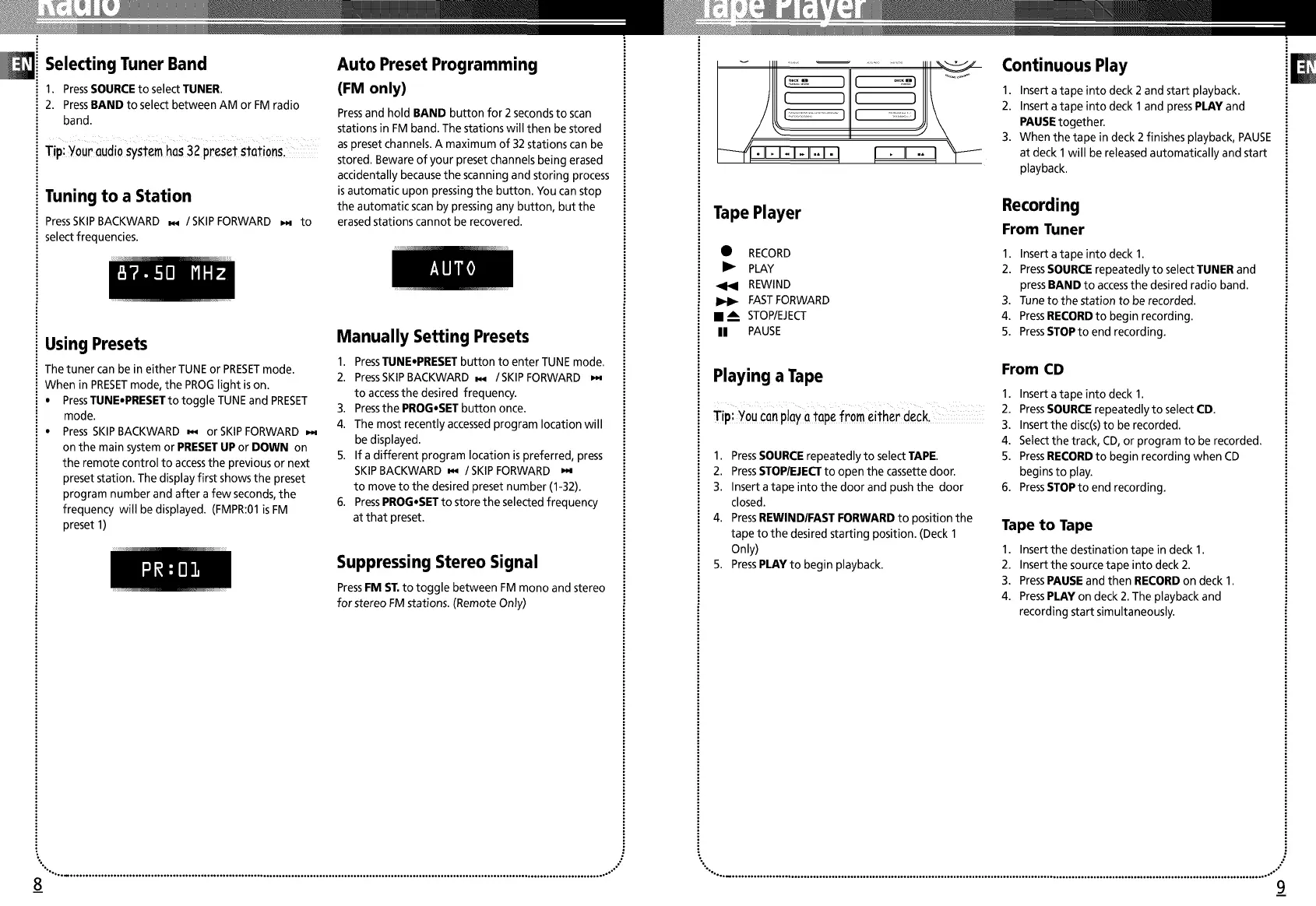
Tape Player
• RECORD
I_ PLAY
REWIND
FASTFORWARD
• A STOP/EJECT
II PAUSE
Playing a Tape
Tip: You can play a tape from either deck.
1. PressSOURCErepeatedly to select TAPE.
2. PressSTOP/EJECTto open the cassette door.
3. Insert a tape into the door and push the door
closed.
4. PressREWINDIFAST FORWARD to position the
tape to the desired starting position. (Deck 1
Only)
5. PressPLAY to begin playback.
Continuous Play
1. Insert atape into deck 2 and start playback.
2. Insert atape into deck 1 and pressPLAY and
PAUSEtogether.
3. When the tape in deck 2 finishes playback, PAUSE
at deck 1will be released automatically and start
playback.
Recording
From Tuner
1. Insert atape into deck 1.
2. PressSOURCErepeatedly to select TUNER and
pressBAND to accessthe desired radio band.
3. Tune to the station to be recorded.
4. PressRECORDto begin recording.
5. PressSTOPto end recording.
From CD
1. Insert atape into deck 1.
2. PressSOURCErepeatedly to select CD.
3. Insert the disc(s)to be recorded.
4. Select the track, CD,or program to be recorded.
5. PressRECORDto begin recording when CD
begins to play.
6. PressSTOPto end recording.
Tape to Tape
1. Insert the destination tape in deck 1.
2. Insert the source tape into deck 2.
3. PressPAUSEand then RECORDon deck 1.
4. PressPLAY on deck 2. The playback and
recording start simultaneously.
",o ................................................................................................................................................................................ .°-" ,°,° ............................................................................................................................................................................... ,°-"
8_ 9_


 To Next Page
 Loading...