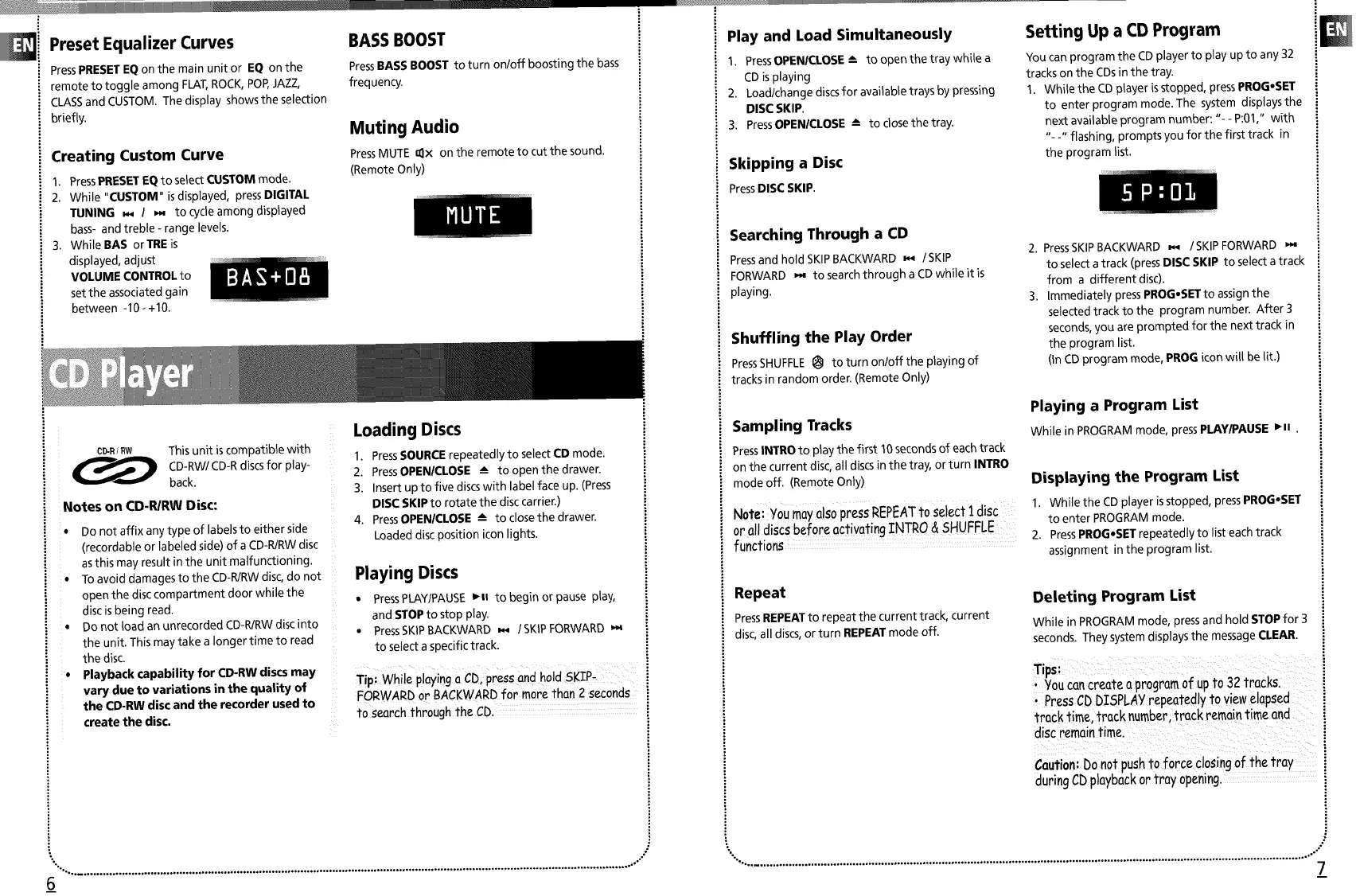
Preset Equalizer Curves
PressPRESETEQon the main unit or EQ on the
remote to toggle among FLAT,ROCK,POP,JAZZ,
CLASSand CUSTOM. The display showsthe selection
briefly.
Creating Custom Curve
1. PressPRESETEQto select CUSTOM mode.
2. While "CUSTOM" isdisplayed, pressDIGITAL
TUNING _ I _ to cycle among displayed
bass- and treble - range levels.
3. WhiteBAS orTREis
displayed, adjust
VOLUME CONTROLto
set the associated gain
between -10 _+10.
BASS BOOST
PressBASSBOOST to turn on/off boosting the bass
frequency.
Muting Audio
PressMUTE _x on the remote to cut the sound.
(Remote Only)
CD-R/RW
This unit iscompatible with
CD-RW/CD-R discsfor play-
back,
Notes on CD-R/RW Disc:
• Do not affix any type of labels to either side
(recordabte or labeled side) of a CD-R/RWdisc
asthis may result in the unit malfunctioning.
• To avoid damages to the CD-R/RWdisc, do not
open the disc compartment door while the
disc isbeing read.
• Do not toad an unrecorded CD-R/RWdisc into
the unit. This may take a longer time to read
the disc.
• Playback capability for CD-RW discs may
vary due to variations in the quality of
the CD-RW disc and the recorder used to
create the disc.
Loading Discs
1. PressSOURCE repeatedly to select CD mode.
2. PressOPEN/CLOSE -_ to open the drawer.
3. Insert up to five discswith label face up. (Press
DISC SKIP to rotate the disc carrier.)
4. PressOPEN/CLOSE -_ to close the drawer.
Loaded disc position icon lights.
Playing Discs
• PressPLAYIPAUSE•u to begin or pause play,
and STOPto stop play.
• PressSKIPBACKWARD _,_ I SKIPFORWARD
to select aspecific track.
i
i
i
i
Tip: While playing a CD, press and hold SKIP.
FORWARD or BACKWARD for more than 2 seconds
to search through the CD
".°. ................................................................... o.......................................................... ,...................... , ......................... .°-"
6
Play and Load Simultaneously
1. PressOPENICLOSE-_ to open the tray while a
CDis playing
2. Load/change discsfor available trays by pressing
DiSC SKIP.
3. PressOPENICLOSE --- to closethe tray.
Skipping a Disc
PressDISC SKIP.
Setting Up a CD Program
You can program the CDplayer to play up to any 32
tracks on the CDsin the tray.
1. While the CDplayer isstopped, pressPROG,SET
to enter program mode. The system displays the
next available program number: "- - P:01," with
"- -" flashing, prompts you for the first track in
the program list.
Searching Through a CD
Pressand hold SKIPBACKWARD _ /SKIP
FORWARD _ to search through a CDwhile it is
playing.
Shuffling the Play Order
PressSHUFFLEI_ to turn on/off the playing of
tracks in random order. (Remote Only)
Sampling Tracks
PressINTROto playthe first 10seconds of each track
on the current disc,all discs in the tray, or turn INTRO
mode off. (Remote Only)
Note: YoumayalsopressREPEATto select 1disc
or all discsbefore activatingINTRO & SHUFFLE
functions
2. PressSKIPBACKWARD _ /SKIP FORWARD
to select atrack (pressDISC SKIP to select atrack
from a different disc).
3. Immediately pressPROG,SET to assign the
selected track to the program number. After 3
seconds,you are prompted for the next track in
the program list.
(In CD program mode, PROG icon will be lit.)
Playing a Program List
Whilein PROGRAMmode,pressPLAY/PAUSE•ll
Displaying the Program List
I. While the CD player isstopped, pressPROG•SET
to enter PROGRAMmode.
2. PressPROG•SET repeatedly to list each track
assignment in the program list.
Repeat
PressREPEATto repeat the current track, current
disc, all discs,or turn REPEATmode off
Deleting Program List
While in PROGRAMmode, pressand hold STOPfor 3
seconds. They systemdisplays the messageCLEAR.
Tips:
• You can create o program of upto 32 tracks
Press CD DISPLAY repeatedly to view elapsed
track time track number, track remain time and
disc remain time i
i
Caution: Do not push to force closing of the tray i
during CD playback or tray opening
%. ..................... , ...................... ,° ................. o........ o.............................................................................................. . ........ ,-"
7


 To Next Page
 Loading...