42
Appendix A: Connecting the Receiver
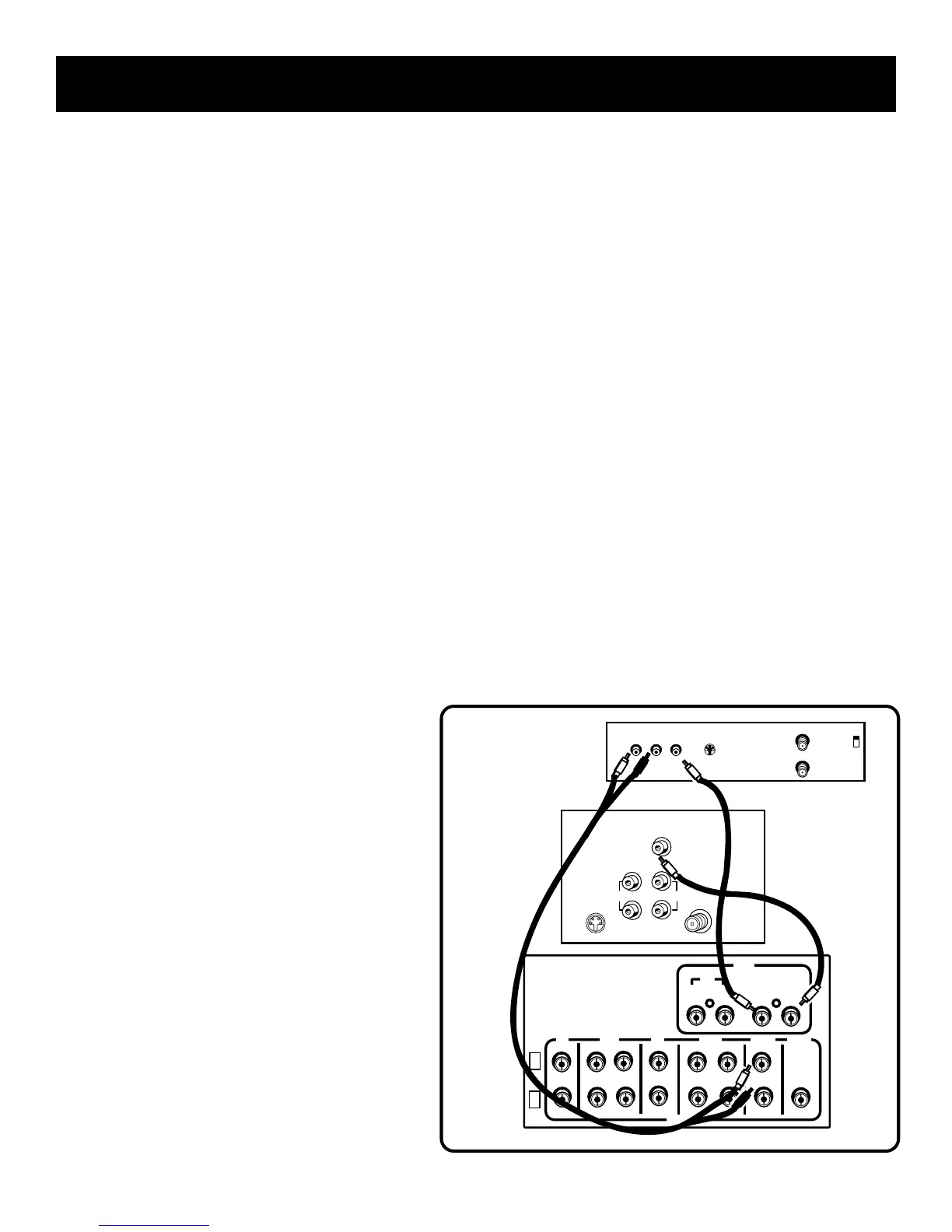
Second VCR
Using this connection enables you to play a video tape but
not record a tape.
This connection provides
• stereo, surround sound, or mono on the VCR
• VCR playback only
To use this connection, you
MUST HAVE
• (1) paired (red/white) stereo cable
• (2) single (yellow) video cable
To Connect
1. Connect the cables as shown in the
diagram below.
Using This Connection
To play a tape on the second VCR
1. Press VCR2•LD.
2. Press PLAY.
IN OUT
L
R
CD
TAPE
TV VCR
SUB
WOOFER
IN OUT IN OUT
AUDIO
IN
VCR
OUT
MONITOR
VIDEO
VIDEO
VIDEO
AUDIO
RECEIVER
SECOND
VCR
L
R
L
OUT TO TV
CH3
CH4
L
R
AUDIO
S-VIDEO
IN FROM ANT
VIDEO
TV
S-VIDEO
AUDIO
CABLE /
ANTENNA
L /
MONO
RIGHT
VIDEO
INPUT
INOUT



 To Next Page