TV WITH AUDIO/VIDEO JACKS
THIS CONNECTION ASSUMES:
• You are connecting an antenna, cable, or cable box system
• Your television has audio/video jacks
THIS CONNECTION PROVIDES:
• Hi-Fi stereo sound playback from VCR
• Record one channel while watching another (except when
using a cable box for all channels)
TO USE THIS CONNECTION, YOU MUST HAVE:
• (1) coaxial cable for cable/antenna connection; (2) for
cable box
• (2) audio/video cables
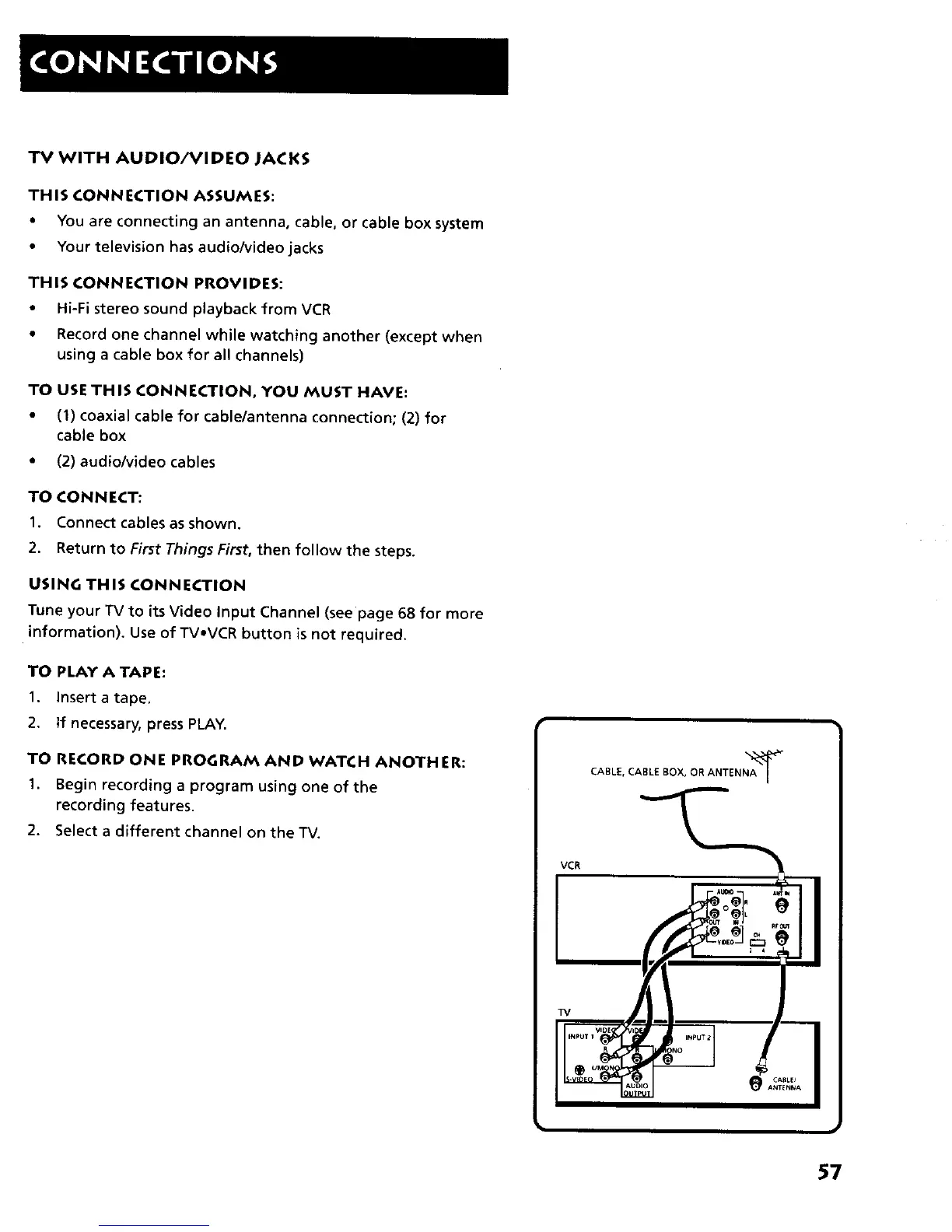
TO CONNECT:
1. Connect cables as shown,
2. Return to First Things First, then follow the steps.
USING THIS CONNECTION
Tune your TV to its Video Input Channel (see page 68 for more
information), Use of TVoVCR button isnot required.
TO PLAY A TAPE:
1. Insert a tape.
2. If necessary, press PLAY.
TO RECORD ONE PROGRAM AND WATCH ANOTHER:
1. Begin recording a program using one of the
recording features.
2. Select a different channel on the TV.
VCR
TV
CABLE, CABLE BOX, OR ANTE NNA'_
57



 To Next Page