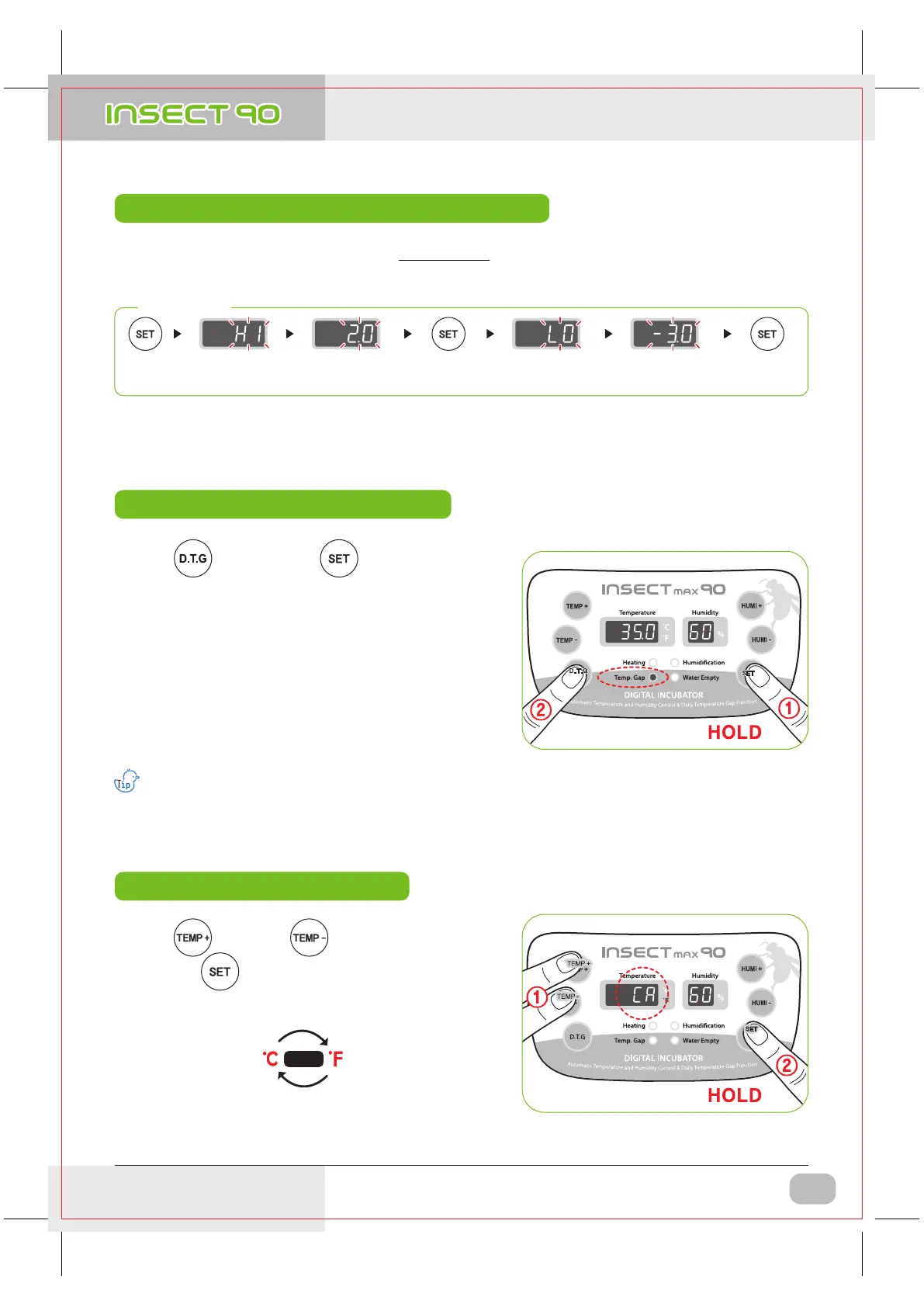
Abnormal high, Low temperature alarm setting method
When D.T,G function operates, TEMP. GAP lamp flickers.
D.T,G function is 1.5
℃
(2.7
℉
) higher than the existing
set temperature once a day for 3 hours.
▶ Daily temperature range (D.T.G)?
It is a function artificially making the highest time zone of
temperature by sun at the natural condition, and it is a
function that can raise the incubation success rate of
the optimal incubation environment by raising temperature
at the fixed time zone.
※ How to Set
* Max. abnormal temp. alarm limit [0.0 ~ 5.0
℃
(0 ~ 9
℉
) Default Setting : 0℃]
* Min. abnormal temp. alarm limit [0.0 ~ -5.0
℃
(0 ~ -9
℉
) Default Setting : 0
℃
]
5Sec.
Set required
high range with
UP / DOWN button
Save setting and
pass to
low humi. set
Set required
low range with
UP / DOWN button
Save setting and
pass to current
temp. & humi.
indication
▶ What is abnormal alarm function? It is an alarm function notifying it to user in case that the temperature of
incubator inside raised or decreased abnormally.
▶ Press button pressing button to turn on
TEMP. GAP lamp and turn ON daily temperature range.
And turn off run lamp to turn OFF daily temperature range.
[Default Setting : OFF]
Repeat
▶ Press button and button at the same time
and press button at the state that CA was displayed
on temperature display window to change it.
(
①
Keep pressing the button)
(
①
Keep pressing the button)
TEMP +
TEMP -
Daily Temp. Range(D.T.G) setting method
How to change Cels. & Fahr.
3. Incubation
DIGITAL INCUBATOR
9
(4) Abnormal high, Low temperature alarm setting method
(5) Daily Temperature Range(D.T.G) setting method
(6) How to change Centigrade & Fahrenheit
USA & Canada Official Sales & Service https://www.R-Com-Hatcher.com
Insect Incubator Rcom Max 90 User Manual


 To Next Page