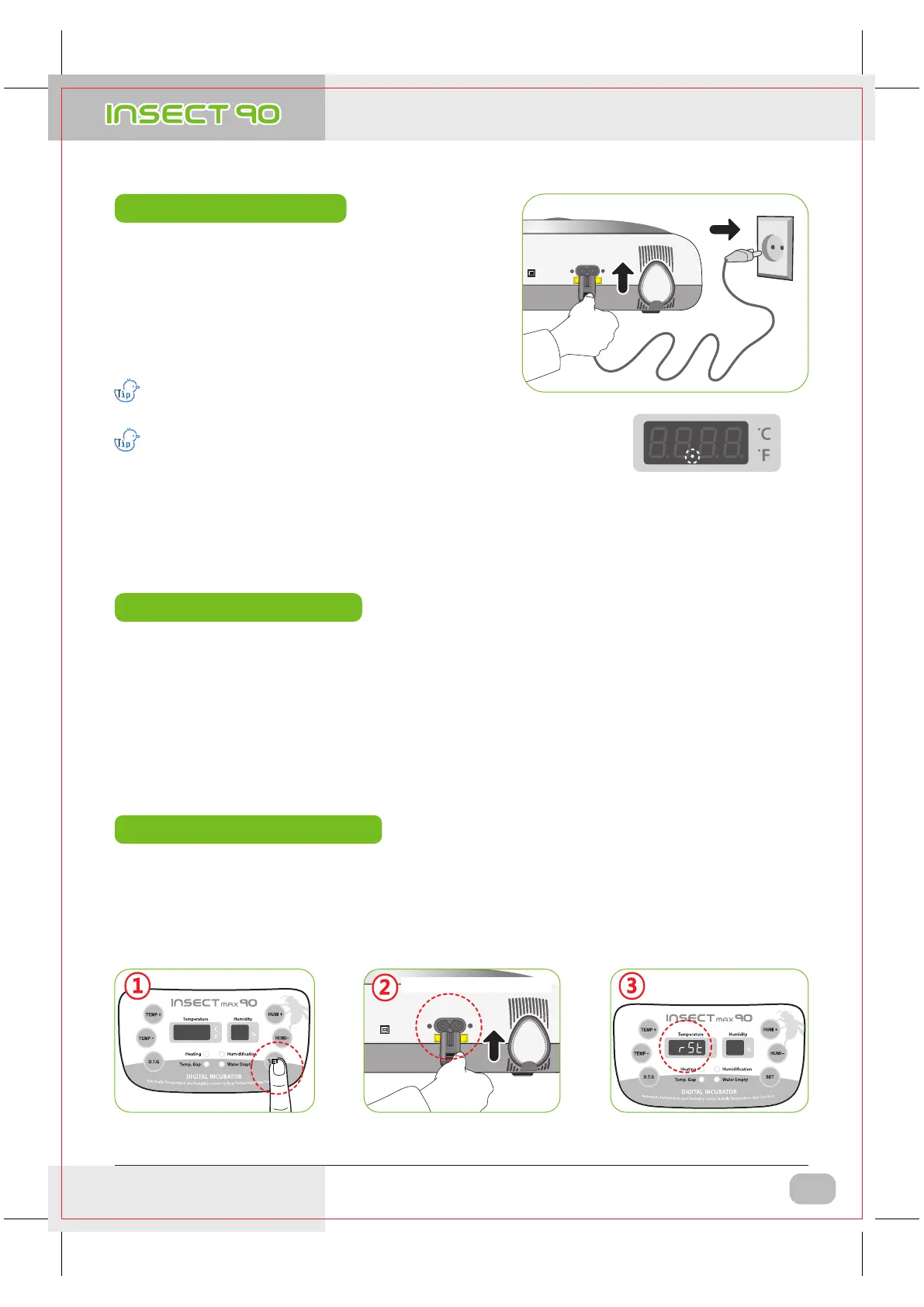
▶ After all eggs are hatched, you should REMOVE the power cord for incubation termination.
(The incubator has no separate power switch.)
▶ In case of neglecting it after turning off incubator during incubating at high humidity, the water leaving in the
inside evaporates and may create water drops on the FND window and control equipment. In order to prevent
this, separate the up and down of main body to dry it. (it may be possible to operate incubator for 1~2 hours
and dry its inside after removing the water for humidification of incubator inside.)
▶ Connect power cord of incubator to start incubation into
the temperature and humidity set in the past.
[In case of initial shipment, temperature 35.0℃ (95℉),
humidity RH 60%]
▶ Set proper temperature and humidity of species to be
incubated to start incubation. It is necessary to pass some
period to be stabilized into set temperature and humidity.
There can be some odor the first time you use incubator,
which is normal.
Power Failure Notification : When firstly input power, or power
failure during incubation, second dot " . " of temp. display is
blink with alarm. Press SET to remove.
※ The artificial intelligence system memorizes and classifies ambient conditions for keeping optimum temperature,
and temperature can move up slowly at the first stage.
+ =
▶ It is for returning to the factory default setting.
▶ It is for initializing the incubator setting or calibration to the factory settings when you handle the incubator
improperly so that the value has changed. Unplug the power supply and hold SET button and re-plug the power
supply as shown on picture. Then, rSt will show on the display, and the incubator will be iitialized to factory setting.
Re-plug the power supply
110V~120V
"rSt" will show on the display
as below, and the incubator
initialize to factory setting.
How to Start Incubation
Incubation Termination
Return to Factory Setting
HOLD
Keep pressing SET button
2. Incubation
3. Function Settings
(1) How to Start Incubation
(2) Incubation Termination
(1) Return to Factory Settion
DIGITAL INCUBATOR
7
USA & Canada Official Sales & Service https://www.R-Com-Hatcher.com
Insect Incubator Rcom Max 90 User Manual


 To Next Page