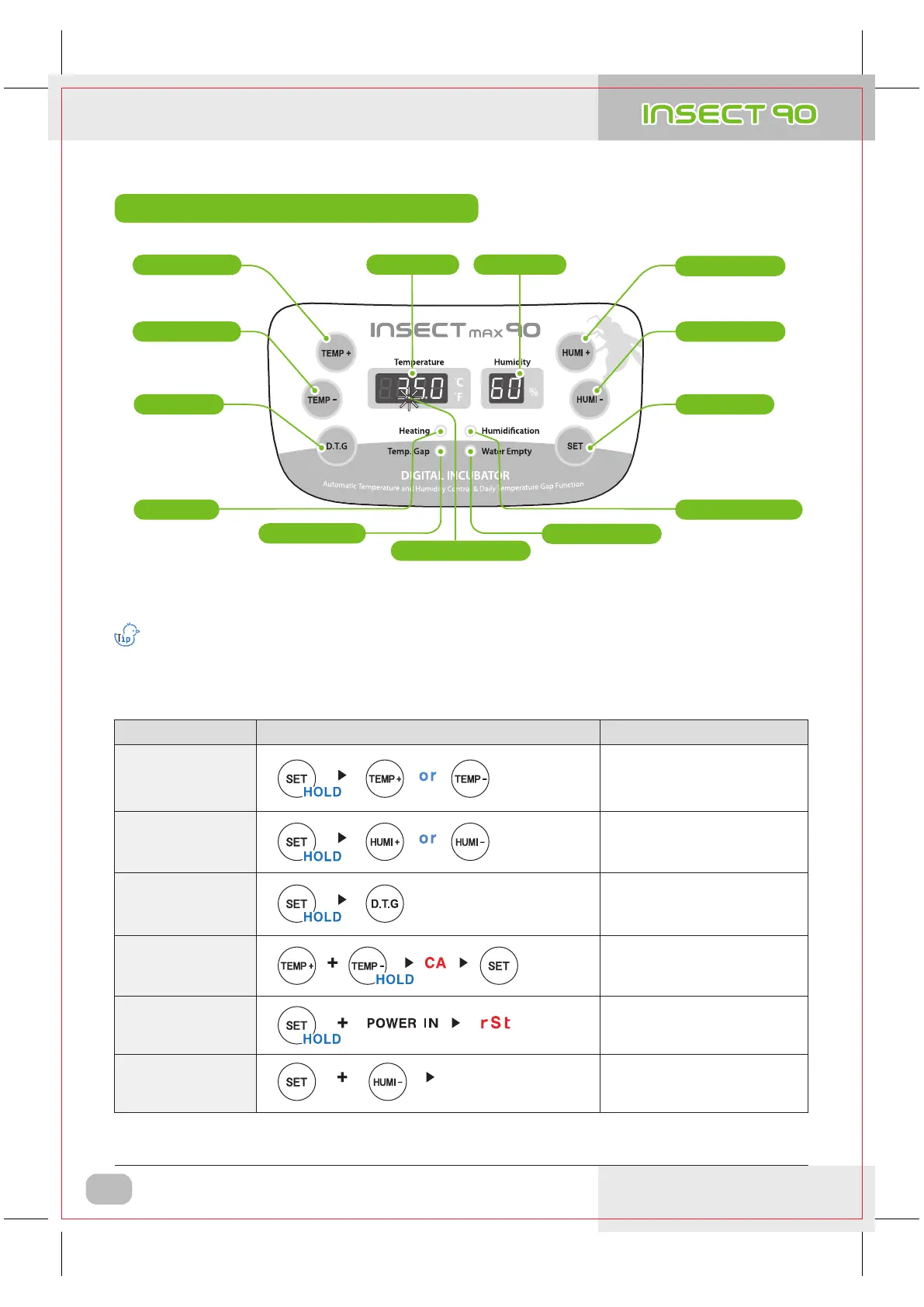
Name & Function of Operation Parts
What’s ‘Temperature&Humidity Setting’?
This is that you set up temp.&humi. As you want to have inside of the machine.
(Blink with water shortage)
- Alarm for water supplement sounds in twice.
( First alarm with water shortage / Second alarm after 3 hours )
Blink with power failure
(to remove, press SET button)
(Lighting when working)
Setting Temp. Up
D.T.G mode
(Blink when working)
Temp. Display
Humi. working lamp
Power Failure Alarm Function
Humi. DisplayTemp. UP Button
Temp. DOWN Button
(Lighting when
working)
Heater Lamp
Daily temperature
range set
Setting Temp. Down
D.T.G Button
Water Supplement Lamp
Temp. Gap Lamp
Setting Humi. Up
Humi. UP Button
Setting value check
Setting Button
Humi. DOWN Button
Setting Humi. Down
[ Function Operation & Explanation ]
※ If you want to change setting value, keep pressing "SET" button and change the value.
How to OperateFunction
Explanation
Changing
Cels. & Fahr.
Changing Cels. & Fahr.
Temp.
Setting
Setting of needed temp.
Humidity
Setting
Daily Temp. Gap
(D.T.G) set
Setting of needed humidity.
How to OFF
Humidification
Function
Initialization
(Factory setting)
Initialization
In case of incubation
at low humidity
D.T.G ON / D.T.G OFF
(one time a day for 3 hours
+ 1.5℃ operation)
below 40%
DIGITAL INCUBATOR
6
1. Introduction
(3) Name & Function of
Operation Parts
USA & Canada Official Sales & Service https://www.R-Com-Hatcher.com
Insect Incubator Rcom Max 90 User Manual


 To Next Page