%*(*5"-*/$6#"503
:
1. Introduction
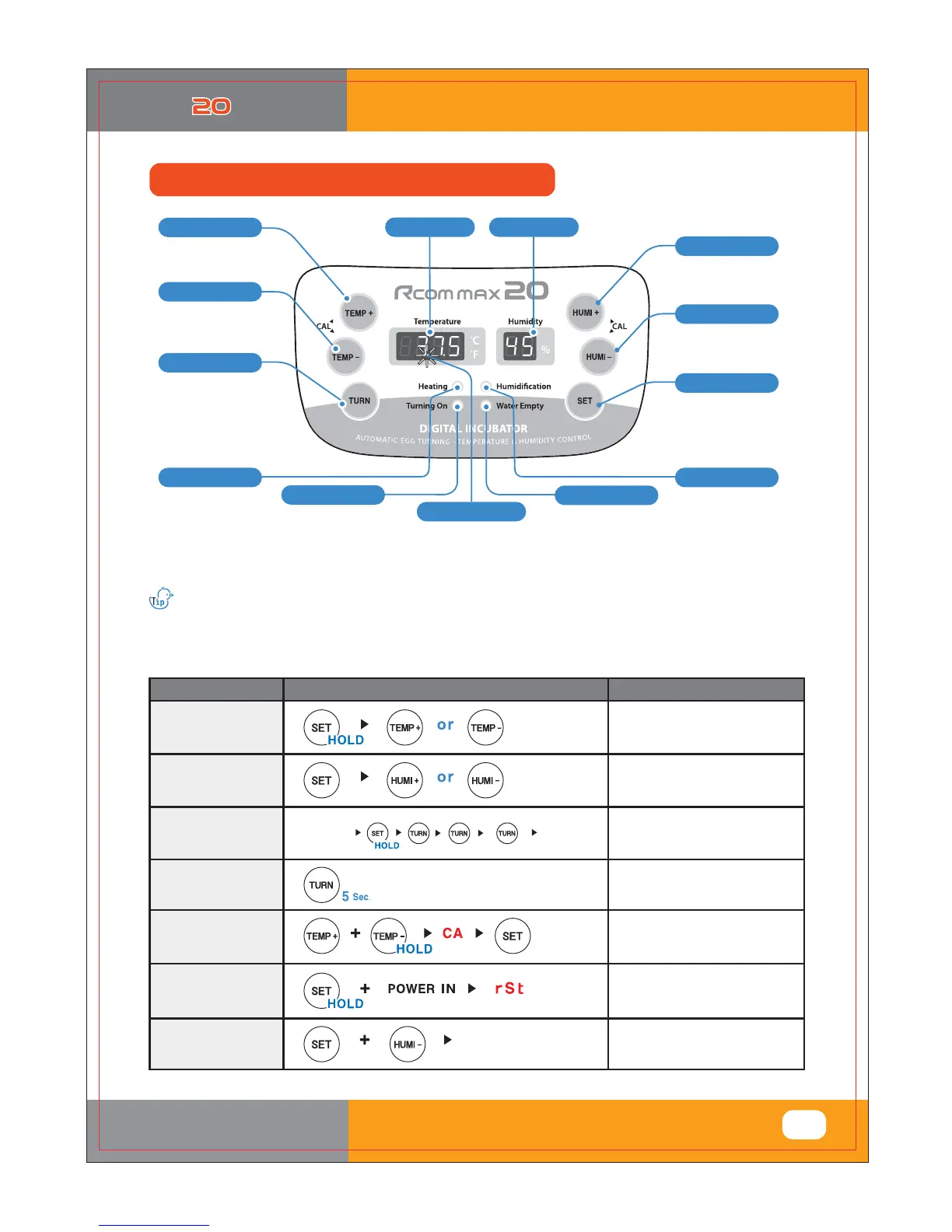
(4) Function of Digital Control &
How to Operate
(Lighting when working)
Humidity DOWN Button
Temp. UP Button
Temp. Display
Humidity Display
Egg-Turning Setting Button
(Blink with water shortage)
Temp. DOWN Button#
Setting Temp. Up
Calibration Temp. Up
Setting Temp. Down
Calibration Temp. Down
(Lighting when working)
Turn on with automatic
egg-turning mode.
(Blink when working)
- Alarm for water supplement sounds in twice.
( First alarm with water shortage / Second alarm after 3 hours )
Water Supplement Lamp
Egg-Turning Lamp
Heater Lamp
Setting value check
Humidification working lamp
Power Failure Alarm Function
Blink with power failure
(to remove, press SET button)
Humidity UP Button
Setting Button
Setting Humidity Up
Calibration Humidity Up
Setting Humidity Down
Calibration Humidity Down
Automatic egg-turning setting
or cancellation
/ Egg-turning test
Function of Digital Control & How to Operate
What’s ‘Temperature&Humidity Setting’?
This is that you set up temp.&humi. As you want to have inside of the machine.
[ Function Operation & Explanation ]
If you want to change setting value, keep pressing "SET" button and change the value.
put some water after take off label from the back and attach to the window.
How to OperateFunction
Explanation
Changing
Cels. & Fahr.
Changing Cels. & Fahr.
Temp.
Setting
Setting of needed temp.
Humidity
Setting
Egg-Turning
Interval Setting
Setting of needed humidity.
How to OFF
Humidification
Function
Egg-Turning
Test
Egg-Turning Test (once)
Initialization
(Factory setting)
Initialization
Set Humidity as 20%
Egg-Turning Interval Setting
as required
5#Krxuv
rqfh 5#wlphv
6#Krxuv
6#wlphv+RII,
Odps#RII
Ghidxow#vhwwlqj
#hyhu|4#krxu#
#+Odps=#RQ,
###7#wlphv
hyhu|#4#krxu#
+Odps#RQ,
uhshdw
20%













 To Next Page