Version 1.0 P a g e | 8
4.5.3 PPPoE
P
P
P
P
P
P
o
o
E
E
s
s
t
t
a
a
n
n
d
d
s
s
f
f
o
o
r
r
P
P
o
o
i
i
n
n
t
t
-
-
t
t
o
o
-
-
P
P
o
o
i
i
n
n
t
t
P
P
r
r
o
o
t
t
o
o
c
c
o
o
l
l
o
o
v
v
e
e
r
r
E
E
t
t
h
h
e
e
r
r
n
n
e
e
t
t
.
.
I
I
t
t
r
r
e
e
l
l
i
i
e
e
s
s
o
o
n
n
t
t
w
w
o
o
w
w
i
i
d
d
e
e
l
l
y
y
a
a
c
c
c
c
e
e
p
p
t
t
e
e
d
d
s
s
t
t
a
a
n
n
d
d
a
a
r
r
d
d
s
s
:
:
P
P
P
P
P
P
a
a
n
n
d
d
E
E
t
t
h
h
e
e
r
r
n
n
e
e
t
t
.
.
I
I
t
t
c
c
o
o
n
n
n
n
e
e
c
c
t
t
s
s
u
u
s
s
e
e
r
r
s
s
t
t
h
h
r
r
o
o
u
u
g
g
h
h
a
a
n
n
E
E
t
t
h
h
e
e
r
r
n
n
e
e
t
t
t
t
o
o
t
t
h
h
e
e
I
I
n
n
t
t
e
e
r
r
n
n
e
e
t
t
w
w
i
i
t
t
h
h
a
a
c
c
o
o
m
m
m
m
o
o
n
n
b
b
r
r
o
o
a
a
d
d
b
b
a
a
n
n
d
d
m
m
e
e
d
d
i
i
u
u
m
m
,
,
s
s
u
u
c
c
h
h
a
a
s
s
a
a
s
s
i
i
n
n
g
g
l
l
e
e
D
D
S
S
L
L
l
l
i
i
n
n
e
e
,
,
w
w
i
i
r
r
e
e
l
l
e
e
s
s
s
s
d
d
e
e
v
v
i
i
c
c
e
e
,
,
o
o
r
r
c
c
a
a
b
b
l
l
e
e
m
m
o
o
d
d
e
e
m
m
.
.
A
A
l
l
l
l
u
u
s
s
e
e
r
r
s
s
o
o
v
v
e
e
r
r
t
t
h
h
e
e
E
E
t
t
h
h
e
e
r
r
n
n
e
e
t
t
c
c
a
a
n
n
s
s
h
h
a
a
r
r
e
e
a
a
c
c
o
o
m
m
m
m
o
o
n
n
c
c
o
o
n
n
n
n
e
e
c
c
t
t
i
i
o
o
n
n
.
.
P
P
P
P
P
P
o
o
E
E
i
i
s
s
o
o
f
f
t
t
e
e
n
n
u
u
s
s
e
e
d
d
f
f
o
o
r
r
D
D
S
S
L
L
.
.
A
A
l
l
l
l
l
l
o
o
c
c
a
a
l
l
u
u
s
s
e
e
r
r
s
s
c
c
a
a
n
n
s
s
h
h
a
a
r
r
e
e
o
o
n
n
e
e
P
P
P
P
P
P
o
o
E
E
c
c
o
o
n
n
n
n
e
e
c
c
t
t
i
i
o
o
n
n
f
f
o
o
r
r
a
a
c
c
c
c
e
e
s
s
s
s
i
i
n
n
g
g
t
t
h
h
e
e
I
I
n
n
t
t
e
e
r
r
n
n
e
e
t
t
.
.
Y
Y
o
o
u
u
r
r
s
s
e
e
r
r
v
v
i
i
c
c
e
e
p
p
r
r
o
o
v
v
i
i
d
d
e
e
r
r
w
w
i
i
l
l
l
l
p
p
r
r
o
o
v
v
i
i
d
d
e
e
y
y
o
o
u
u
i
i
n
n
f
f
o
o
r
r
m
m
a
a
t
t
i
i
o
o
n
n
a
a
b
b
o
o
u
u
t
t
u
u
s
s
e
e
r
r
n
n
a
a
m
m
e
e
,
,
p
p
a
a
s
s
s
s
w
w
o
o
r
r
d
d
,
,
a
a
n
n
d
d
a
a
u
u
t
t
h
h
e
e
n
n
t
t
i
i
c
c
a
a
t
t
i
i
o
o
n
n
m
m
o
o
d
d
e
e
.
.
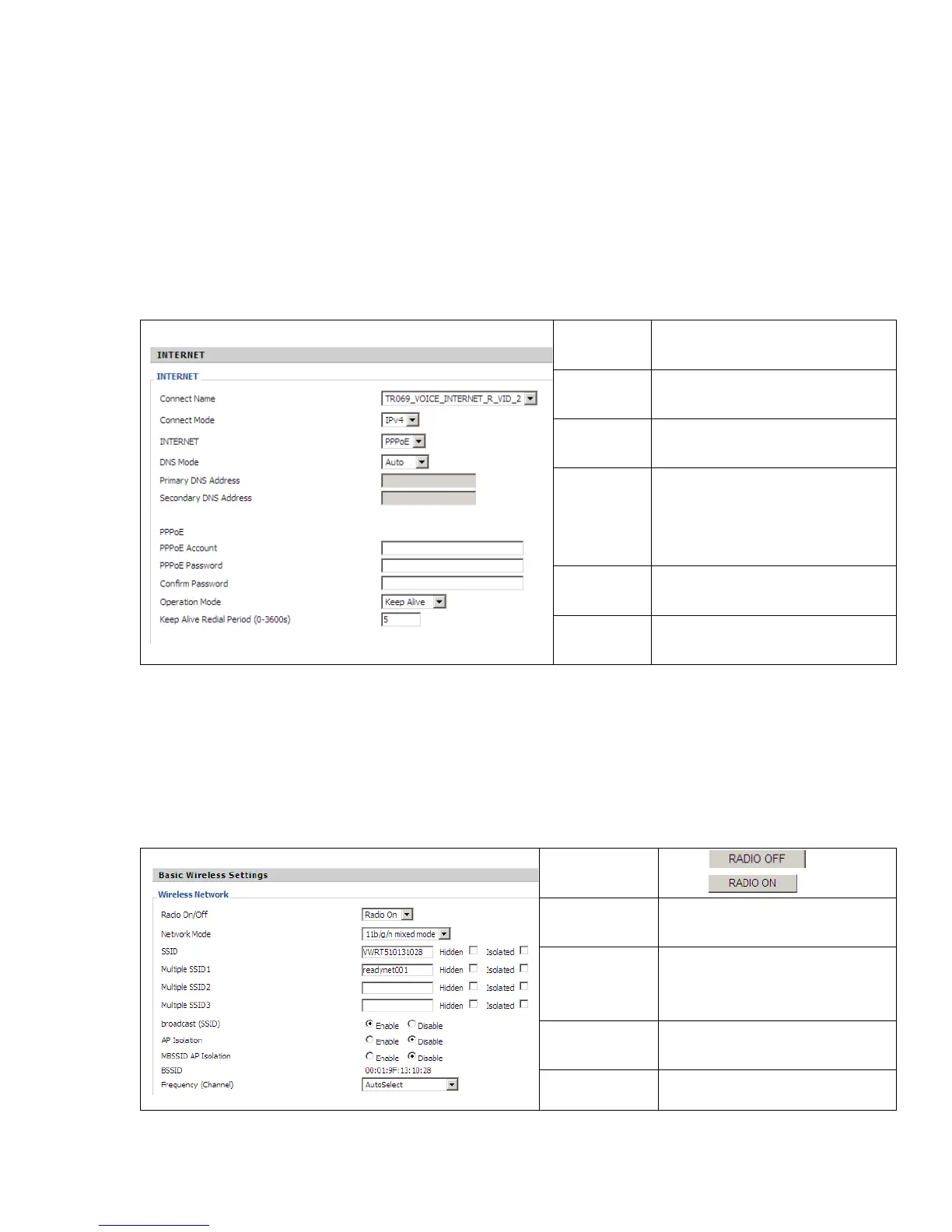
PPPoE
Account
Assign a specific valid user name
provided by the ISP.
PPPoE
Password
Assign a valid password provided by
the ISP.
Confirm
Password
Input the password again.
DNS Mode
Set the DNS Mode to Auto or
Manual.
If Manual, fill in primary and
secondary DNS addresses.
Primary
DNS Server
Type in the primary IP address for
the route.
Secondary
DNS Server
Type in secondary IP address for
necessity in the future.
4.6 Setting up the Wireless Connection
T
T
o
o
s
s
e
e
t
t
u
u
p
p
t
t
h
h
e
e
w
w
i
i
r
r
e
e
l
l
e
e
s
s
s
s
c
c
o
o
n
n
n
n
e
e
c
c
t
t
i
i
o
o
n
n
,
,
p
p
l
l
e
e
a
a
s
s
e
e
f
f
o
o
l
l
l
l
o
o
w
w
t
t
h
h
e
e
s
s
e
e
s
s
t
t
e
e
p
p
s
s
.
.
4.6.1 Enable Wireless and Set the SSID
O
O
p
p
e
e
n
n
t
t
h
h
e
e
W
W
i
i
r
r
e
e
l
l
e
e
s
s
s
s
/
/
B
B
a
a
s
s
i
i
c
c
w
w
e
e
b
b
p
p
a
a
g
g
e
e
a
a
s
s
s
s
h
h
o
o
w
w
n
n
b
b
e
e
l
l
o
o
w
w
.
.
Radio On/Off
Press to disable.
Press to enable.
Network Mode
Choose one network mode from the
drop down list.
Network
Name(SSSID)
The name of the wireless name, it
can be any text numbers or various
special characters.
Multiple
SSSD1-3
Set more wireless network.
Frequency
Choose channel frequency.


 To Next Page