Version 1.0 P a g e | 16
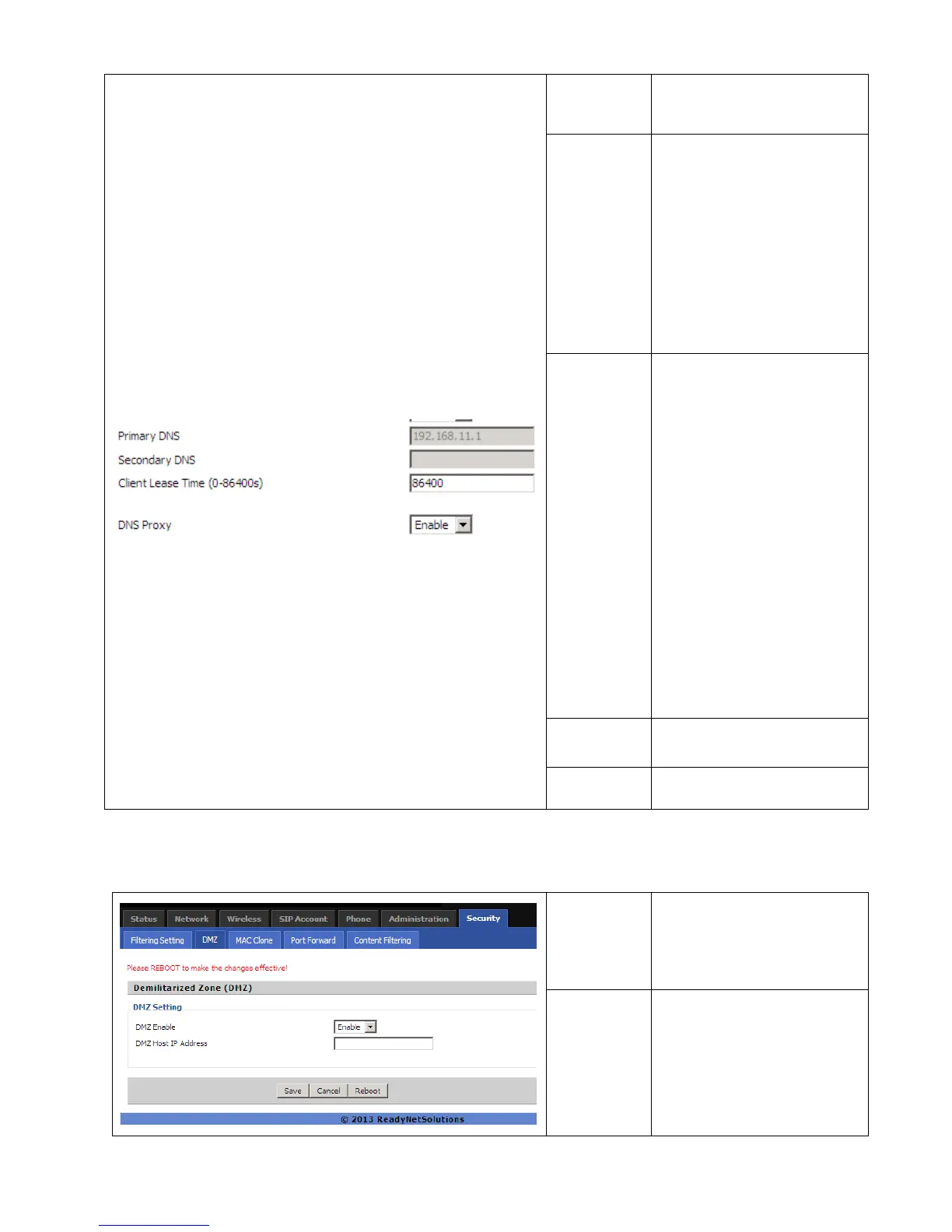
Primary/Sec-
ondary DNS
Input the primary or secondary
DNS IP address.
Primary DNS
You must specify a DNS server
IP address here because your
ISP should provide you with
usually more than one DNS
Server. If your ISP does not
provide it, the router will
automatically apply default DNS
Server IP address:
202.96.134.33 to this field.
Secondary
DNS
You must specify a DNS server
IP address here because your
ISP should provide you with
usually more than one DNS
Server. If your ISP does not
provide it, the router will
automatically apply default DNS
Server IP address:
202.96.128.86 to this field.
If both the Primary and
Secondary IP Address fields are
left empty, the router will assign
its own IP address to local users
as a DNS proxy server and
maintain a DNS cache.
Client Lease
Time
It allows you to set the leased
time for the specified PC.
DNS Proxy
If or not enable DNS proxy.
5.2.3 DMZ/Port Forward
D
D
M
M
Z
Z
DMZ Enable
Enable DMZ
DMZ Host IP
Address
Enter the private IP address of
the DMZ host


 To Next Page