Version 1.0 P a g e | 2
Hardware Installation
S
S
t
t
e
e
p
p
1
1
.
.
C
C
o
o
n
n
n
n
e
e
c
c
t
t
t
t
h
h
e
e
L
L
i
i
n
n
e
e
p
p
o
o
r
r
t
t
t
t
o
o
a
a
l
l
a
a
n
n
d
d
l
l
i
i
n
n
e
e
p
p
h
h
o
o
n
n
e
e
j
j
a
a
c
c
k
k
w
w
i
i
t
t
h
h
a
a
n
n
R
R
J
J
-
-
1
1
1
1
c
c
a
a
b
b
l
l
e
e
(
(
s
s
t
t
a
a
n
n
d
d
a
a
r
r
d
d
p
p
h
h
o
o
n
n
e
e
c
c
o
o
r
r
d
d
)
)
.
.
S
S
t
t
e
e
p
p
2
2
.
.
C
C
o
o
n
n
n
n
e
e
c
c
t
t
t
t
h
h
e
e
W
W
A
A
N
N
p
p
o
o
r
r
t
t
t
t
o
o
a
a
n
n
a
a
c
c
c
c
e
e
s
s
s
s
p
p
o
o
i
i
n
n
t
t
s
s
u
u
c
c
h
h
a
a
s
s
a
a
m
m
o
o
d
d
e
e
m
m
,
,
s
s
w
w
i
i
t
t
c
c
h
h
,
,
o
o
r
r
r
r
o
o
u
u
t
t
e
e
r
r
w
w
i
i
t
t
h
h
a
a
n
n
E
E
t
t
h
h
e
e
r
r
n
n
e
e
t
t
c
c
a
a
b
b
l
l
e
e
.
.
S
S
t
t
e
e
p
p
3
3
.
.
C
C
o
o
n
n
n
n
e
e
c
c
t
t
o
o
n
n
e
e
o
o
f
f
t
t
h
h
e
e
L
L
A
A
N
N
p
p
o
o
r
r
t
t
s
s
t
t
o
o
y
y
o
o
u
u
r
r
c
c
o
o
m
m
p
p
u
u
t
t
e
e
r
r
w
w
i
i
t
t
h
h
a
a
n
n
E
E
t
t
h
h
e
e
r
r
n
n
e
e
t
t
c
c
a
a
b
b
l
l
e
e
.
.
S
S
t
t
e
e
p
p
4
4
.
.
C
C
o
o
n
n
n
n
e
e
c
c
t
t
o
o
n
n
e
e
e
e
n
n
d
d
o
o
f
f
t
t
h
h
e
e
p
p
o
o
w
w
e
e
r
r
c
c
o
o
r
r
d
d
t
t
o
o
t
t
h
h
e
e
p
p
o
o
w
w
e
e
r
r
p
p
o
o
r
r
t
t
o
o
f
f
t
t
h
h
i
i
s
s
d
d
e
e
v
v
i
i
c
c
e
e
.
.
C
C
o
o
n
n
n
n
e
e
c
c
t
t
t
t
h
h
e
e
o
o
t
t
h
h
e
e
r
r
e
e
n
n
d
d
t
t
o
o
t
t
h
h
e
e
w
w
a
a
l
l
l
l
o
o
u
u
t
t
l
l
e
e
t
t
o
o
f
f
e
e
l
l
e
e
c
c
t
t
r
r
i
i
c
c
i
i
t
t
y
y
.
.
S
S
t
t
e
e
p
p
5
5
.
.
P
P
u
u
s
s
h
h
t
t
h
h
e
e
O
O
N
N
/
/
O
O
F
F
F
F
s
s
w
w
i
i
t
t
c
c
h
h
t
t
o
o
p
p
o
o
w
w
e
e
r
r
o
o
n
n
t
t
h
h
e
e
r
r
o
o
u
u
t
t
e
e
r
r
.
.
S
S
t
t
e
e
p
p
6
6
.
.
C
C
h
h
e
e
c
c
k
k
t
t
h
h
e
e
P
P
o
o
w
w
e
e
r
r
,
,
W
W
A
A
N
N
,
,
a
a
n
n
d
d
L
L
A
A
N
N
L
L
E
E
D
D
s
s
t
t
o
o
a
a
s
s
s
s
u
u
r
r
e
e
n
n
e
e
t
t
w
w
o
o
r
r
k
k
c
c
o
o
n
n
n
n
e
e
c
c
t
t
i
i
o
o
n
n
s
s
.
.
3 Voice Prompt
V
V
o
o
i
i
c
c
e
e
M
M
e
e
n
n
u
u
S
S
e
e
t
t
t
t
i
i
n
n
g
g
O
O
p
p
t
t
i
i
o
o
n
n
s
s
Code
Contents
1
Step 1. Pick up phone and press “****” to start IVR.
Step 2. Choose “1” and the AC1200MS reports the current WAN port connection type.
Step 3. Prompt "Please enter password”, user needs to input password with end char # if user
wants to configure WAN port connection type.
Password in the IVR is same as the Web login. User can use phone keypad to enter
password directly and the matching table is in Note 4.
For example: WEB login password is “admin”, so password in IVR is “admin” too, user
inputs “23646” to access and then configure theWAN connection port.
Step 4. Report “operation successful” if password is correct.
Step 5. Choose the new WAN port connection type, either 1. DHCP or 2. Static.
Step 6. Report “operation successful”, indicates user successfully made the changes.
AC1200MS will return to sound prompting “please enter your option, one WAN
Port …….”.
If at any time you want to quit, press “**”.
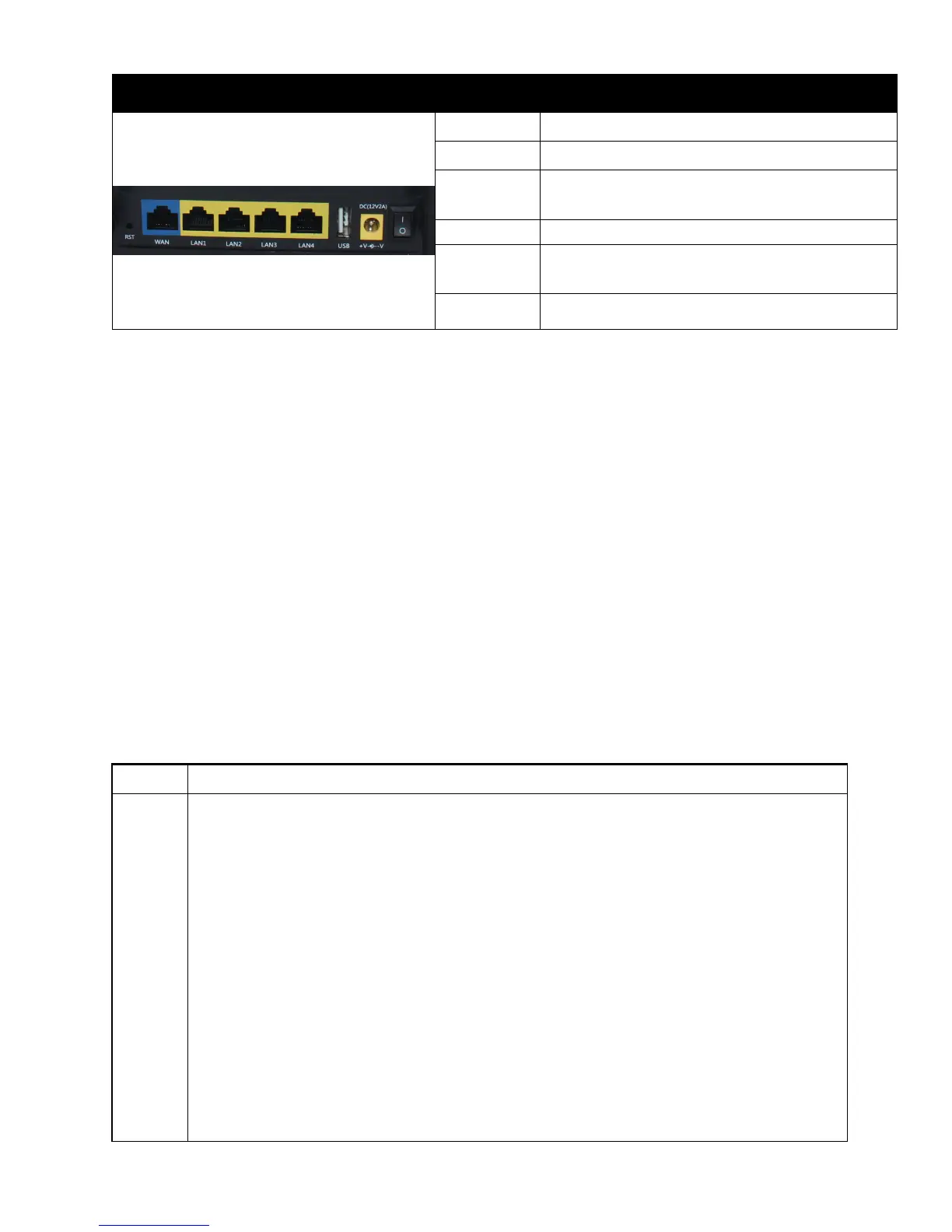
Rear Panel
Interface
Description
R
R
S
S
T
T
R
R
e
e
s
s
e
e
t
t
t
t
o
o
f
f
a
a
c
c
t
t
o
o
r
r
y
y
d
d
e
e
f
f
a
a
u
u
l
l
t
t
s
s
e
e
t
t
t
t
i
i
n
n
g
g
s
s
W
W
A
A
N
N
C
C
o
o
n
n
n
n
e
e
c
c
t
t
o
o
r
r
f
f
o
o
r
r
a
a
c
c
c
c
e
e
s
s
s
s
i
i
n
n
g
g
t
t
h
h
e
e
I
I
n
n
t
t
e
e
r
r
n
n
e
e
t
t
.
.
L
L
A
A
N
N
(
(
1
1
/
/
2
2
/
/
3
3
/
/
4
4
)
)
C
C
o
o
n
n
n
n
e
e
c
c
t
t
o
o
r
r
s
s
f
f
o
o
r
r
l
l
o
o
c
c
a
a
l
l
n
n
e
e
t
t
w
w
o
o
r
r
k
k
e
e
d
d
d
d
e
e
v
v
i
i
c
c
e
e
s
s
.
.
U
U
S
S
B
B
C
C
o
o
n
n
n
n
e
e
c
c
t
t
o
o
r
r
f
f
o
o
r
r
U
U
S
S
B
B
d
d
e
e
v
v
i
i
c
c
e
e
.
.
DC
12V/2A
Connector for a power adapter.
ON/OFF Power Switch.


 To Next Page