Version 1.0 P a g e | 18
Wireless
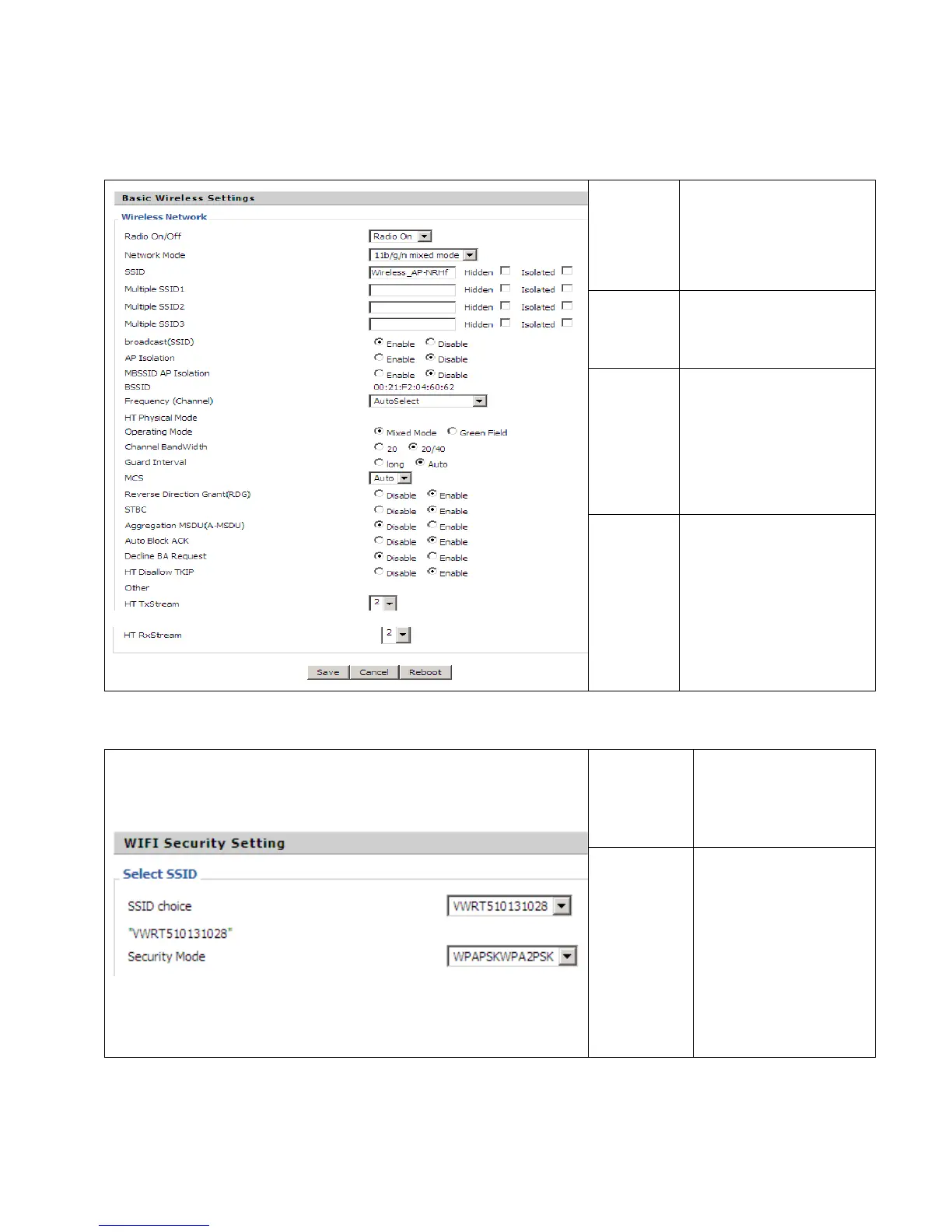
5.3.1 Basic
Radio
On/Off
Select Radio On to enable
the wireless, select Radio
Off to disable wireless.
Network
Mode
Choose one network mode
from the five types.
SSID
The name of the wireless. It
can be any text numbers or
various special characters.
The default SSID is
"AC1200MSXXXXX (last 5
digits of the LAN MAC)".
Multiple
SSID1-3
Broadcast
(SSID)
User can set multiple SSIDs.
Enable SSID broadcast.
5.3.2 Wireless Security
SSID Choice
Choose one SSID from
SSID, Multiple SSID1,
Multiple SSID2 and
Multiple SSID3.
Security
Mode
Select an appropriate
encryption mode to
improve the security and
privacy of your wireless
data packets.
Each encryption mode will
activate a different web
page to configure.


 To Next Page