EasyManua.ls Logo

Realistic PRO-2021 - General Operation Outline

Realistic PRO-2021
46 pages
Print Icon
To Next Page IconTo Next Page
To Previous Page IconTo Previous Page
Loading...
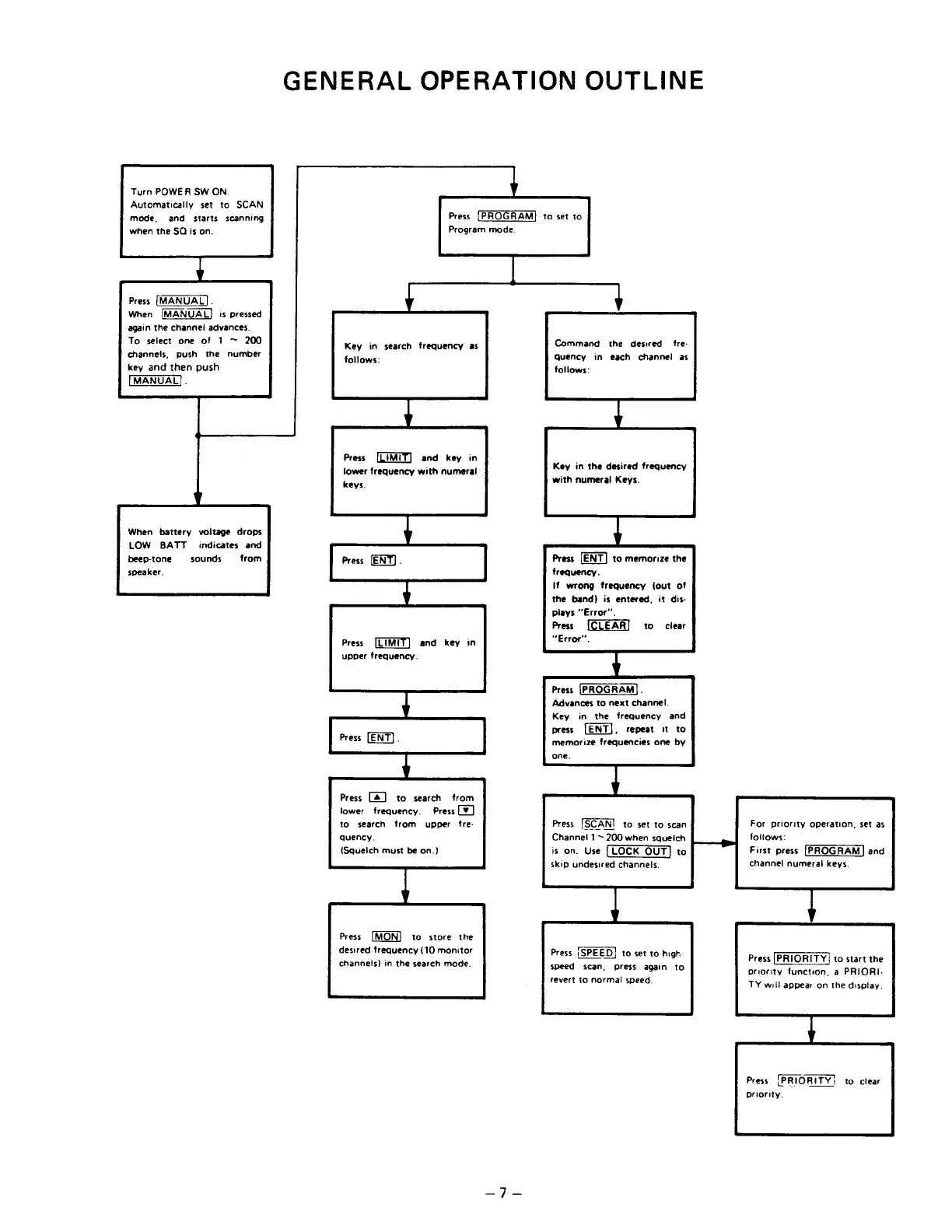
GENERAL
OPERATION
OUTLINE
Turn
POWER
SW
ON.
Automatically
set
to
SCAN
mode,
and
starts
scanning
when
the
SO
is
on.
Press
[MANUAL].
When
[MANUAL]
is
pressed
again
the
channei
advances.
To
select
one
of
1
200
channels,
push
the
number
key
and
then
push
[MANUAL].
Key
in
search
freguency
as
follows:
Press
[LIMIT]
and
key
in
lower
frequency
with
numeral
keys.
When
battery voitage
drops
LOW
BATT
indicates
and
beep-tone
trom
speaker.
sounds
Press
[LIME
upper
frequency.
and
key
in
Press
.
Press
[А]
to
search
from
lower
frequency.
Press
[Y]
to
search
trom
upper
fre-
quency.
(Squelch
must
be
оп.)
(MON)
to
store
the
desired
frequency
(10
monitor
channels)
in
the
search
mode.
Press
Program
mode.
Press
[PROGRAM]
to
set
to
Command
the
desired
fre-
Quency
in
each
channel
as
follows:
Key
in
the
desired
freguency
with
numeral
Keys.
Press
to
memorize
the
frequency.
If
wrong
frequency
(out
of
the
band)
is
entered,
it
dis-
plays
“Error”,
Press
“Error”.
to
clear
Press
(PROGRAM).
Advances
to
next
channel.
Key
in
the
freguency
and
press
LENT),
repeat
it
to
memorize
frequencies
one
by
one.
For
priority
operation,
set
as
follows:
First
press
[PROGRAM]
and
channel
numeral
keys.
Press
[SCAN]
to
set
to
scan
Channel
1
~
200
when
squelch
is
on.
Use
|
LOCK
QUT]
to
skip
undesired
channels.
Press
SPEED)
to
set
то
high:
speed
scan,
press
again
to
revert
to
norma!
speed.
Press
[PRIORITY]
to
start
the
priority
function,
a
PRIORI-
TY
will
appear
on
the
display.
Press
(PRIORITY!
to
clear
priority,

Related product manuals