EasyManua.ls Logo

Realistic STA-7 - Page 14

Realistic STA-7
46 pages
Print Icon
To Next Page IconTo Next Page
To Previous Page IconTo Previous Page
Loading...
CONNECTION
REPAIR
STEP 2
CONNECTION
4) FM RF, IF
&
MPX OPERATION CHECK
Adjust
FM Alignment.
(See
FM Alignment Section on
page
18.)
Set
SELECTOR Switch
to
FM.
Connect
FM
SG
(1000
H2,75 kHz
dev.) to
FM
300
o Antenna
Terminal.
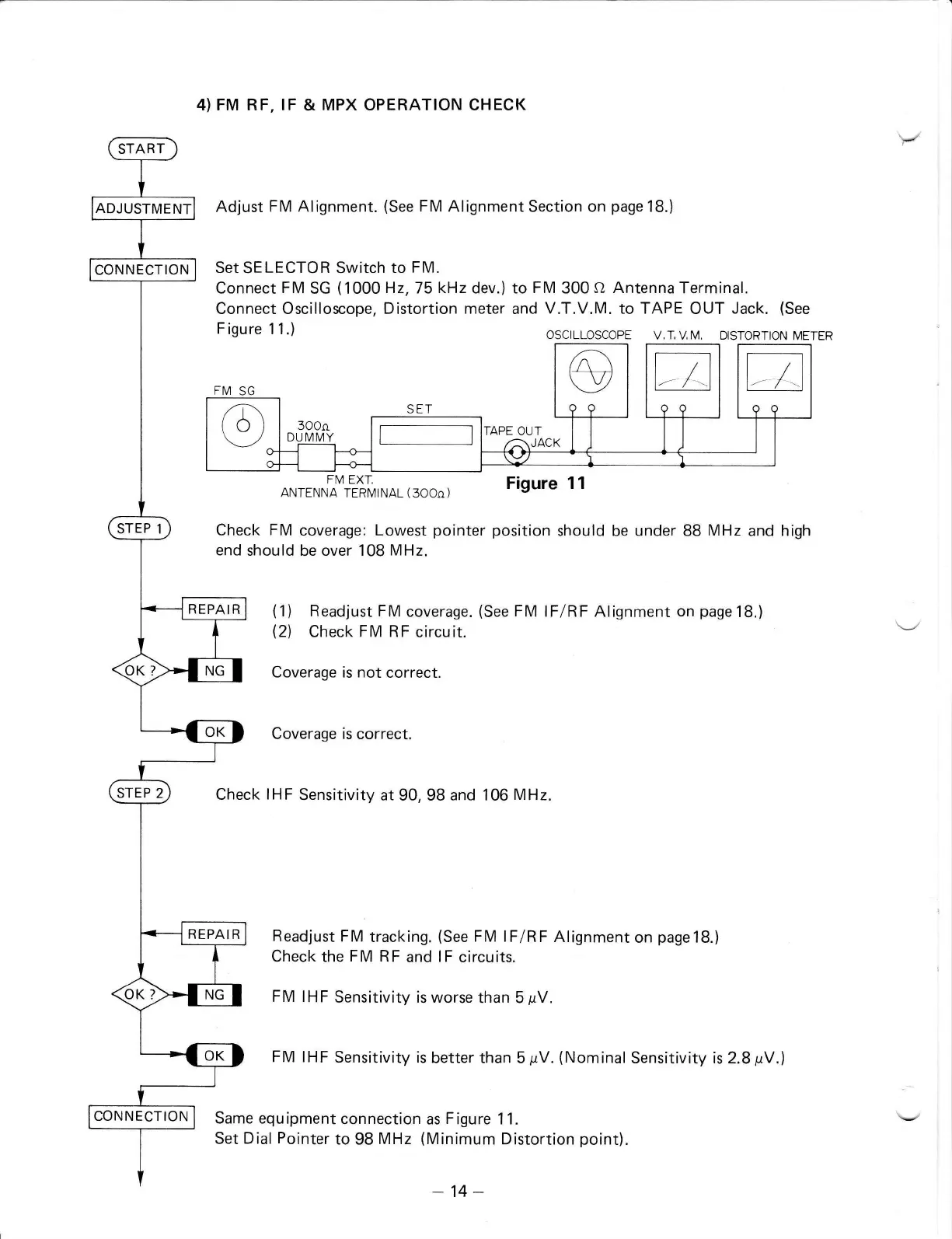
Connect Oscilloscope, Distortion meter and
V.T.V.M.
to
TAPE
OUT
Jack.
(See
F
igure 1 1.)
OSCILLOSCOPE
V,I,VM, DISTORTION
METER
FM EXI,
ANTENNA
TERI\4lNAL
(
3OOo)
Figure 11
Check FM
coverage:
Lowest
pointer position
should be under BB
MHz
and high
end
should
be
over 108
MHz.
(1)
Readjust FM
coverage.
(See
FM
lFlRF Alignment
on
page
18.)
(2)
Check FM RF
circuit.
Coverage is not
correct.
Coverage is correct.
Check
IHF
Sensitivity
at 90, 98
and
106
MHz.
Readjust
FM
tracking.
(See
FM lFlRF
Alignment
on
page18.)
Check the
FM RF
and
lF
circuits.
F M lH
F
Sensitivity is worse
than 5
pV.
FM IHF
Sensitivity
is
better than 5
pV.
(Nominal
Sensitivity is
2.8
pV.)
Same equipment
connection as
Figure
11.
Set Dial
Pointer
to 98
MHz
(Minimum
Distortion
point).
FIV]
SG
@
99
A
a9
A
aa
o
SET
3OOo
DU I\4MY
TAF
,our
I I
A\JACK Ll
-J
--l
\)a/
'r
-14-

Related product manuals