Need help?
Do you have a question about the Realtek RTL8188SU and is the answer not in the manual?
Details FCC radiation exposure limits and co-location restrictions for the transmitter.
States OEM integrator's responsibility for end-product FCC compliance and module integration.
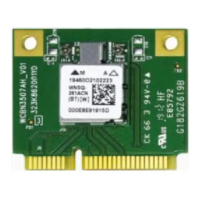
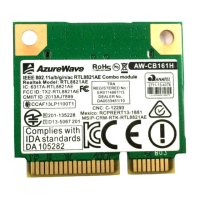
The Realtek RTL8188SU is a compact and versatile 802.11b/g/n wireless module designed for seamless integration into various host devices. This slim module provides robust wireless connectivity, enabling devices to communicate over a local area network (LAN) using the widely adopted Wi-Fi standards. Its primary function is to facilitate wireless data transmission and reception, allowing host devices to connect to access points and other wireless-enabled devices.
The RTL8188SU module operates as a wireless network interface controller (NIC), providing the necessary hardware and firmware to establish and maintain wireless connections. It supports the IEEE 802.11b, 802.11g, and 802.11n standards, offering compatibility with a broad range of existing wireless networks. The module's design incorporates a fractal antenna, which is known for its compact size and efficient performance in various orientations, making it suitable for devices with limited internal space.
At its core, the RTL8188SU handles the complex processes of wireless communication, including signal modulation, demodulation, error correction, and data packet management. It supports multiple modulation techniques such as DBPSK, DQPSK, CCK, BPSK, QPSK, 16QAM, and 64QAM, allowing it to adapt to different signal conditions and achieve optimal data rates. For 802.11n, it supports MCS0-7 in both 20MHz and 40MHz bandwidths, enabling higher throughput and improved range compared to older standards.
The module operates in the 2.4 GHz frequency band, which is a commonly used spectrum for Wi-Fi, offering a good balance of range and penetration through obstacles. It supports channels 1 through 13, with channels 1-11 typically used for active scanning and channels 12-13 for passive scanning in certain regions. The module can function in both infrastructure mode, where it connects to an access point, and ad-hoc mode, where devices connect directly to each other without an intermediary access point.
Power management is a critical aspect of the RTL8188SU's design, especially for battery-powered devices. The module is engineered to operate efficiently across various power states. It requires multiple supply voltages for its core, I/O, and other components, ensuring stable operation. The power consumption varies depending on the operational mode, with different current draws for receiving and transmitting data at various speeds and modulation schemes. This allows host devices to manage power effectively, extending battery life when the wireless module is not actively transmitting or receiving at its maximum capacity.
The RTL8188SU is designed for ease of integration into host systems, primarily through a USB 2.0 interface. This standard interface provides a straightforward connection for data transfer and control signals. The pin assignment for the module is clearly defined, with dedicated pins for power supply (VCC), ground (GND), USB data lines (SHDM and SHDP), and a wireless radio on/off control. This simple pinout facilitates quick and reliable integration into custom PCB designs.
The module's compact form factor makes it suitable for a wide array of embedded applications, including but not limited to consumer electronics, industrial equipment, and portable devices where space is at a premium. Its support for various operating systems, including Windows XP, 2000, Vista, and Win 7, ensures broad compatibility with common computing platforms, simplifying driver development and deployment for OEM integrators.
Security is a paramount concern in wireless communications, and the RTL8188SU addresses this by supporting robust security protocols. It is compatible with QOS-WMM (Wi-Fi Multimedia), WPA (Wi-Fi Protected Access), WPA2, and Cisco Compatible Extensions (CCX4). These security features enable secure data transmission, protecting against unauthorized access and ensuring data integrity in wireless networks. The module allows for the implementation of strong encryption and authentication mechanisms, which are essential for safeguarding sensitive information.
The module's ability to operate across a wide range of temperatures, from 0°C to 75°C, makes it suitable for deployment in diverse environmental conditions. This operational flexibility is crucial for devices that may be exposed to varying ambient temperatures, ensuring reliable performance without degradation.
As an embedded module, the RTL8188SU itself typically requires minimal direct maintenance from the end-user. The primary maintenance considerations revolve around the host device into which it is integrated and the software drivers that enable its functionality.
For OEM integrators, the module comes with clear guidelines for FCC compliance, which are crucial for ensuring the legality of the final product in the United States. These guidelines specify minimum separation distances between the antenna and users (20cm) to comply with radiation exposure limits. This information is vital for the design and placement of the module within the host device. The OEM integrator is responsible for ensuring that the end product meets all FCC compliance requirements, including proper labeling and user manual instructions.
The user manual for the end product must inform users about the required separation distance from the antenna and the FCC radio-frequency exposure guidelines. It must also state that any unauthorized changes or modifications to the equipment could void the user's authority to operate it. For smaller end products (less than 8x10cm), additional FCC Part 15.19 statements regarding interference compliance must be included in the user manual and, if space permits, on the product label.
Software maintenance primarily involves driver updates. Realtek, or the OEM integrator, may release updated drivers to improve performance, fix bugs, or enhance compatibility with new operating systems or wireless standards. Users of the end product would typically update these drivers through the host device's operating system or the manufacturer's support channels.
Troubleshooting for the RTL8188SU module, when integrated into a host device, generally follows standard wireless networking diagnostics. This includes checking network settings, verifying driver installation, ensuring proper antenna connection (if external), and confirming that the wireless radio is enabled. The FCC guidelines also suggest basic troubleshooting steps for interference, such as reorienting the receiving antenna, increasing separation between equipment, or connecting to a different circuit.
The module's robust design and adherence to industry standards contribute to its long-term reliability, reducing the need for frequent hardware maintenance. Its certifications, once obtained for the final product, further assure compliance and quality, minimizing potential issues related to regulatory standards. The clear documentation provided by Realtek assists integrators in correctly implementing and maintaining the module within their products.
 General
| Wireless Standard | IEEE 802.11b/g/n |
|---|---|
| Frequency Band | 2.4GHz |
| Maximum Data Rate | Up to 150Mbps |
| Interface | USB 2.0 |
| Security | WEP, WPA, WPA2 |
| Operating Systems Supported | Windows, Linux, macOS |


 To Next Page