3 ©RECONYX, Inc.
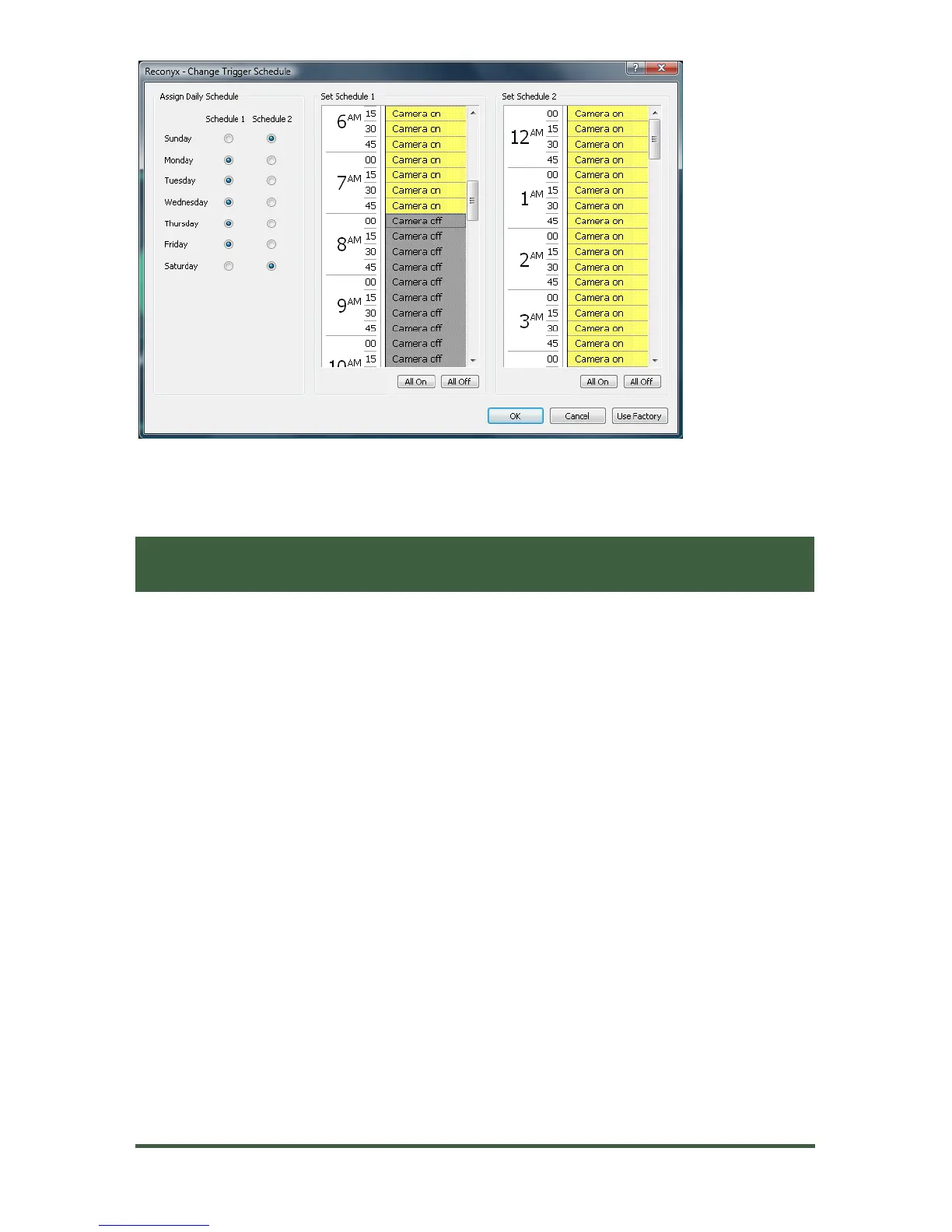
In the example image above, the camera is off during the week from 8am to
6pm (Schedule 1).
is on for triggers all day Saturday and Sunday (Schedule 2), but
Configuring Your Schedules
Click on the circle buttons next to the days of the week to assign them to
Schedule 1 or Schedule 2.
In Schedule 1, click the fifteen-minute blocks to change the setting from
Camera on to Camera off, or vice versa. Repeat for Schedule 2.
To select larger blocks of time, click and hold your left mouse button in the
fifteen-minute block you want to start with. While holding the mouse
button, drag your cursor down until the block of time you want is
highlighted, and then release the mouse button to change the setting from
Camera on to Camera off, or vice versa.
Click All On to quickly change the setting for all time blocks in that
schedule to Camera on.
Click All Off to quickly change the setting of all time blocks in that
schedule to Camera off.
Click Use Factory at any time to reset the schedules back to the factory
defaults.


 To Next Page