11
Usage of earbuds & recording terminal
●
イヤホン・録音端子とお持ちのイヤホンまたはヘッドホン
を接続すると、ステレオで音楽をお楽しみいただけます。
※ イヤホンおよびヘッドホンは付属していませ
ん。 市販のイヤホンまたはヘッドホンをお買
い求めください。
●
イヤホン・録音端子とお持ちの外部入力端子があるラジ
オカセットレコーダーなどの録音機器を接続し、レコード
の音を録音することができます。
※ 録音用の接続コードは付属していません。 市
販の接続コードをお買い求めください。
イヤホンまたはヘッドホンケーブルが接続されると、ス
ピーカーから音は出なくなります。
※ 音量は徐々に上げてください。 特に、イ
ヤホンをお使いのときは、突然大きな音
を出力して耳を傷めるおそれがあります。
プラグが接続されると、スピーカーから音は出なくなり
ます。
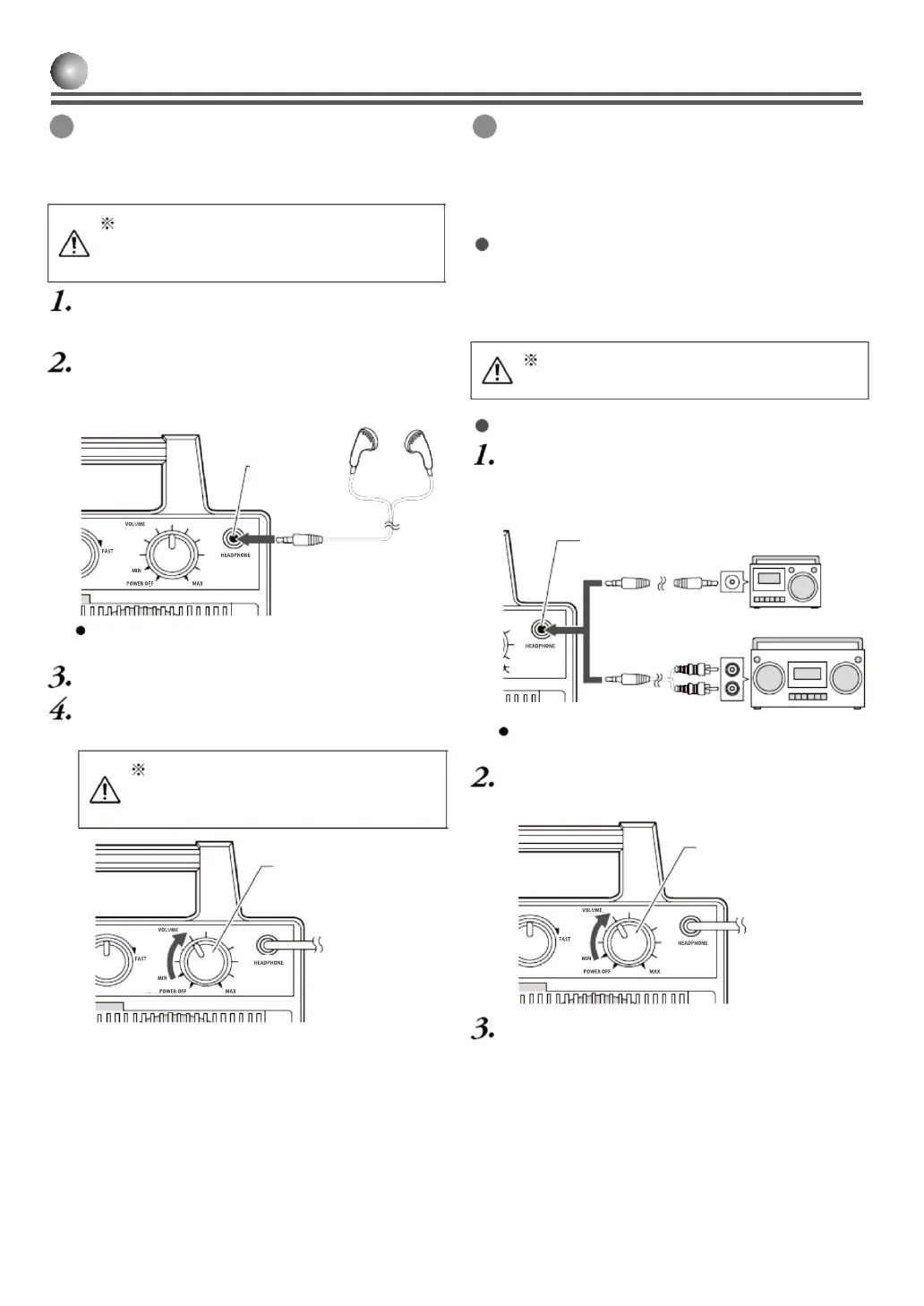
You can connect earbuds / recording terminals to
your earbuds or headsets to listen to music in stereo.
Earbuds or headsets are not supplied.
Please use your own one.
Turn the power switch & volume dial anti-
clockwise and set the volume to the minimum.
Connect the earbud terminal to
Φ
3.5mm stereo
mini plug earbud or headset cable.
Earbuds &
recording
terminal
After connecting earbuds or headset cable,
sound does not come out of the speaker.
Turn the power switch & volume dial to adjust to
easy-to-listen sound volume.
When using earbuds, increase sound
volume incrementally not to damage
your ears with loud noise.
volume dial
You can record the record’s sound by connecting
a recording device with external input terminal like
radio cassette recorder to earbuds & recording
terminal.
Connection cord for recording is not
supplied. Please use your own ones.
Prepare the cord with has
Φ
3.5mm stereo mini
plug at one end and a terminal to connect to input
terminal of recording device at another end.
Connect
Φ
3.5mm stereo mini plug of connection
cord to earbud terminal and another plug to the
recording device.
Earbuds & recording terminal
After connecting earbuds or headset cable,
sound does not come out of the speaker.
volume dial
Turn the power switch & volume 3/4 round to the
right slowly.


 To Next Page
 Loading...