5. Router Table Assembly - cont.
Attaching the table on to the stand
1. As the table is heavy, it is suggested
that two people lift the table during
installation.
2. Align the two holes at the bottom of
the table (away from the spindle hole)
with the two holes drilled in left and right
table supports
3. Secure the table using two M8 x
25mm screws/nuts/washers. Do not over
tighten allowing free movement of the
table.
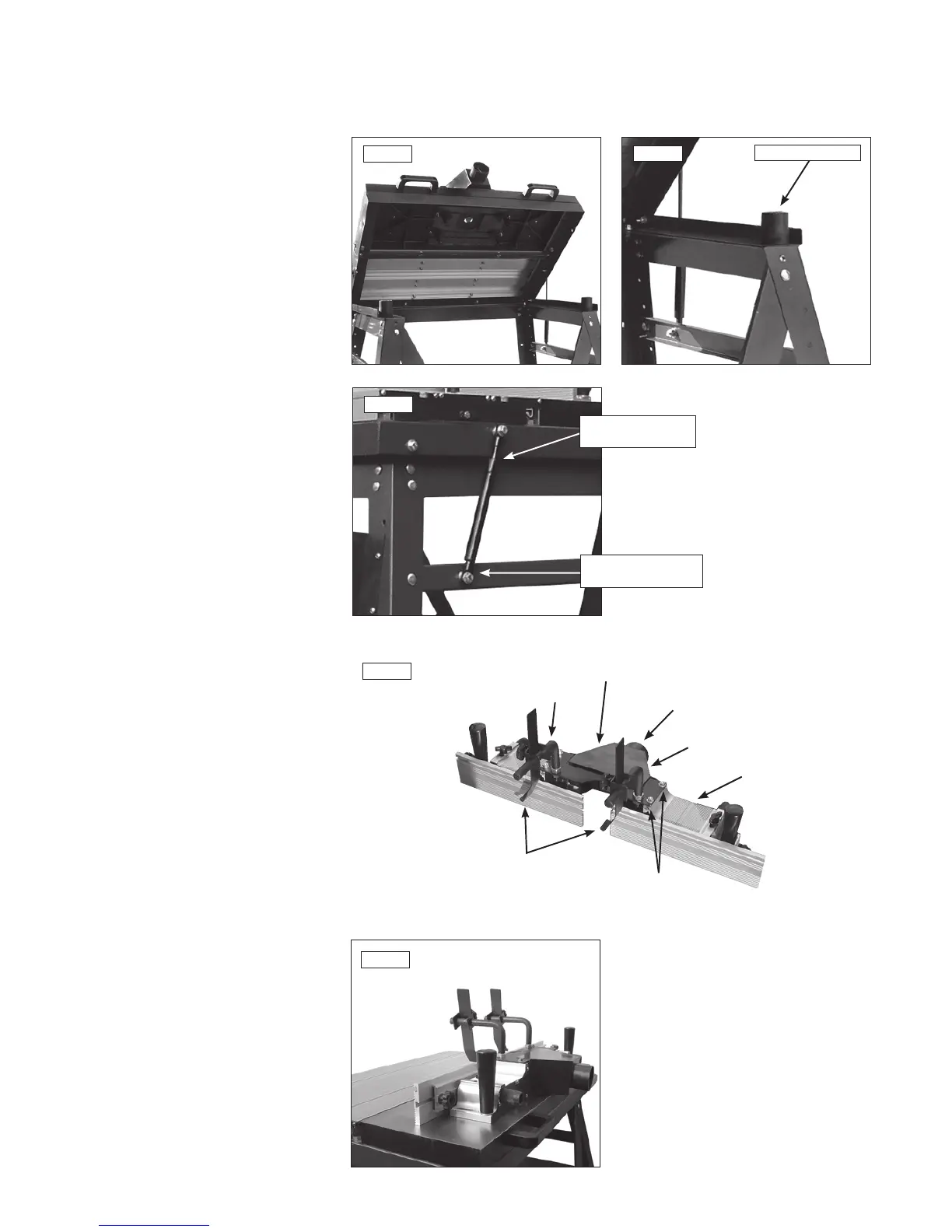
4. Locate and secure in position, using
fixings supplied, the left and right table
support as shown Fig.1.1.
5. Affix the two rubber mounts on to the
side of the stand in illustration Fig.1.2.
these support the table
6. Attach the table tilt support dampers
to the table and stand. Note illustration
Fig.1.3. shows support lever bottom
collar set against frame such that outside
face of collar is in the vertical plane.
Fix in this position using M8 x 30mm
screws through the slot in the support
and secure from the inside of the frame.
Adjust screw to allow free movement of
strut before tightening collar.
Installing the dust hood assembly
1. The dust hood is mounted on the
fence body.
2. Fix the dust collection hood in place
by tightening the four - M6 nuts as
shown in the illustration Fig.1.4.
3. When the dust hood assembly is
mounted to the table, use a flexible hose
to connect to a dust extractor.
4. The outlet of the dust hood
is 58mm.
5. Insert the post of the work clamps into
the holes on the dust hood as shown.
6. Use an open ended wrench to fix in
position with lock nut.
Installing the fence
1. After completing assembly of the dust
unit as shown Fig.1.4. the unit should
then be fitted to the table.
2. The fence/hood assembly is locked
in position on the table by means of the
two lock handles as shown Fig.1.5.
Fig.1.1
Fig.1.4
Fig.1.5
Fig.1.3
Fig.1.2
Rubber mount
Table tilt
support damper
Suppport damper
bottom collar
Attachment
nuts
Fence body
Post
Dust outlet
Dust hood
Post
Work
clamps


 To Next Page