10
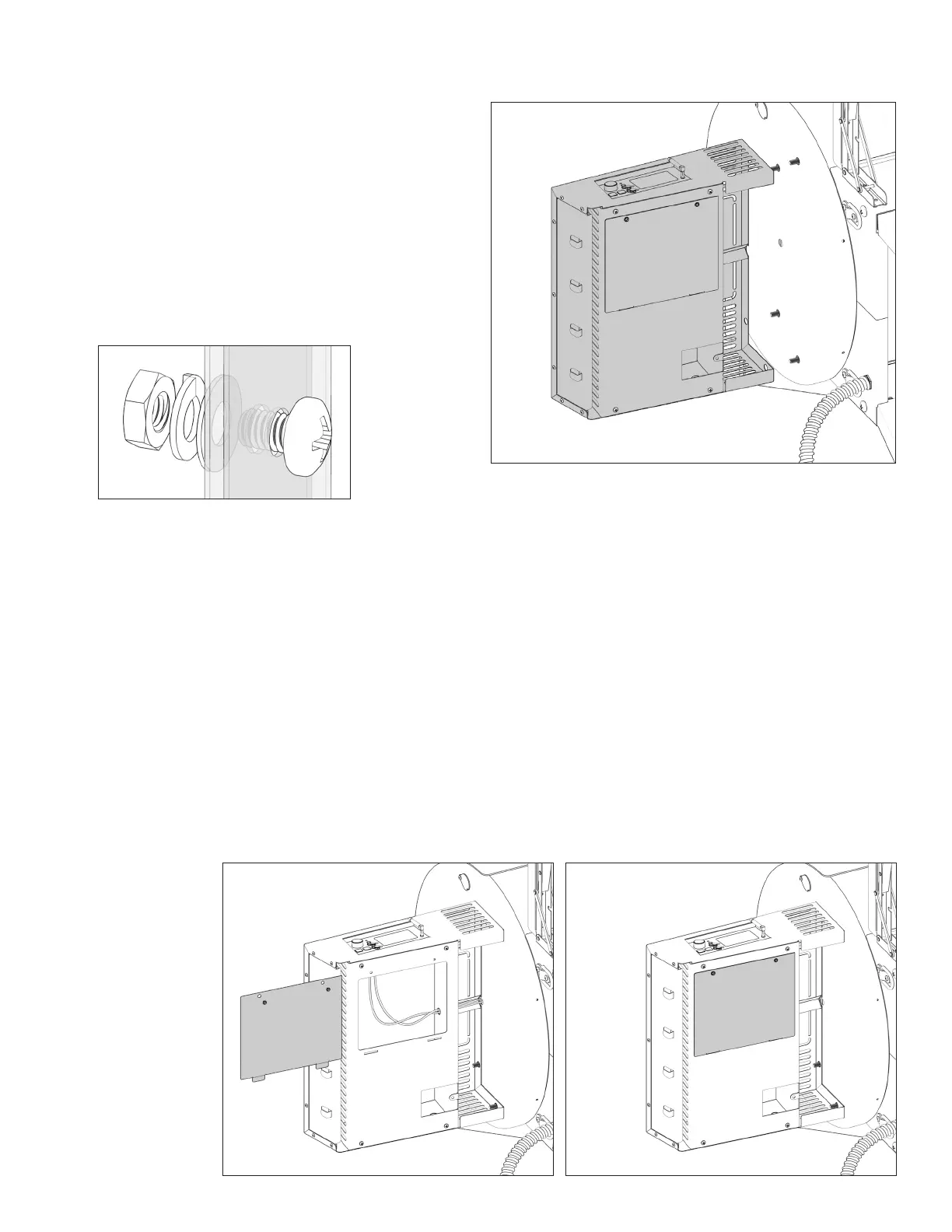
With assistance, line up the side shelf with
controller (8) against the exterior of grill body (1).
Follow bolt assembly order.
Tip: Begin with the bolt from the interior of the grill
barrel using the bolt assembly order. This will give
you easier assembly access with a Phillips head
screwdriver for a more secure build.
Hand tighten until all screws are in place.
Step 7
Install Side Shelf
Install RTD Wires to Smart Grill Technology
TM
Controller
Step 8
Locate the access panel underneath the side shelf (8) and open it by removing the two screws. Feed
the two white braided RTD wires inside through the grommet hole.
Plug the two white braided RTD wires onto the tabs labeled ‘RTDpt1000’ (wires can attach to either
connector).
Slide them firmly onto the connectors and be careful to not touch any other parts of the circuit board.
Replace the access door with the two screws.
Connect the wiring harness from under the Smart Grill Technology™ controller shelf to the grill body
wiring harness.
A guide to
connecting the
wires is on the
following page.


 To Next Page