General
Instructions
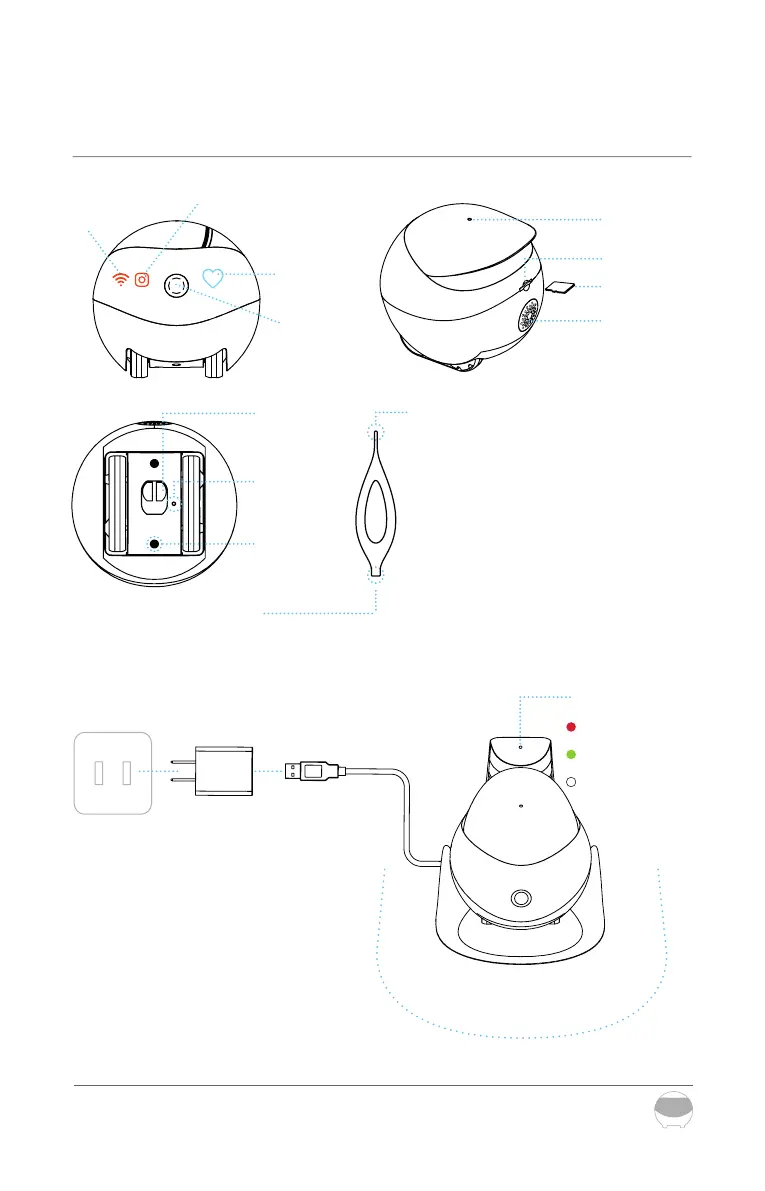
Mic.
Power
socket
Adapter USB
connector
Red light:charging
Green light:full
Lights o: no
power
Charging
contact point
Indicator light
Reset button
Empty space
Detachable
screw
SD-card
Slot card
Speaker
Device
status
indicator
Wi-Fi
connection
indicator
Camera
indicator
Camera
*Larger-end of the pin
*Smaller-end of the pin
Power on/o and RESET of REDDY:
Use the smaller-end of the pin to press
RESET
POWER ON: press RESET for 2 seconds
(or place the robot on the charging dock)
POWER OFF: click RESET twice
REBOOT: click RESET 1 time when REDDY is on
RESET: press RESET for 5 seconds until you
hear ‘REDDY’
>0.6m >0.6m
>2m
Note for charging Robot:
Place the back side of the charging dock
along the wall and free from any obstacles
0.6 meters on right/left and 2 meters in front.
19



 To Next Page