www.altronics.com.au
Redback® Proudly Made In Australia 1
Redback® A 4488 Paging Console
User manual revision number: 1.6 13/07/2020
Operating Manual
A 4488 Paging Console
A 4489A Audio Switcher
A 4580 16 Zone Switcher
Redback® Proudly Made In Australia
Distributed by Altronic Distributors Pty. Ltd.
Phone: 1300 780 999 Fax: 1300 790 999 Internet: www.altronics.com.au
1.0 Overview
The A 4488 paging microphone is a simple to use and elegant desk top design which provides up to 4 zones of paging. It
allows the operator to manually select any zone or any combination of zones. Also included is an All Call & Cancel button.
A pre-announcement chime is available at the paging console and through the PA system. Both of these are set by DIP
switches on the rear of the unit. Provision has also been made on the rear of the unit for a 3.5mm BGM input for
background music. The paging microphones can be used in conjunction with the A 4489A Audio Switcher or the A 4580
16 Zone Paging System.
A maximum of two paging consoles can be connected to the A 4489A Audio Switcher at the same time. These work in a
“rst in, best dressed” arrangement. Each unit must be assigned an ID number through DIP switch settings on the rear of
the unit. A maximum of six paging consoles can be connected to the A 4580.
The A 4489A Audio Switcher provides a Microphone level or Line level output which can be connected directly to the
inputs of up to four ampliers to provide up to four zones of audio. Connection between the A 4488 and A 4489A is via
a Cat5e cable which carries power and the balanced audio output from the microphone. A BGM input on the rear of the
A4489A directs background music to all zones until over-ridden by zone paging.
2.0 Features
• Four zones of paging. • High level balanced output via Cat 5 cable
• 3.5mm BGM input on rear of microphone • 24V DC power supplied via Cat 5 cable *
• Pre-announcement chime. • Chime volume adjustment
• Mic volume adjustment • BGM (paging microphone) volume adjustment
• BGM input for background music to all zones
A 4488
A 4489A
A 4580

 Need help?
 General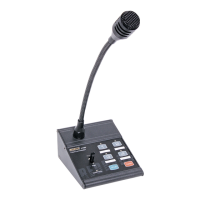

 To Next Page