-5-
Effective 2018-11-02 Bulletin No. DA30D-A
Drawing No. LP1078
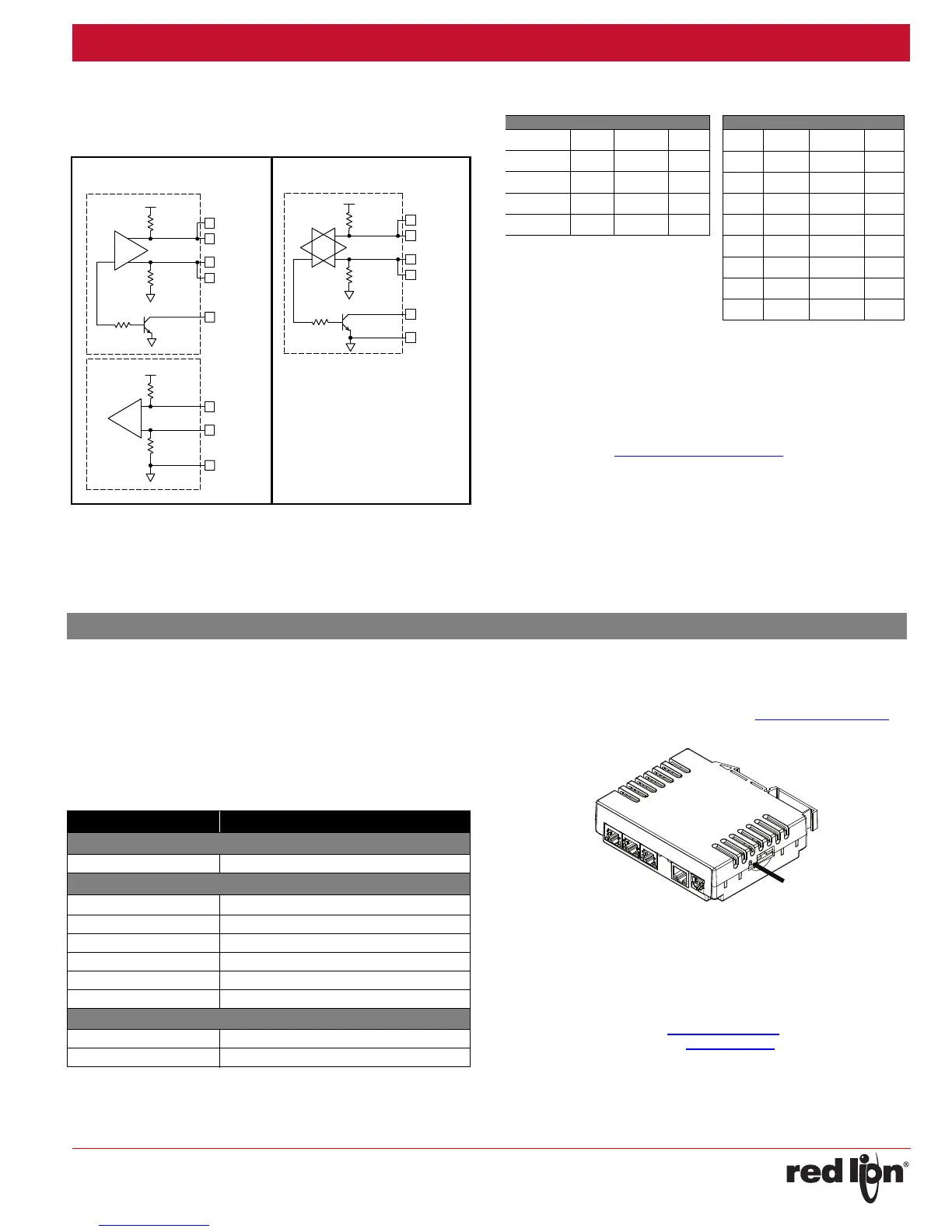
RS422/485COMMSPORT
The RS485 port of the DA30D can be used for RS485 or RS422
communication. There is a separate RJ connector for each option. Each
serial port has a pair of LEDs to indicate transmit and receive activity.
Note: All Red Lion devices connect A to A and B to B. Refer to
www.redlion.net for additional information.
ExamplesofRS4852‐WireConnections
DH485COMMUNICATIONS
The DA30D’s RS422/485 COMMS port can also be used for Allen
Bradley DH485 communications.
WARNING: DO NOT use a standard DH485 cable to connect this port to
Allen Bradley equipment. A cable and wiring diagram are available
from Red Lion at www.redlion.net/cables-drivers
.
TX
5V
8
1
7
2
TxB
TxA
130K
130K
5
TxEN (OC)
RX
130K
5V
130K
RxB
4
RxA
3
COMM
6
RS422/485 4-WIRE
CONNECTIONS
RS485 2-WIRE
CONNECTIONS
TxEN (OC)
TX/RX
130K
5
TxA
2
8
130K
5V
7
1
TxB
6 COMM
DAX0D TO RED LION RJ11
DAx0D:RJ45 Name RLC:RJ11 Name
5TxEN2TxEN
6COMM3COMM
1 TxB 5 B-
2 TxA 4 A+
DAX0D TO RED LION RJ45
DAx0D Name RLC:RJ45 Name
1,4 TxB 1,4 TxB
4,1 RxB 4,1 RxB
2,3 TxA 2,3 TxA
3,2 RxA 3,2 RxA
5TxEN 5 TxEN
6COMM 6 COMM
7 TxB 7 TxB
8 TxA 8 TxA
CRIMSON
®
3.1SOFTWARE
Crimson 3.1 software is available as a no charge download from Red
Lion’s website. The latest version of the software is always available from
the website, and updating your copy is free.
STATUSLEDS
There are three status LEDs that show system status by default, or they
may be be user configured via System Functions using Crimson 3.1.
Shown below is the default system status of the LEDs.
FACTORYRESETBUTTON
The factory reset button located on the bottom of the unit enclosure
near the SD card slot can be used to access the system console. Refer to
Crimson 3 System Console Technical Note at w
ww.redlion.net/TNIA22 for
access procedure and available options.
TROUBLESHOOTINGYOURDAx0D
If for any reason you have trouble operating, connecting, or simply have
questions concerning your new DAx0D unit, contact Red Lion’s technical
support.
Email: support@redlion.net
Website: www.redlion.net
Inside US: +1 (877) 432-9908
Outside US: +1 (717) 767-6511
LED INDICATION
GREEN
STEADY Unit is powered.
BLUE
FLASHING
Unit is in the boot loader
OFF No SD card is present.
STEADY Valid SD card present.
FLASHING RAPIDLY SD card being checked.
FLICKERING SD card accessed.
FLASHING SLOWLY Incorrectly formatted SD card present.
RED
FLASHING Data tag is in an alarm active state.
STEADY Data tag is in an alarm accepted state.
SOFTWARE/UNITOPERATION


 To Next Page