25
USER INTERFACE / RUN
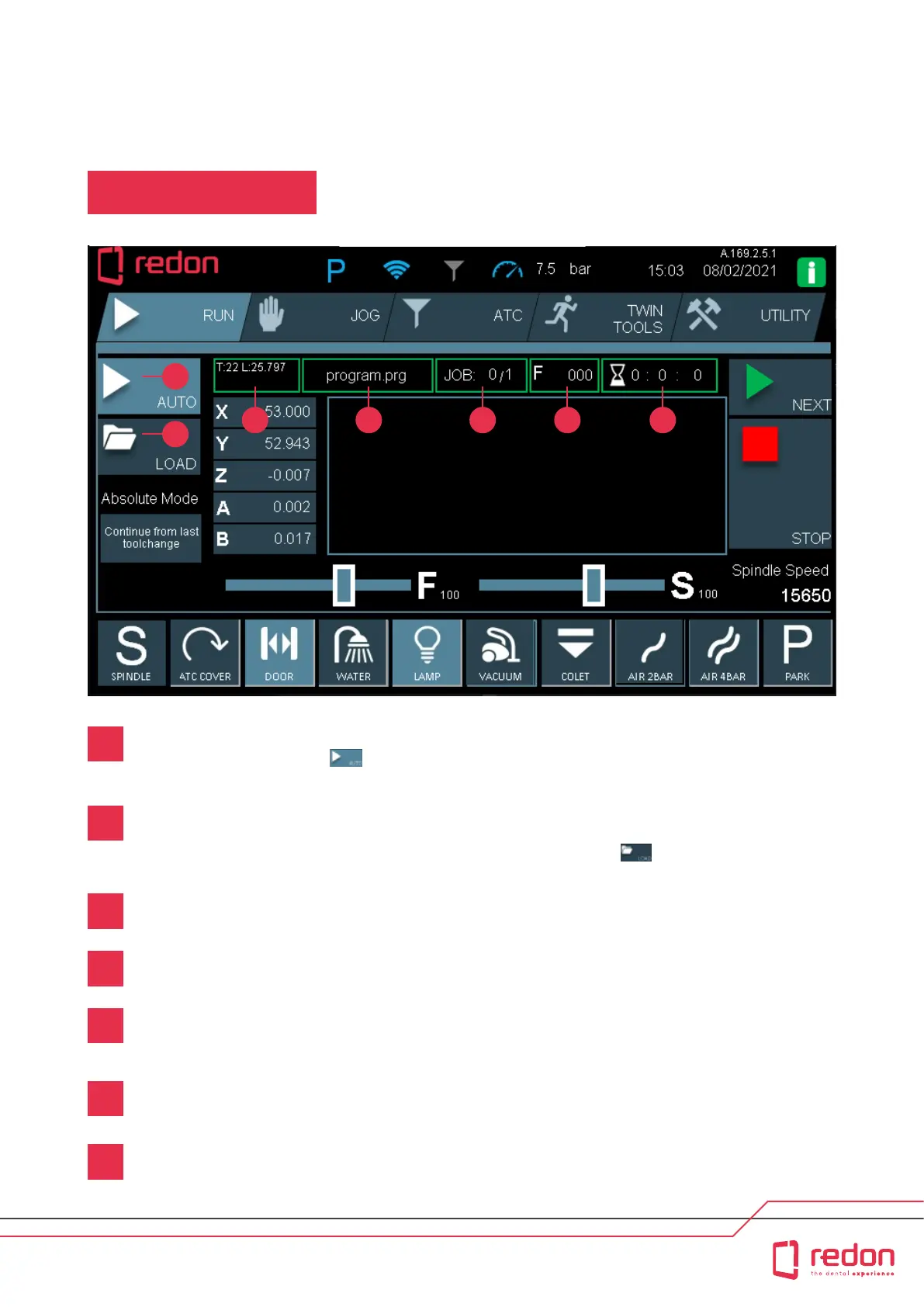
RUN Main Screen
1
2
3 4 5 6 7
AUTO: Enables automatic running of programs, i.e. running one or more programs installed in the machine’s
memory. You can also use the menu to automatically resume programs aer a power failure or resume
programs that are stopped by the user staing from the last tool change position.
* Wireless data transfer is an optional function. A wireless internet network
must be available for this function to work.
LOAD: Enables recalling programs from the memory. Initially, programs calculated in the CAM soware are
saved in the machine’s memory. Data transfer is peormed with a USB ash drive or via the network with a
cable (Ethernet) or wireless connection*. You must recall a program from the menu so that the machine
can automatically run that program.
Shows the number of programs to be processed and the number of the program in queue that is currently
being run. For example, if JOB 1/6 is shown, this means that 6 dierent programs have been recalled and that
the rst program in the queue is being run.
Shows the progress speed of the program calculated in the cam soware in the line of code.
Shows the number and condition of the tool on the spindle.
For detailed information, see ATC screen, p. 35.
Shows the name of the active program.
Shows the time elapsed since the sta of automatic program running.
1
2
3
4
5
6
7



 To Next Page