43
USER INTERFACE / JOG
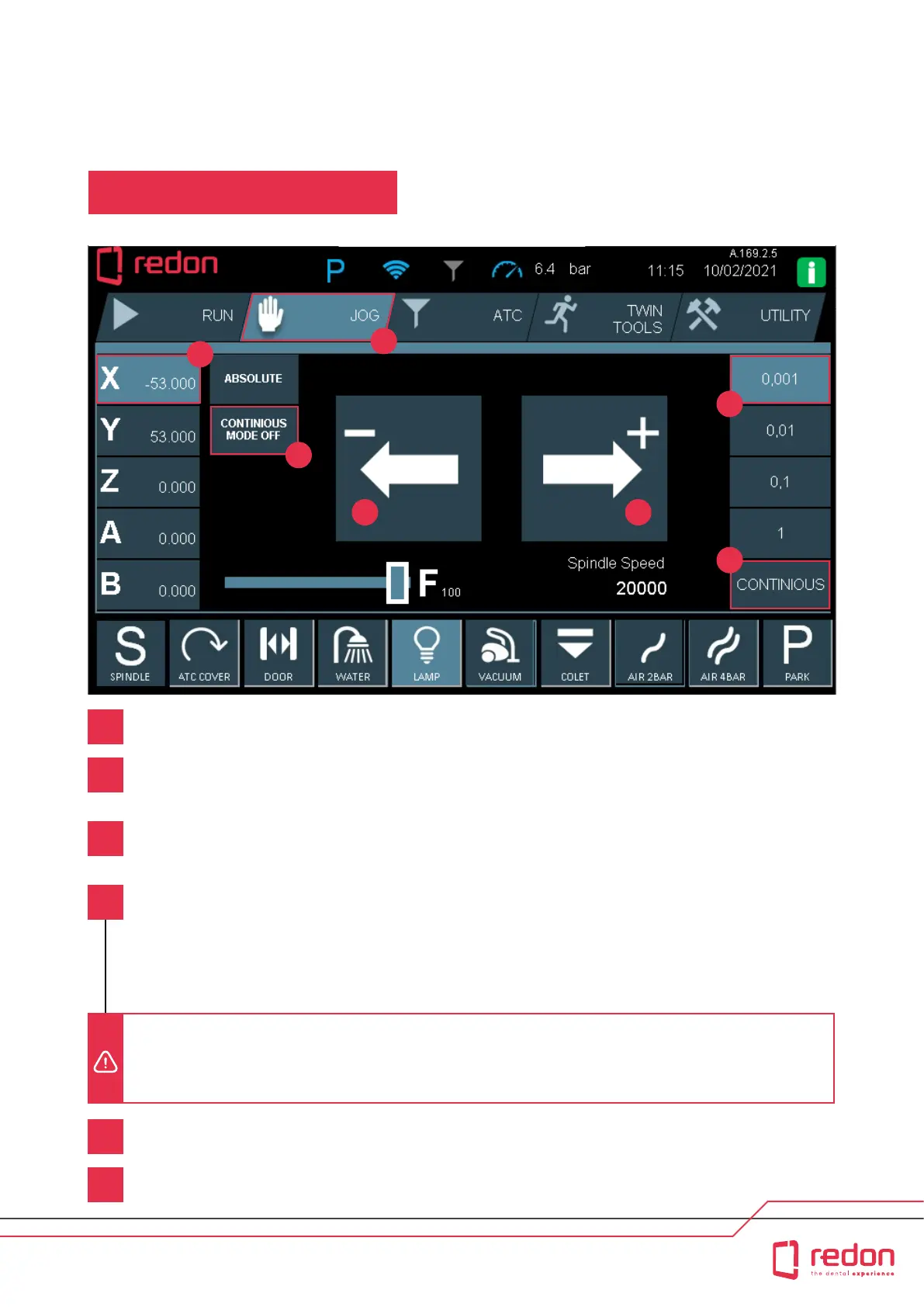
JOG (Manuel Movement)
Use the JOG function to move the axes manually.
Movement buon when moving the axis in the negative direction.
Movement buon when moving the axis in the positive direction.
Axis buons are listed as X, Y, Z, A, and B in ascending order. Numerical values shown next to an axis leer
indicate the coordinates of the respective axis. Press the axis that you want to move. In the sample image, the X
axis has been selected.
To move the axes in increments of 0.001mm, 0.01mm, 0.1mm and 1mm, touch the respective increment value.
(In the sample image, 0.001 is shown.) When you press the movement buons, the selected axis is moved by
that amount and then it is stopped.
If you want to move the axes continuously, click the CONTINUOUS MODE OFF buon. The buon will now read
CONTINUOUS MODE ON, and continuous movement will be activated. If you press the movement buons when the
CONTINUOUS tab is selected in the right pa of the screen, the axis moves continuously. When you take your nger
o the buon or the axis has reached its limits, the movement stops. CONTINUOUS MODE OFF allows intermient
movement. If you press the movement buons when the CONTINUOUS tab is selected in the right pa of the screen,
the axis moves intermiently. When you take your nger o the buon or the axis has reached its limits, the movement
stops. Intermient movement has been added to the user inteace for safety purposes.
1
2
3
4
5
6
CAUTION! When moving the machine axes, the covers must be closed. Movement with a reduced F speed prevents risks such
as collision. When the CONTINUOUS MODE OFF buon is active, progression of intermient movement is also reduced. Pay
close aention to ensure that no foreign object is present inside the machine when the axes are moved. Foreign objects inside the
machine may damage the machine by causing jams or collisions.
2
3
4
5 6
1
4



 To Next Page