EasyManua.ls Logo

Redring Selectronic - User Manual

Redring Selectronic
12 pages
Print Icon
To Next Page IconTo Next Page
Loading...
IMPORTANT
This booklet should be given to the customer after installation and demonstration.
SHOWER HANDBOOK
Question and Answer IconNeed help?

Do you have a question about the Redring Selectronic and is the answer not in the manual?

Summary

User Information and Operation

How to Use Your Shower

Explains normal operation, temperature, and flow controls.

Routine Maintenance

Advice on cleaning the showerhead and unit using a soft cloth.

How Your Shower Works

Details how water is heated and temperature is controlled by the electronics.

Troubleshooting

Guides users on checking for issues before calling a contractor.

Spares and Accessories

Lists available spare parts and optional accessories for the shower.

Over Temperature Shutdown and Lock Features

Over Temperature Shutdown

Explains the automatic safety shutdown and purging procedure when water gets too hot.

Temperature Lock Operation and Override

Describes how to use, enable, and temporarily disable the temperature lock feature.

Handset and Showerhead Operation

Handset Operation

Details the different spray patterns and how to adjust them.

Showerhead Cleaning

Instructions for regular cleaning of the showerhead to maintain performance.

Installation Instructions

Fixing the Shower to the Wall

Guidance on selecting a location and mounting the shower unit securely.

Plumbing Connections

Details water supply requirements, pipework, and connections.

Electrical Connections

Specifies electrical supply requirements and safe connection procedures.

Commissioning the Unit

Steps for initial setup, testing, and setting operating modes.

Guarantee and After Sales Service

Product Guarantee

Details the warranty terms and conditions for the instant water heater.

After Sales Service

Provides contact information for technical queries, sales, and spare parts.

Overview

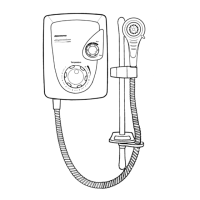
The Redring Selectronic Shower is an advanced electric shower designed for user comfort and safety, offering both normal and temperature lock modes of operation. It features intuitive controls and a digital display for temperature and flow settings.

Function Description

The shower operates by heating water instantaneously as it flows over internal heating elements within a plastic heat exchanger assembly. An electronic control system automatically adjusts the power to these elements and the water flow to achieve and maintain the selected water temperature. This system senses the incoming water temperature and flow rate, then calculates the necessary heating power. The amount of hot water available at a chosen temperature is limited by the total power of the heater, with the ideal flow rate being automatically calculated and adjusted.

Water is turned on and off by a built-in solenoid valve. A stabiliser within the flow valve compensates for minor fluctuations in water pressure. To prevent the shower from overheating due to exceptional reductions in water pressure, several safety mechanisms are in place:

  • If the water flow drops below 1.0 l/min, power to the heating elements is switched off, though the solenoid valve remains open, allowing water to flow.
  • An outlet temperature sensor will automatically switch off both water flow and heating elements if an excessive temperature is detected, signaling an "over temperature shutdown" condition.
  • A two-stage mechanical thermal cut-out, independent of the electronics, is mounted on the heat exchanger. Stage one switches off power to the elements if it senses excessive temperature, resetting when cold water runs through the shower. Stage two operates only in extreme temperature conditions and will permanently switch off, requiring replacement.
  • A pressure relief device is fitted as a safeguard against other extreme conditions, and if it operates, a replacement part will be required.

Usage Features

The shower offers two primary modes: Normal and Temperature Lock. The Temperature Lock mode, which is the factory preset, ensures a maximum temperature is not exceeded, making the shower safer for less-able individuals, the elderly, and children by disabling the temperature control buttons. The operating mode can be set during commissioning or installation.

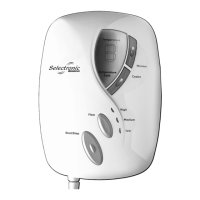
Controls:

  • Start/Stop Button: Located at the bottom of the shower, it's a large, soft rubber button with a raised pip in the centre. Pressing it once (confirmed by a single bleep) starts the unit, resets the motorised valve, and usually lights up the display to number 1, counting up to 6 (the average showering temperature). Once close to this setting, a double bleep indicates readiness for use. Pressing it again (confirmed by three short bleeps) switches the shower off. The water will continue to run for a few seconds to cool the unit, with the display circling, before automatically switching off.
  • Warmer Button: Located towards the top right, it has a textured front and a central recess with a raised pip. Pressing it once (single bleep) increases the temperature setting (e.g., from 6 to 7). Users should wait a few seconds for the temperature to adjust.
  • Cooler Button: Located underneath the Warmer button, it's smooth with a central recess but no raised pip. Pressing it once (single bleep) decreases the temperature setting (e.g., from 6 to 5). Users should wait for the temperature to adjust.
  • Flow Button: Located above and to the right of the Start/Stop button, it's smaller, smooth, and recessed, without a raised pip. Pressing it once (single bleep) reduces the flow rate without changing the temperature setting. The flow can be reduced from high to medium, and then to low with subsequent presses. The shower always starts in the high flow condition.

Temperature Lock Override:

While in Temperature Lock mode, the warmer and cooler buttons are inactive, and the temperature lock light illuminates, with the normal setting being number 5. This lock can be temporarily overridden while the shower is running by pressing the warmer and cooler buttons together for more than three seconds. The shower will then operate in normal mode but will revert to temperature lock mode for the next use.

Over Temperature Shutdown:

If an abnormal condition causes the water to become too hot, the unit will automatically shut down, stopping water flow to prevent hot water from the handset. This is indicated by eight short bleeps and a flashing "o" and "t" on the display. The unit will remain in this state until the water reaches a safe temperature, then switch off automatically, requiring a normal restart.

Purging Hot Water:

To speed up cooling during an over-temperature shutdown, users can press the cooler and flow buttons together for 20 seconds. This will switch on the water flow (which will be hot, so caution is advised) until a safe temperature is reached, after which the unit will switch off with three short bleeps.

Handset Operation:

The shower handset offers three distinct spray plate settings, adjustable by rotating the spray plate:

  • Surf: Outer spray only.
  • Sport: Inner spray only.
  • Cascade: Combination of inner and outer spray. Each setting has a positive click for identification. The spray head rotates approximately 130°. In very cold winter conditions, selecting only the inner or outer spray pattern may be necessary to ensure correct operation with a slightly lower water flow rate. It is normal for some water to drip from the spray head after use, which helps prevent scale build-up.

Maintenance Features

Routine Maintenance:

  • Cleaning: The unit and accessories should be cleaned using a soft cloth. Abrasive or solvent cleaning fluids should not be used.
  • Shower Head Cleaning: To maintain performance, the shower head should be cleaned regularly by rubbing the rubber nozzles. The frequency of cleaning will depend on water hardness, ranging from weekly to quarterly.
  • Isolating Switch: It is advisable to switch off the shower at the isolating switch to prevent accidental activation during cleaning or maintenance.

Troubleshooting (Self-Help Check List):

The manual provides a self-help checklist for common issues:

  • Water too HOT/COLD: Press the cooler/warmer button in NORMAL operation.
  • Spray pattern poor: Clean spray plate holes; select outer/inner only.
  • Display behaves erratically: Switch off electricity at the ceiling/isolating switch, wait a few seconds, then switch on.
  • Water does not flow when Start/Stop button is pressed: Check if water supply is on. If "o" and "t" are flashing, the unit is in over-temperature mode (see purging section). If no lights, check ceiling switch and power supply.
  • Warmer/cooler buttons do not function: Unit is in "temp lock" mode (see override section).
  • Unit makes a whirring noise: This is normal; a motor adjusts flow and operates at the start of each shower.

Professional Service Check List:

For qualified service representatives, an additional checklist is provided for more complex issues, requiring electricity to be switched off at the isolating switch before removing the front cover:

  • Poor temperature control: Check inlet/outlet thermistors, solenoid valve filter for blockages, and board configuration for power rating.
  • Water too COLD: Check thermal cut-out, all four elements, and triacs.
  • Poor or no control over water flow: Replace inlet flow valve assembly.
  • No water when start button is pressed: Check water supply, solenoid coil, and replace logic PCB if needed.
  • Unit switched off but heating water: Replace triac PCB.
  • Pressure relief valve blown: Check for cause of high pressure and replace the valve.
  • Temperature buttons do not function: Unit is in templock mode; change position of templock switch to OFF.
  • Shower runs cold for 30 seconds then switches off: Flow transducer fault; check if internal blade "spins" when water flows, replace if not.

Redring Selectronic Specifications

General IconGeneral
Warranty2 years
TypeElectric Shower
Power Ratings8.5 kW, 9.5 kW
Safety FeaturesPressure relief device
Cable Entry PointsBottom
Water PressureMinimum 1 bar, Maximum 10 bar
Voltage230-240V
InstallationWall-mounted
ControlsPush button

Related product manuals