Pantone 534 Blue
Pantone 123 Yellow
Pantone 485 Red
Pantone 123 Yellow
Pantone 534 Blue
Black
Rich Black -
20/20/20/100
Blue - 100/80/30/5
Yellow - 0/27/100/0
Red - 10/100/100/5
Yellow - 0/27/100/0
Blue - 100/80/30/5
Only if you REALLY need them:
Pantone 534 Blue - 100/80/30/5
Pantone 485 Red - 10/100/100/5
Pantone 123 Yellow - 0/27/100/
Battery Installation
WARNING: To avoid electric shock, disconnect the test leads from any
source of voltage before removing the battery cover.
1. Turn power off and disconnect the test leads from the meter
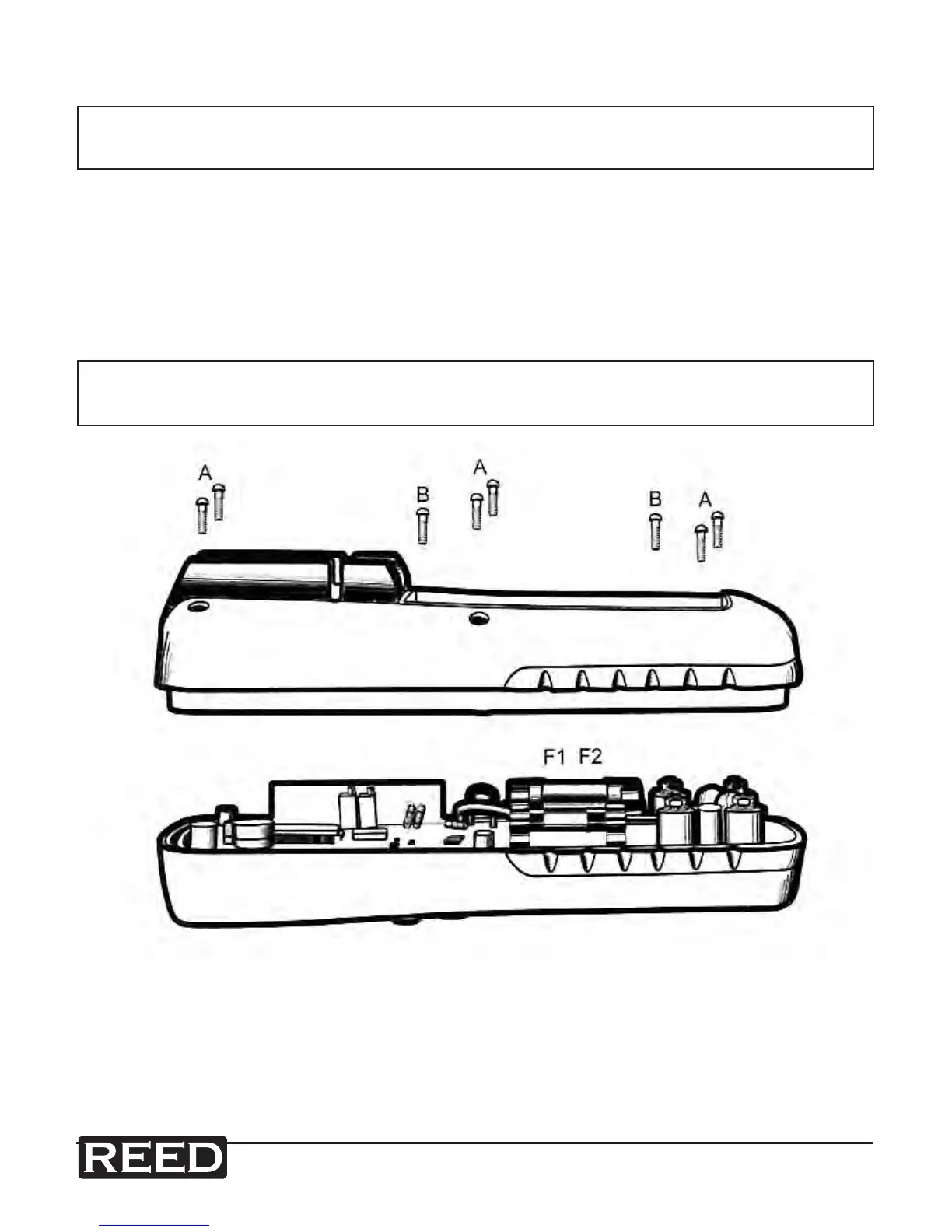
2. Open the rear battery cover by removing two screws (B) using a Phillips
head screwdriver
3. Insert the battery into battery holder, observing the correct polarity
4. Put the battery cover back in place. Secure with the screws
WARNING: To avoid electric shock, do not operate the meter until the
battery cover is in place and fastened securely.
NOTE: If your meter does not work properly, check the fuses and batteries
to make sure that they are still good and that they are properly inserted.


 To Next Page