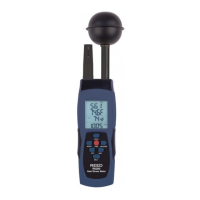
SWITCH UNIT OF TEMPERATURE °C/°F
PresstheUNITbuttontoswitchbetween°Cand°F.
SWITCH UNIT OF PRESSURE
PresstheBKLTbuttontochangethepressuremeasuringunit.(hpa-->
inHg-->mmHg).
TEMPERATURE DISPLAY MODES
PresstheMODEbuttontotogglethroughtheGT(Globetemperature)-->
WBGTtemperature-->HI(Heatindex)-->DPT(Dewpoint)-->WB(Wet
bulbtemperaturemeasurements).
NOTE: Verify the meter is not displaying the MAX/MIN/AVG. If so,
press the MAX/MIN button until the icons have disappeared.
FREEZE READING
PresstheHOLDbuttonundernormalmeasurementanda“HLD” icon
appearsonthedisplaytoindicatethatthemeterisinDataHold.When
thisfeatureisturnedon,theonlyfunctionalityavailableistheabilityto
switch between units of pressure, temperature and scrolling through
the temperature display modes“GT/WBGT/HI/DPT/WB”.
AUTO-POWER OFF
Themeterwillautomaticallyturnoffwhennotinuseforaperiodof15
minutes.TodisabletheautopowerofffunctionpresstheHOLD and PWR
buttonsatthesametime.TheLCDwillmomentarilydisplay“n” indicating
theauto-powerofffeatureisdisabled.
BACKLIGHT FUNCTION
Pressandholdthe“BKLT”buttontoactivateorinactivatebacklight
function.
www.GlobalTestSupply.com
Find Quality Products Online at: sales@GlobalTestSupply.com


 To Next Page