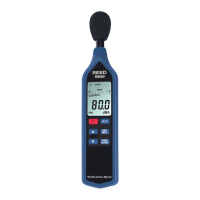
The REED R8085 is a versatile instrument designed for comprehensive noise measurement, acting as a Noise Dosimeter, Sound Level Meter, and Data Logger. It is engineered to meet noise survey requirements in compliance with OSHA and CCOHS regulations, and its personal sound exposure measurements adhere to IEC 61252 and ANSI S1.25 standards. The device also meets IEC 61672 Class 2 and ANSI S1.4 Type S for Sound Level Meters, ensuring high accuracy with a ±1.0dB tolerance.
Function Description:
The R8085 primarily measures sound pressure levels (SPL) in dB and personal noise exposure in %DOSE. As a noise dosimeter, it quantifies an individual's noise exposure over a work shift, with 100% DOSE representing the maximum allowable exposure according to various standards (OSHA, CCOHS, MSHA, DOD, ACGIH, ISO). It supports both A and C frequency weightings and Fast & Slow time weightings, making it suitable for a wide range of noise assessment scenarios. The device can operate in two main modes for noise exposure: Test Duration Mode, which allows for immediate testing over predefined durations, and Programmable Time Mode, which enables users to set specific start and end times for measurements.
For sound pressure level measurements, the R8085 offers different dB ranges (Low: 35-80dB, High: 80-130dB, Auto: 35-130dB) and a DOSE range of 70-130dB. It features data logging capabilities for both manual and automatic recording of SPL readings. The internal memory can store up to 16,000 data points, with a "FULL" indicator on the LCD when this limit is reached. Stored data can be downloaded and exported to Excel for further analysis using optional PC software (R8085-PC) and a USB cable (R8085-USB).
Important Technical Specifications:
- Measurement Type: Sound Pressure Level (dB), Personal Noise Exposure (%DOSE)
- Measuring Range(s):
- SPL: 35 to 130dB (Low: 35-80dB, High: 80-130dB, Auto: 35-130dB)
- DOSE: 70 to 130dB
- Dynamic Range: 50dB (in each range)
- Accuracy:
- 31.5Hz: ±3.0dB
- 63Hz: ±2.0dB
- 125Hz: ±1.5dB
- 250Hz: ±1.5dB
- 500Hz: ±1.5dB
- 1kHz: ±1.0dB
- 2kHz: ±2.0dB
- 4kHz: ±3.0dB
- 8kHz: ±5.0dB
- Resolution: 0.1dB
- Response Time: Approx. 1 second
- Frequency Range: 31.5Hz to 8kHz
- Frequency Weighting: A, C
- Time Weighting: Fast/Slow (125mS and 1 second)
- Microphone: 0.5" (12.7mm) electret condenser
- Display: 4-digit LCD with backlight
- Data Hold: Yes
- Min/Max: Yes
- Alarm Indicators: Over (visual on-screen)
- Datalogging Capabilities: Yes
- Real-Time Clock and Date Stamp: Yes
- Selectable Sampling Rate: 1, 2, 5, 10, 30, 60, 120, 300, 600, 1800, 3600 seconds
- Selectable Dose Measurement Rate: 0, 1, 5, 10, 15, 30 minutes / 1, 2, 4, 8, 10, 12, 24 hours
- Auto Shut-off: Yes (after 10 minutes/off)
- Tripod Mountable: Yes
- Low Battery Indicator: Yes
- Power Supply: 3 x AAA batteries
- Output: RS-232/USB (optional)
- PC Connectivity: USB Cable (R8085-USB, optional)
- Software: PC Software (R8085-PC, optional)
- Software OS Compatibility: Windows XP/Vista/7/8/10
- Product Certifications: CE, IEC61252, ANSI S1.25, IEC 61672 Class 2, ANSI S1.4 Type S
- Operating Temperature: 32 to 122°F (0 to 50°C)
- Storage Temperature: 14 to 140°F (-10 to 60°C)
- Operating Humidity Range: <85%
- Dimensions: 4.2 x 2.3 x 1.0" (107 x 58 x 25mm)
- Weight: 4.3oz (122g)
Usage Features:
The R8085 is designed for ease of use with a clear LCD display and intuitive button controls.
- Power On/Off: Press the POWER button to turn on; press and hold for 2 seconds to turn off.
- Sound Pressure Level (SPL) Measurement: Default settings are "Auto Range," "A Frequency Weighting," and "Fast Time Weighting." Users can adjust Response Time (FAST for short bursts, SLOW for average), Frequency Weighting (A for general noise, C for high-level noise/low-frequency noise), and dB Range (Low, High, Auto) using dedicated buttons.
- Data Hold: Press the HOLD button to freeze current readings; press again to resume.
- Maximum and Minimum Readings: Enter recording mode by pressing RUN/PAUSE. Subsequent presses toggle between maximum ("REC MAX") and minimum ("REC MIN") values. Hold RUN/PAUSE for 2 seconds to exit.
- Backlighting: Press the BACKLIGHT button to activate the LCD backlight, which automatically turns off after approximately 5 seconds.
- Noise Exposure (%DOSE) Measurement:
- Test Duration Mode: Select desired duration (e.g., 24Hr, 12Hr, 10Hr, 8Hr, 4Hr, 2Hr, 1Hr, 30min, 15min, 10min, 5min, 1min). Press RUN/PAUSE to start. The "DUR" indicator flashes.
- Programmable Time Mode: Set specific start ("BEG") and end ("END") times and dates. This requires setting the internal clock first. The "BEG" indicator appears.
- Pausing/Resuming: Unlock the keypad by pressing FUNC. and ENTER simultaneously, then press RUN/PAUSE to pause. Press RUN/PAUSE again to resume.
- Ending Session: To end a session in programmable mode, unlock the keypad and hold ENTER for 2 seconds.
- Data Logging (SPL):
- Manual Mode: Set sampling rate to "0" seconds. Hold LOG to enter manual logging. Press LOG to save a reading. "LOGGER" flashes.
- Automatic Mode: Set desired sampling rate (1, 2, 5, 10, 30, 60, 120, 300, 600, 1800, 3600 seconds). Hold LOG to enter automatic logging. "LOGGER" flashes with each stored data point. Press LOG to pause/resume. Hold LOG for 2 seconds to end.
- Setup Mode: Access by holding FUNC. for 2 seconds. Parameters include:
- dAtE: Set time and date (YY/mm/dd/h/m/s).
- SP-t: Set data logging sampling rate.
- PoFF: Enable/disable auto power off (after 10 minutes of inactivity).
- SEt LC: Set Criterion Level (80, 84, 85, 90 dB).
- SEt LT: Set Threshold (70-90 dB).
- SEt ER: Set Exchange Rate (3, 4, 5, 6 dB).
- SPC: Check memory space.
- CLrE: Clear stored data.
- Verify Set Time, Date and Sampling Rate: Press the TIME button during normal operation.
- Calibration: Requires an external calibrator (e.g., REED R8090). Enter calibration mode by holding HOLD and RUN/PAUSE for 3 seconds. Adjust the upper display to match the calibrator's output (94.0dB). Press ENTER to save.
Maintenance Features:
- Battery Replacement: The low battery indicator signals when to replace the 3 x AAA batteries. Remove the Phillips screw and battery cover on the back of the meter.
- Product Care:
- Store in a clean, dry place.
- Change batteries as needed.
- Remove batteries if not used for a month or longer.
- Clean with biodegradable cleaner; do not spray directly on the instrument.
- Calibration: Regular calibration is recommended, especially after exposure to extreme conditions or prolonged disuse, to maintain accuracy.
- Microphone Placement: When measuring, clip the microphone as close as possible to the user's ear (e.g., shirt collar). Ensure the cable does not hinder movement and avoid direct contact with strong winds or blowing air to prevent measurement errors.
The R8085 is a lightweight and compact device, making it suitable for portable use or long-term monitoring with its tripod mount. It comes with a microphone with clip, batteries, wrist strap, and a carrying case. Optional accessories include PC software, a USB cable, and a sound level calibrator.

 Need help?
 General

 To Next Page