16
b) Checking and Setting the Driving Function
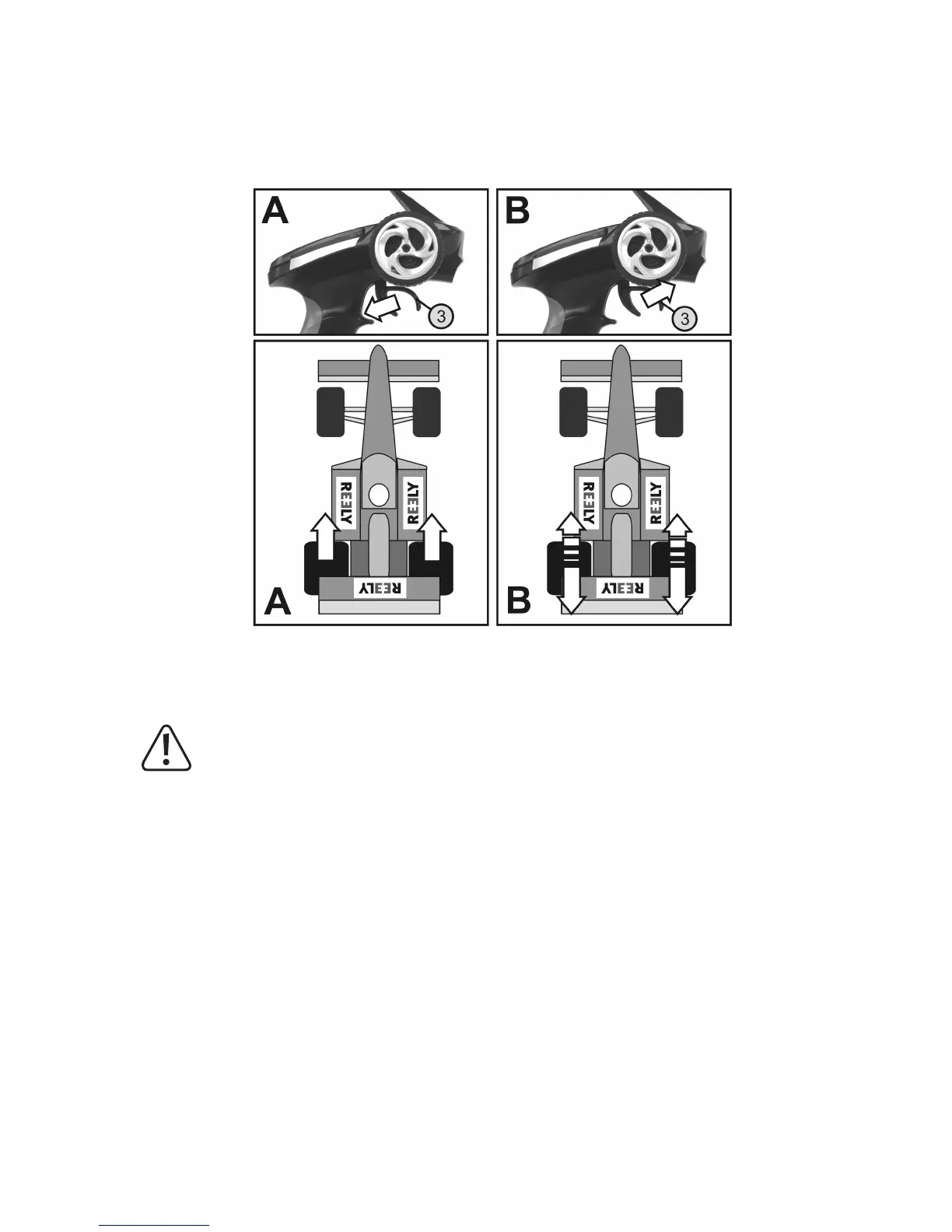
Whenyoumovetheoperatingleverforthedrivefunction(seegure1,item3)towardsthehandletothestop,the
modelmustaccelerate(seegure13,sketchesA).Ifyoupresstheleverforwards,themodelmustdecelerateor
switchtoreversedriving(seegure13,sketchesB).
Figure 13
Ifyourmodel‘sdrivereactsoppositetotheindicationingure13,usethedrivefunctionreverseswitch(seegure12,
item 7) to switch the effective direction of the operating lever.
Important!
In a model with a combustion engine, set the linkage for carburettor and brake linkage so that the throttle/
brake servo is not limited mechanically. The trim setting for the driving function must be in the middle posi-
tion.
Foramodelwithanelectronicspeedcontroller,thedifferentpositionsoftheoperatingleverforthedrive
function(forwards,stop,reverse)mayhavetobeprogrammedintothespeedcontroller.Furtherinforma-
tion on this can be found in the documents for the speed controller. If the speed controller is not program-
mable, adjust the trim so that the vehicle will stand when the operating lever for the driving function is not
in the middle position.
Whenyou have veriedorset the correctdrivingand steering function,rstswitch offthe receiver andthenthe
transmitter.
Yourmodelisnowreadyforitsrsttestrun.



 To Next Page