ENGLISH
28
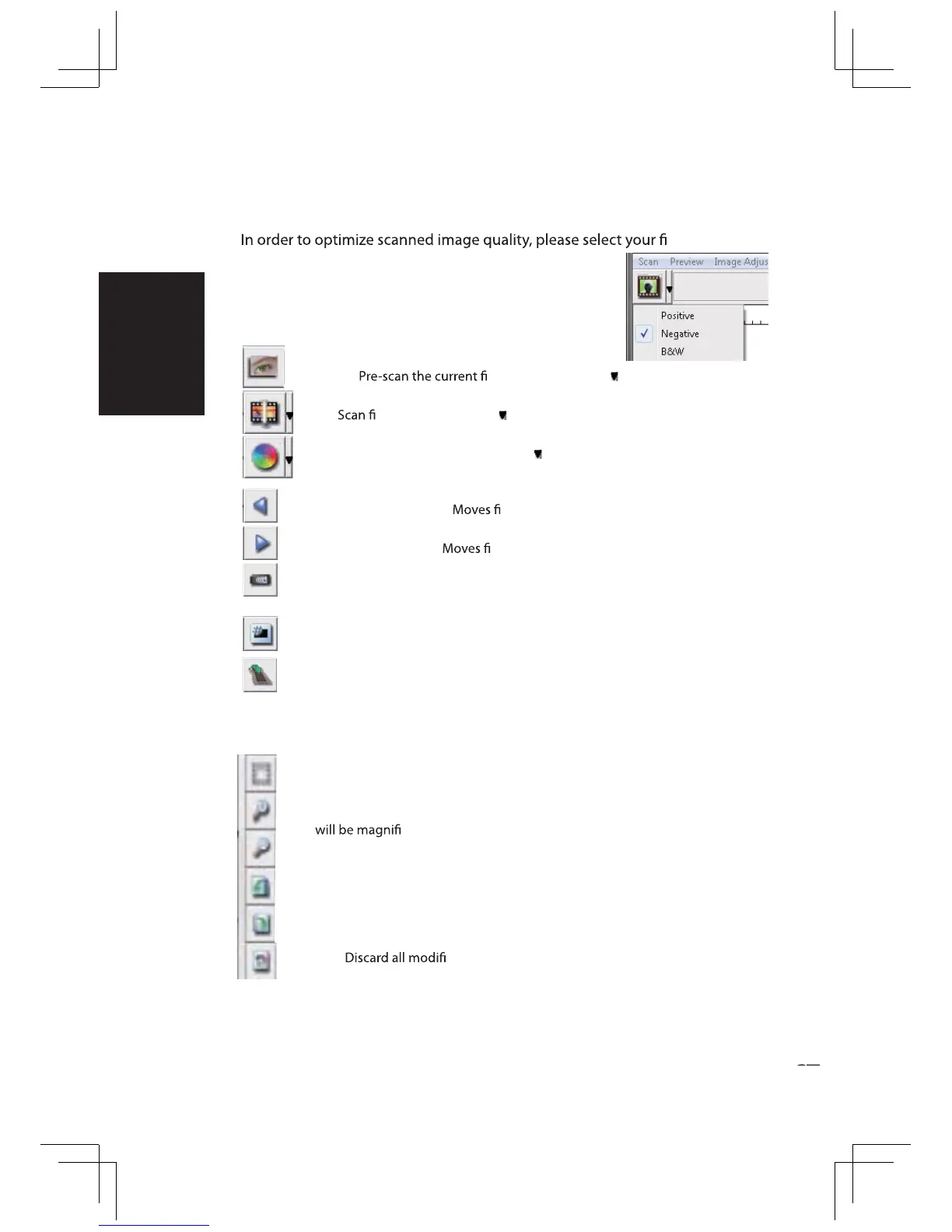
Function Bar Diagram
lm type
and brand from the toolbar:
Prescan:
lm, press drop down for more options.
Scan: lm, press drop down button for more options.
Image Adjustment: Press drop down button for more options.
Backward One Frame: lm back one frame.
Forward One Frame: lm forward one frame.
Reload Magazine: Reset the frame number, the location number will be
returned to 1. Press this button before loading each
magazine into the scanner.
Set Current Position: Change the current slide position number in the
magazine.
Go to: A pop-up dialogue box will prompt to enter which frame to change to.
II. Preview Window Area [Fixed Windows]
Toolbar Diagram
Select scan area: more than one selection can be made at a time.
Zoom In:
To magnify the image where the cursor is currently located. The image
ed with every click until the maximum multiple (1000%) is
reached.
Zoom Out: To reduce the size of the viewed image click the Zoom Out cursor to
the desired area, the image will reduce by half with every click until the lowest
multiple (25%) is reached.
Rotate 90 Left: To rotate the image counter clockwise 90 degrees.
Rotate 90 Right: To rotate the image clockwise 90 degrees.
Revert: cations and restores the image back to the original state
in preview windows.
Negative
Positive (also known as Slide)
Black and White















 To Next Page