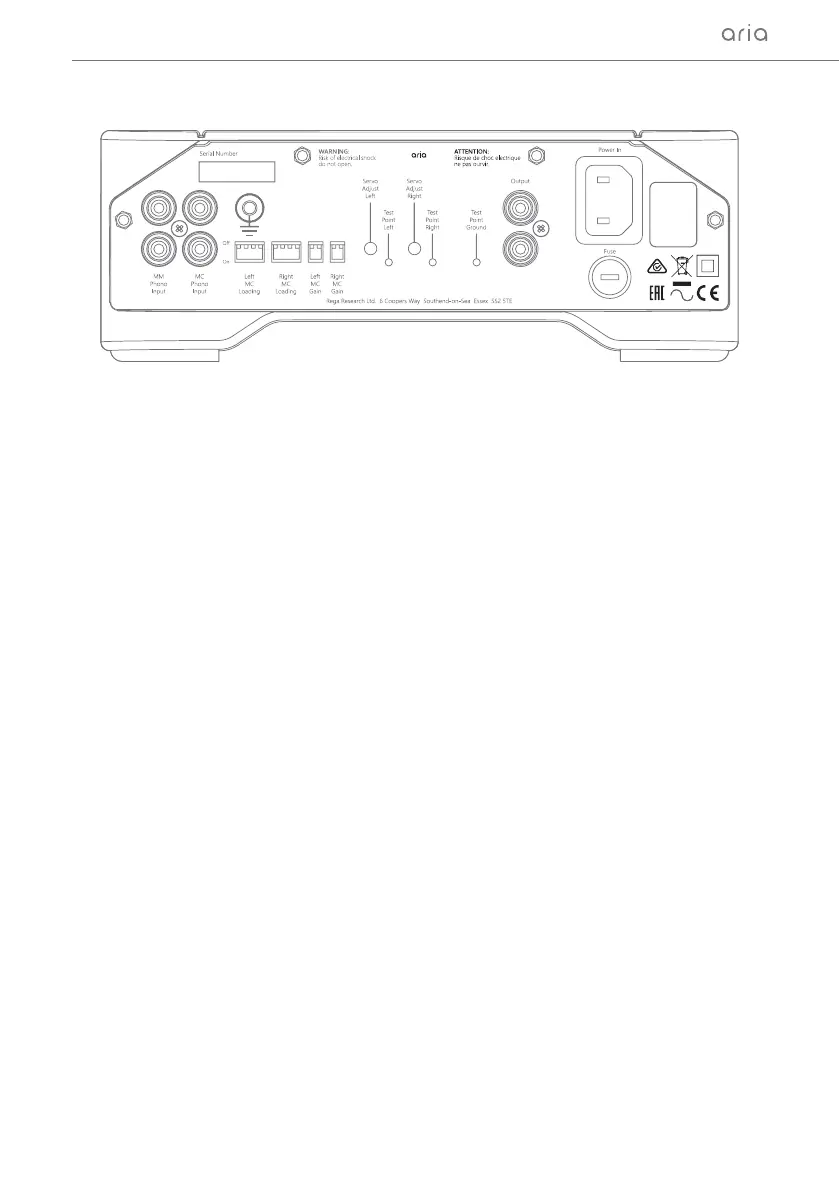
IMPORTANT: Turn off the Aria before changing any of the settings on the back, especially the MC Gain
setting which causes the MC input circuit to re-adjust. This may cause a big ‘thump’ through the
speakers if the amplier is on and the Aria is the source component. The MC input has the provision
for selecting resistive input loading of 70 to 400 Ω and capacitive loading of 1000 to 4200 pF. The input
sensitivity can also be changed by 6 dB. You must adjust each channel (left and right) individually,
via the use of the dip switches located on the back panel. Your cartridge manufacturer will state the
recommended loading for the model MC cartridge you have chosen.
The Rega Ania, Apheta 2 or Aphelion MC models require the following settings:
Left and Right MC Loading Resistance - 1 only on = 100 Ω
Left and Right MC Loading Capacitance - 3 and 4 off = 1000 pF
Left and Right MC Gain - 1 on and 2 off high gain = 69.3 dB
*The Aria will be factory set to the above settings by default.
MC Cartridge Adjustment
5


 To Next Page